SANC eRegister South Africa 2026: Login, Registration & Status Check
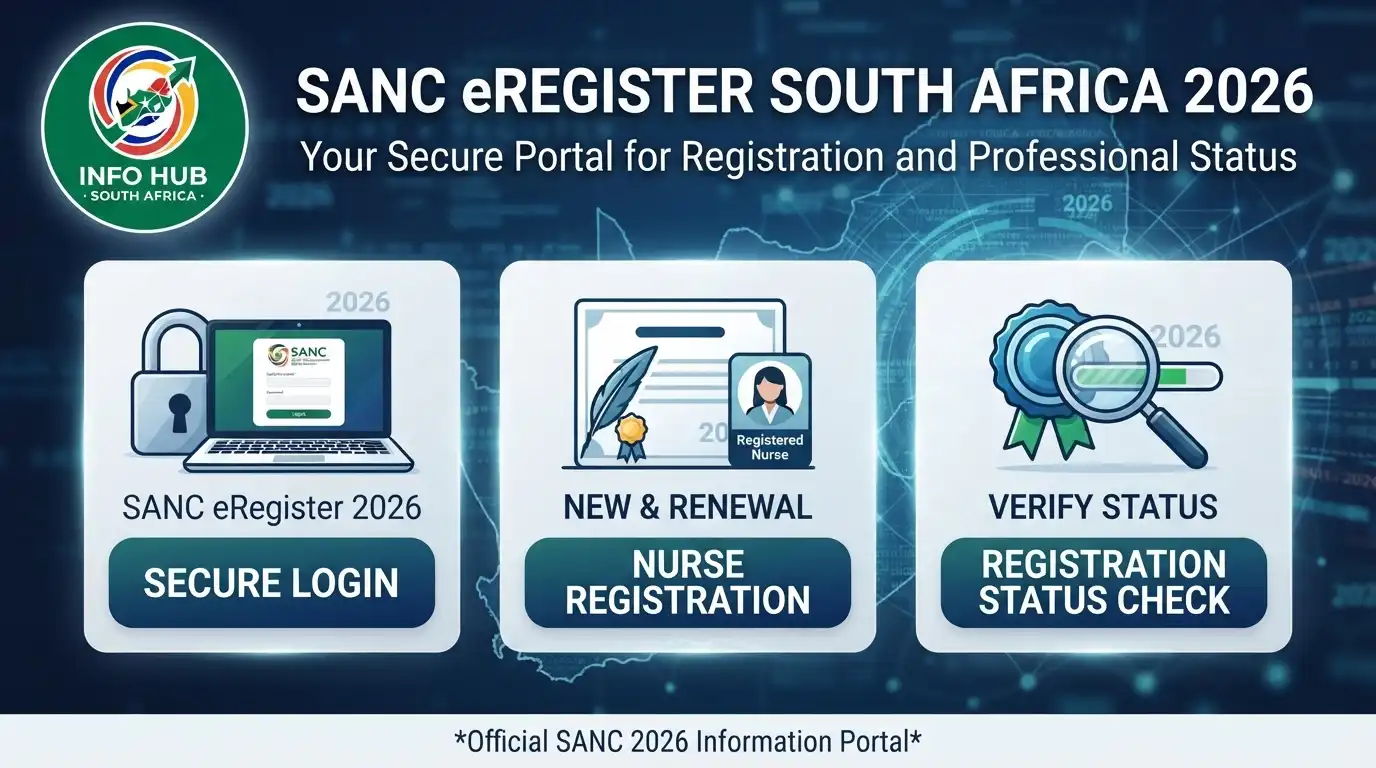
The SANC eRegister is the South African Nursing Council’s online electronic register for checking information about registered nursing and midwifery practitioners. It can be used to verify a practitioner’s registration details and professional status without relying only on a physical document.
A useful point to understand is that the SANC eRegister is not the same as a conventional account-based login portal. The search facility is designed around looking up registration information, so a person searching the register does not necessarily need to create a username and password first.”Visit Homepage for more”.
What Is the SANC eRegister?
The SANC eRegister is an electronic version of information held in the South African Nursing Council’s register. It provides a way to check registered nursing professionals and related registration information online.
The Council is responsible for regulating nursing in South Africa, and registration is important because practitioners must meet the applicable requirements before practising in their registered capacity.
The online register can therefore be useful for several groups:
The key purpose is verification. The SANC eRegister should not be confused with a payment receipt or an Annual Practising Certificate. Each serves a different purpose.
SANC eRegister vs SANC Account
One common source of confusion is the phrase sanc eregister login.
The eRegister search service is primarily a registration lookup facility. It is not simply a personal dashboard where every SANC service is managed through a username and password.
If you are trying to check whether a practitioner appears on the register, start with the official eRegister rather than looking for an unofficial “SANC login” page.
What Information Can You Check on SANC eRegister?
When you perform an eregister SANC search, the available record can provide important information about the practitioner.
Depending on the record and information made available by the Council, users may see details such as:
| Information | What it helps you understand |
|---|---|
| Practitioner name | Identifies the person recorded by SANC |
| SANC reference number | Identifies the practitioner’s Council record |
| Professional category | Shows the registered nursing or midwifery category |
| Registration information | Helps confirm registration with SANC |
| Qualifications | Shows qualifications recorded on the register |
| Practising status | Helps determine the status shown by the register |
The exact information displayed should always be interpreted according to the current SANC system. If information appears incorrect or incomplete, the practitioner should contact SANC rather than relying on an unofficial website.
How to Use SANC eRegister Online
Using the SANC e register is generally straightforward. You should begin with the official SANC website so that you are working with the Council’s own service.
Step 1: Open the Official SANC Website
Visit the official South African Nursing Council website.
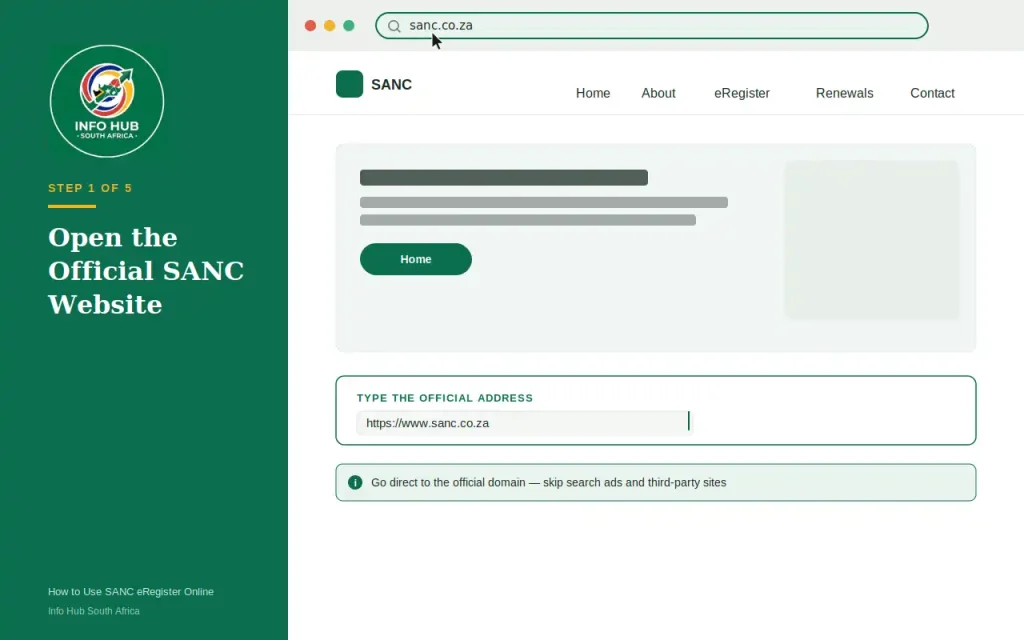
Avoid relying on search advertisements or third-party websites that claim to provide SANC registration verification. The safest approach is to start with the Council’s own domain.
Step 2: Open the eRegister
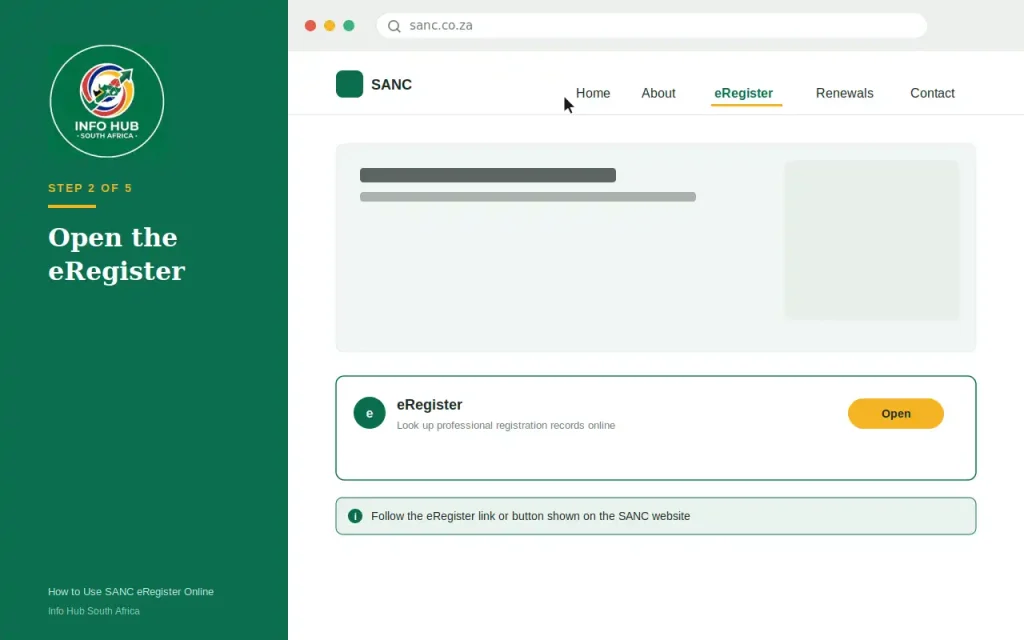
You can access the eRegister directly through the official page:
Look for the eRegister service and follow the instructions presented by the SANC website.
Step 3: Accept the Conditions of Use
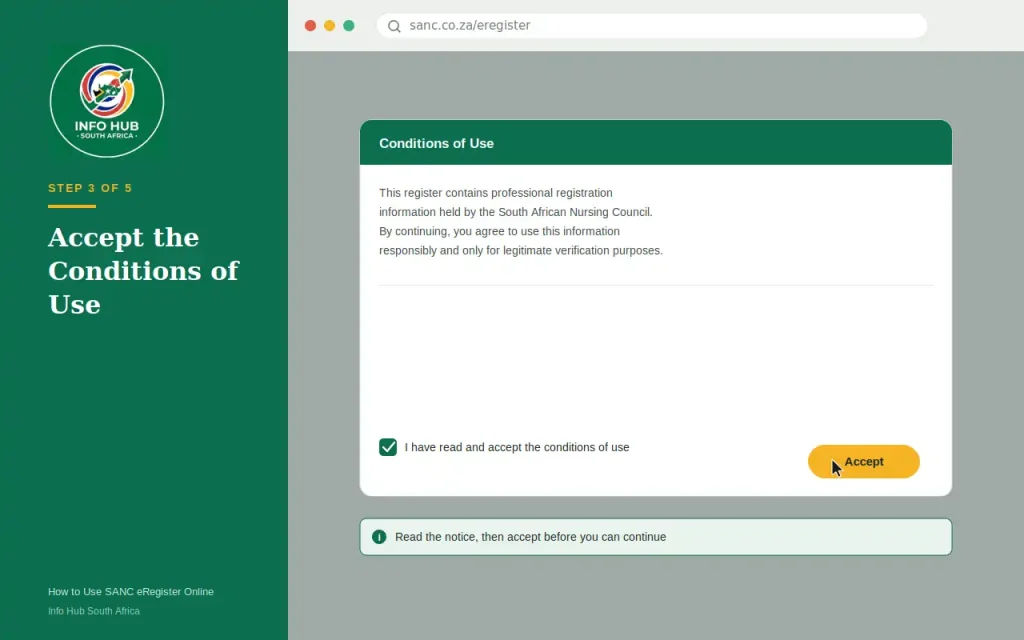
The eRegister may display conditions or a notice before allowing you to continue.
Read the information provided and select the option to accept the conditions of use when appropriate.
This step is important because the register contains professional registration information and is intended to be used responsibly.
Step 4: Enter the SANC Number
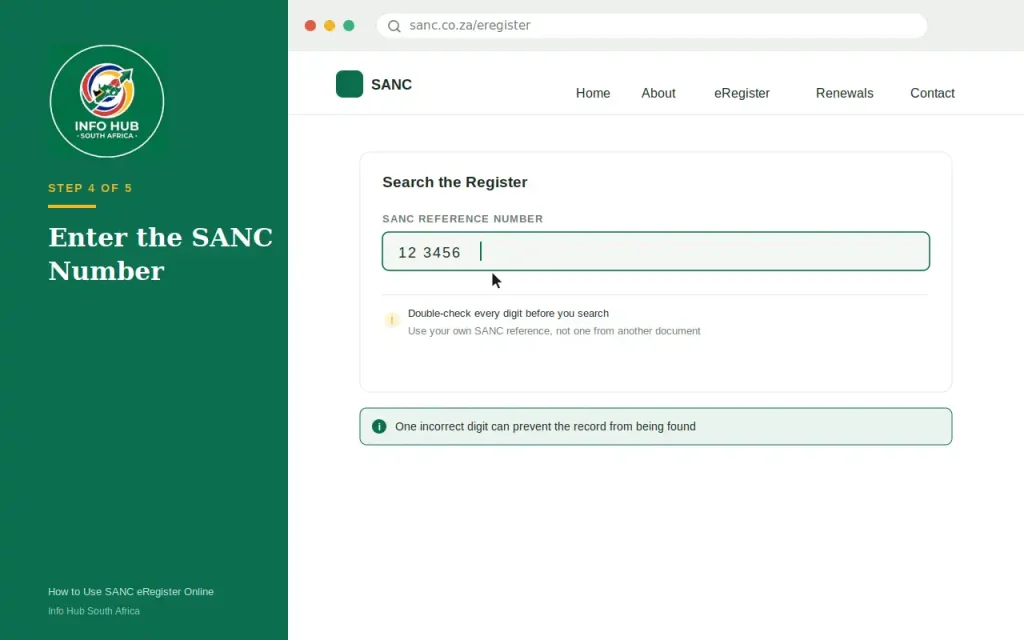
If you are checking a specific practitioner, enter the relevant SANC reference number into the search field.
Take care when entering the number. A single incorrect digit can prevent the system from finding the expected record.
Tip: If you are checking your own information, use the SANC reference number associated with your Council record rather than guessing from another document.
Step 5: Submit the Search
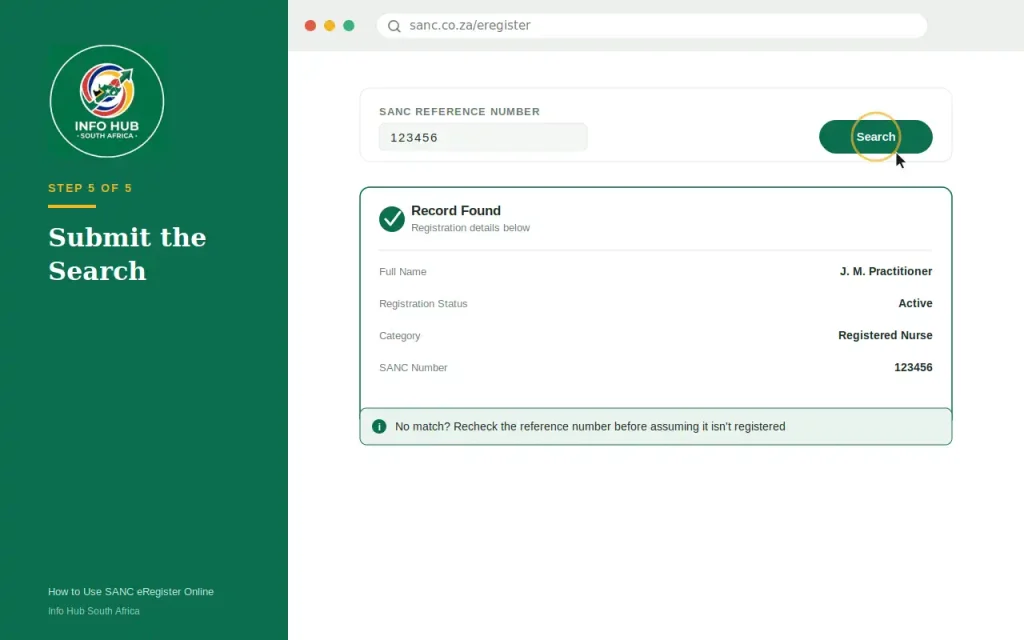
Select the available search or find option.
The system will process the information and, where a matching record is available, display the relevant registration details.
If nothing appears, don’t immediately assume that the person is not registered. First check whether the reference number was entered correctly.
How to Check Your SANC Registration Status
The phrase sanc registration status usually refers to whether a practitioner’s registration record allows the person to practise in the relevant professional capacity.
The SANC eRegister can be useful for checking the information shown against a practitioner’s record.
However, registration and payment are closely connected. SANC states that, after the first year of registration, practitioners must pay the applicable annual fee to remain on the register, after which an Annual Practising Certificate is issued.
What Does an Active Registration Mean?
Where the register indicates that the practitioner has the appropriate active status, this generally provides confirmation of the registration information recorded by SANC.
For an employer, this can be an important verification step before employing or retaining someone to perform nursing functions.
For an individual nurse, checking the sanc registration status can also help identify whether there is an issue that needs to be resolved with the Council.
What If My SANC Registration Status Is Not What I Expected?
Don’t rely on assumptions if the information looks wrong.
Check the following first:
SANC specifically advises practitioners to use the correct reference information when making payments because incorrectly referenced payments can create allocation problems.
SANC Annual Fees and Your Registration
Understanding annual fees helps explain why people search for sanc registration status after making a payment.
SANC’s official guidance states that an Annual Practising Certificate is issued after payment of the prescribed annual fee and serves as proof of registration for the relevant practising period.
For 2026, SANC published the following normal annual fees:
| Practitioner category | 2026 annual fee |
|---|---|
| Registered Nurses and Midwives | R870 |
| Enrolled Nurses and Midwives | R520 |
| Enrolled Nursing Auxiliaries | R370 |
Reduced fees may apply to qualifying practitioners aged 60 and above. SANC published the 2026 fee information through its official circular.
Important: Fee amounts can change from one year to another. Always check the current SANC fee notice rather than relying on an old article or social-media post.
SANC Proof of Payment: What You Should Keep
If you have paid a SANC fee electronically or through a bank, keep your payment evidence.
Your SANC proof of payment can be useful if there is a problem identifying or allocating your payment.
SANC’s official annual-fee guidance specifically advises practitioners to keep their bank deposit slip in case questions arise. It also states that proof of payment should not normally be faxed or posted to Council unless SANC requests it.
What Should Be Correct on a SANC Payment?
For individual payments, SANC explains that the payment reference consists of the practitioner’s 8-digit SANC membership/reference number, followed immediately by the relevant payment type code.
For annual fees, the payment code is ANLFEES.
For example, SANC provides a fictional format such as:
12345678ANLFEES
That example is only an illustration. Do not use that number for your own payment. Your own SANC reference number must be used.
Correct payment referencing matters because SANC needs to identify who made the payment and what the payment is for.
How to Get SANC Receipt After Making a Payment
If you’ve paid your annual SANC fees and need evidence of the transaction, you may search for how to get SANC receipt or SANC receipt download. The first thing to establish is whether you need a bank/payment receipt or proof that your Annual Practising Certificate has been issued.
These are different forms of evidence. Your bank transaction record or deposit slip confirms that a payment was made, while the SANC Annual Practising Certificate confirms the relevant practising registration period.
SANC advises practitioners to retain their payment evidence in case a payment needs to be traced or queried.
Your Payment Evidence May Include
Keep a copy of whichever payment record you received, such as:
If SANC asks you to provide proof, having this information available can make it easier to investigate the transaction.
SANC Proof of Payment: What If Your Payment Is Not Showing?
One of the most important things to check is the payment reference used when paying SANC.
A payment can be made successfully by the bank but still require investigation if SANC cannot correctly associate it with the relevant practitioner record.
For individual payments, SANC’s published payment guidance requires the appropriate practitioner reference number and payment code. For an annual fee, the payment code is ANLFEES.
Check These Details First
Before contacting SANC about missing sanc proof of payment, check:
- Whether the transaction was actually completed by your bank.
- Whether the correct SANC reference number was used.
- Whether the correct payment code was included.
- Whether the amount paid was correct.
- Whether you still have the original transaction confirmation.
- Whether sufficient time has passed for the payment to be reflected.
Don’t make another payment simply because the first payment isn’t immediately visible. First establish what happened to the original transaction.
What to Do When SANC eRegister Says “Record Not Found”
A Record Not Found message does not automatically prove that a person has never been registered with SANC.
There are several things worth checking before assuming there is a registration problem.
Check Your SANC Number
Re-enter the reference number carefully. Look for:
If you’re checking another nurse or midwife, ask them to confirm the SANC number rather than relying on an old document.
Check Whether You’re Using the Correct Service
The SANC eRegister is primarily a registration verification tool. It should not be treated as a replacement for every SANC administrative service.
For matters involving fees, certificates, personal details or registration administration, you may need to use the appropriate SANC service or contact the Council directly.
SANC eRegister Login Problems
People often search sanc eregister login because they expect the eRegister to work like a personal online banking or university account.
That can cause confusion.
The eRegister search process is different from an ordinary account dashboard. If you’re trying to verify a practitioner, begin with the official eRegister rather than entering login information on an unofficial website.
If the eRegister Page Does Not Work
Try these basic checks:
These steps can help distinguish a temporary browser problem from an issue with the SANC service itself.
SANC e Register and Mobile Devices
You don’t necessarily need a desktop computer to look up information on the sanc e register.
A smartphone or tablet with a reliable internet connection and a modern browser can be useful for accessing the online service.
However, if the page does not display properly on a mobile device, trying a computer can make the search easier. This is particularly useful when you need to read several fields in a practitioner record.
Electronic APCs and SANC Receipt Information
A major point for practitioners to understand in 2026 is the introduction of electronic Annual Practising Certificates.
SANC’s current information states that electronic APCs are being implemented, with full implementation from July 2026. The Council says electronic certificates are delivered by email, or by SMS where a practitioner does not have email access, with printed certificates no longer being issued except in specified exceptional circumstances.
This changes how practitioners may look for evidence of their practising status.
Instead of expecting a traditional printed certificate, check the email address or mobile contact details registered with SANC.
Keep Your Contact Details Current
If you’re expecting an electronic APC but haven’t received it, check whether your contact information held by SANC is correct.
In particular, review:
A practitioner who has changed their email address or mobile number should make sure SANC has the updated information.
SANC Receipt Download vs Annual Practising Certificate
These terms are sometimes used interchangeably, but they shouldn’t be.
| Document | Main purpose |
|---|---|
| Payment receipt | Shows that a payment transaction was made |
| SANC proof of payment | Evidence that can help demonstrate or trace a payment |
| eRegister record | Helps verify registration information |
| Annual Practising Certificate | Evidence of registration for the applicable practising period |
Understanding this difference can save time when you’re searching for sanc receipt download.
If an employer specifically asks for an APC, sending a bank payment confirmation may not satisfy the request. Likewise, if SANC asks you to trace a payment, an eRegister search is not a substitute for the payment evidence.
When Should You Contact SANC?
If you’ve checked your reference number, payment information and available online records but the problem remains, contacting SANC is the sensible next step.
You may need assistance if:
Use SANC’s official contact channels rather than submitting personal or payment information to an unofficial website.
A Simple SANC Troubleshooting Checklist
Before contacting the Council, work through this checklist:
For eRegister searches:
For payments:
For electronic certificates:
Common Mistakes to Avoid
A few simple mistakes can create unnecessary problems when using the sanc e register or dealing with payments.
Using an Unofficial Website
Search engines may display third-party pages discussing SANC. For registration verification, however, use the official SANC domain.
Entering the Wrong Reference Number
A single incorrect digit can return no matching record. Always check the number before assuming there is a registration problem.
Confusing Payment Evidence With Registration Evidence
A bank confirmation proves that a transaction took place. It does not automatically replace an Annual Practising Certificate or an eRegister verification.
Making a Second Payment Too Quickly
If your first payment isn’t immediately reflected, investigate the transaction before submitting another payment. Keep your sanc proof of payment available so that the Council can trace the original transaction if necessary.
Ignoring Contact Details
With electronic APC delivery becoming the standard, outdated email or mobile information can create practical problems. Make sure your contact details held by SANC remain accurate.
SANC eRegister Checklist
Before you finish your SANC-related task, use this quick checklist:
FAQs
Conclusion
The SANC eRegister is primarily a verification tool, while SANC’s payment systems and Annual Practising Certificate processes deal with different parts of professional registration. Understanding these differences makes it much easier to find the right information without confusing a registration search with a payment or certificate request.
If you’re searching for sanc eregister login, begin with the official SANC eRegister rather than an unofficial login page. If you’re checking sanc registration status, use the registration lookup information provided by the Council. And if your concern is sanc receipt download, identify whether you need a payment confirmation, SANC proof of payment, or an electronic Annual Practising Certificate.
For payment-related problems, keep your transaction evidence and correct reference details available. For registration questions that cannot be resolved online, SANC remains the appropriate authority.
Info Hub South Africa recommends using official government and professional-regulatory websites whenever you are checking registration, payment or practising information. This helps reduce the risk of relying on outdated or inaccurate third-party information.
Read More
Majuba Student Portal South Africa 2026: Student Login, Registration & Complete Portal Guide
Matric Results 2026 Online Check South Africa: Get Your NSC Results Instantly
CUT Status Check South Africa 2026: Complete Application and Admission Guide
Sol Plaatje University Online Application 2026 South Africa: Complete Step-by-Step Application Guide