UJ Status Check South Africa 2026: Check Your Application Online
Checking your UJ status check result is one of the easiest ways to find out what is happening with your application to the University of Johannesburg (UJ). The university provides an online status service where applicants can verify their application using a UJ student number or an ID/passport number, together with contact information linked to the application.
The official UJ status system is available through the University of Johannesburg Student Self-Service Portal. Applicants can use it to check admission information and view relevant communication connected to their application.
If you are searching for UJ status check 2026 undergraduate, UJ status check using ID number, UJ login, or UJ login application, the steps below explain which details you need and how to use the official portal.
What Is the UJ Status Check?
The UJ status check is an online verification service provided by the University of Johannesburg. It allows applicants to check the progress or outcome associated with an application without needing to visit a campus.
According to the current UJ Student Self-Service Portal, applicants can enter either their student number or ID/passport number. They must then select a verification method, provide the contact detail used during the application, select the relevant academic year and complete the verification code before viewing their status.
This makes the service useful for both South African applicants and applicants who applied using an international passport.
Quick answer
If you want to perform a UJ status check using ID number, go to the official UJ application-status portal, select the ID or passport option, enter the contact information associated with your application, choose the academic year and complete the verification step.
Important: Use the details that you originally supplied to UJ. Entering different information may prevent the system from finding your application.
UJ Status Check 2026 Undergraduate
Applicants looking for UJ status check 2026 undergraduate information should use the university’s official application-status service rather than unofficial websites or third-party admission services.
UJ reported that applications for the 2026 academic year attracted very high demand, with more than 450,000 applicants submitting 870,000 study choices. The university also stated that its approved undergraduate first-year intake was 11,200 places, making admission highly competitive for many programmes.
Because admission decisions depend on programme capacity and selection, meeting the minimum admission requirements does not necessarily guarantee a place. UJ’s 2026 admissions information also explains that applicants may be placed on a waiting list when they meet minimum requirements but available places are limited.
For this reason, checking your application status regularly is useful, particularly when UJ has asked you to provide additional information or when an admission decision is expected.
What you should have before checking
Before starting your UJ status check, keep these details available:
The current UJ status page specifically advises users to use Chrome for optimal usage and warns that the application is not compatible with some browsers.
How to Do a UJ Status Check Using ID Number
You do not necessarily need your student number to check your application. The official portal provides an alternative for applicants who want to use their identification details.
Step 1: Open the official UJ status portal
Start by opening the University of Johannesburg’s official application-status page.
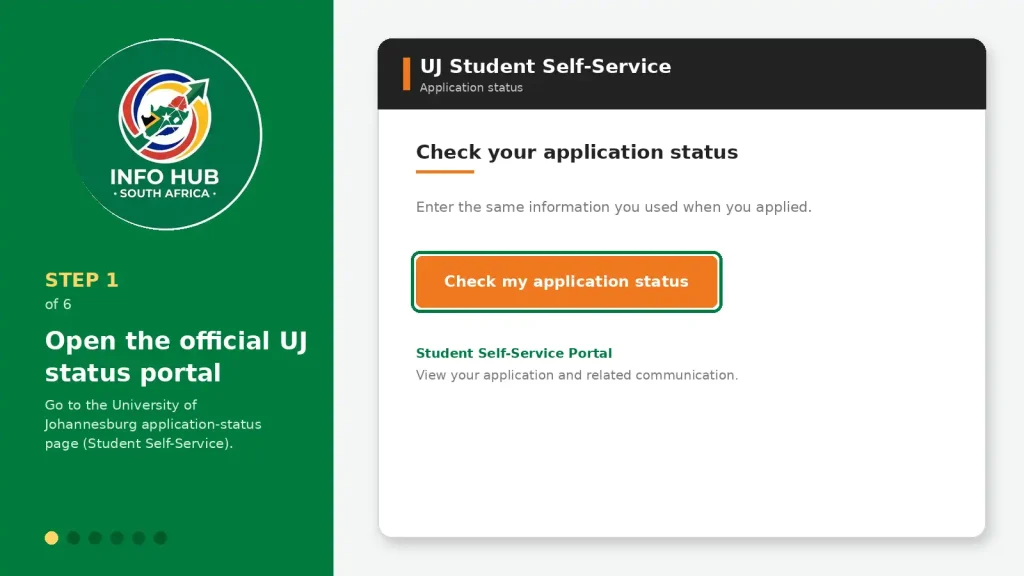
This is the dedicated UJ Student Self-Service page for checking an application. The portal asks applicants to enter the same information that was used when submitting the application.
Step 2: Choose ID or passport number
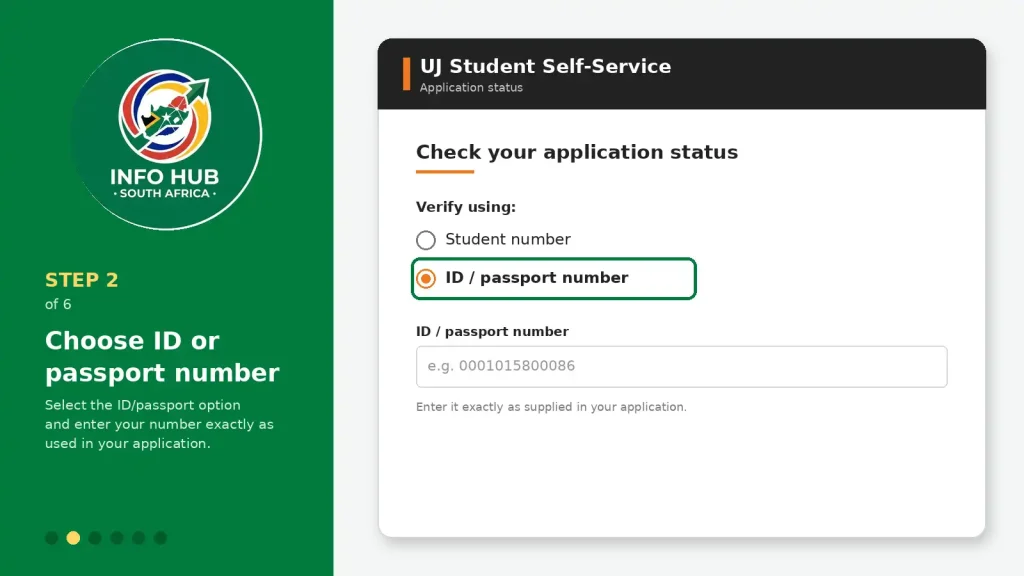
On the verification page, you will see an option for a student number or ID/passport number.
If you are a South African applicant and want to perform a UJ status check using ID number, select the ID/passport option and enter your identification number exactly as it was supplied during your application.
International applicants can use the passport information associated with their application.
Step 3: Select your verification method
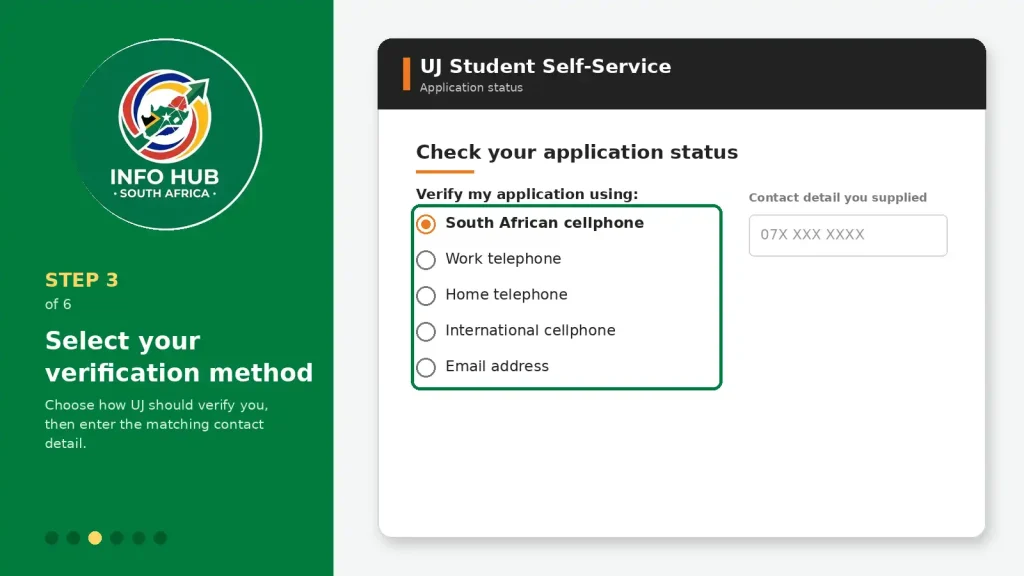
The portal also asks you to choose how UJ should verify your application. Available options shown on the current portal include:
After selecting the appropriate option, enter the corresponding contact detail that you supplied when applying.
Step 4: Select the academic year
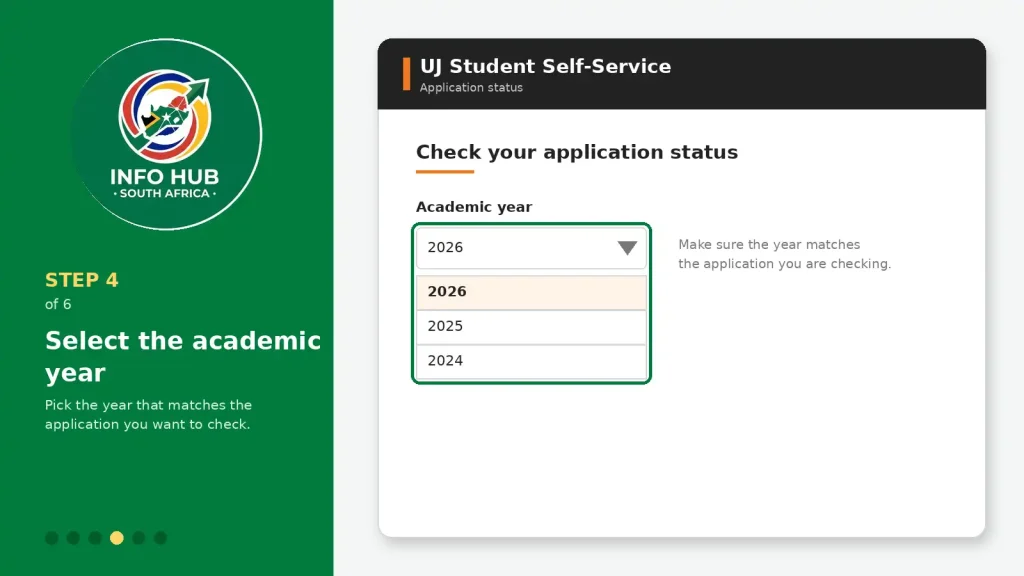
Choose the relevant academic year from the available selection.
This step is important because applicants may have application information associated with different academic periods. Make sure the year you select matches the application you want to check.
Step 5: Complete the verification code
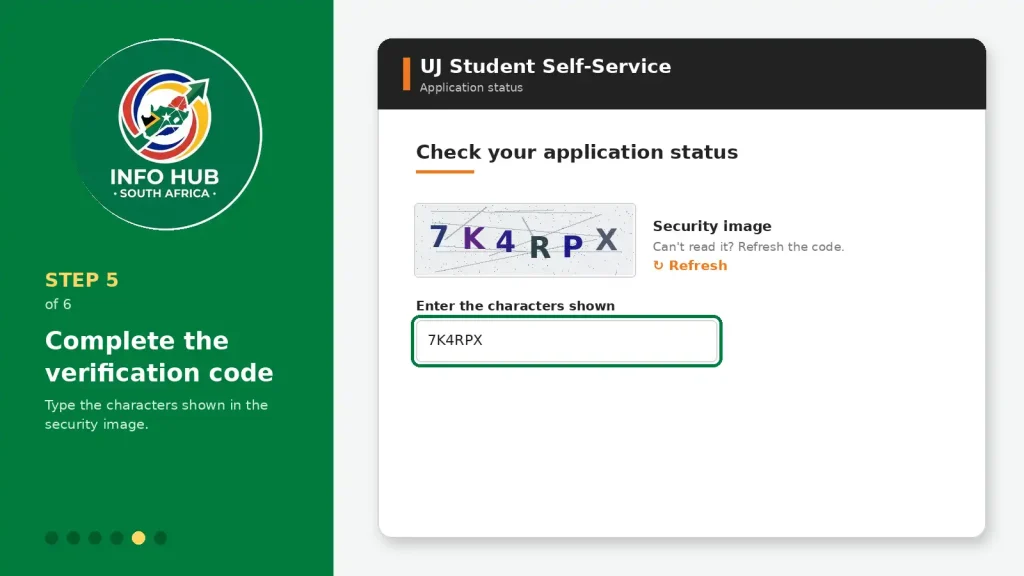
The portal displays a security image and asks you to enter the characters shown in the verification field.
Type the characters carefully. If the code is difficult to read, use the available option on the page to refresh it if provided.
Step 6: View your application status
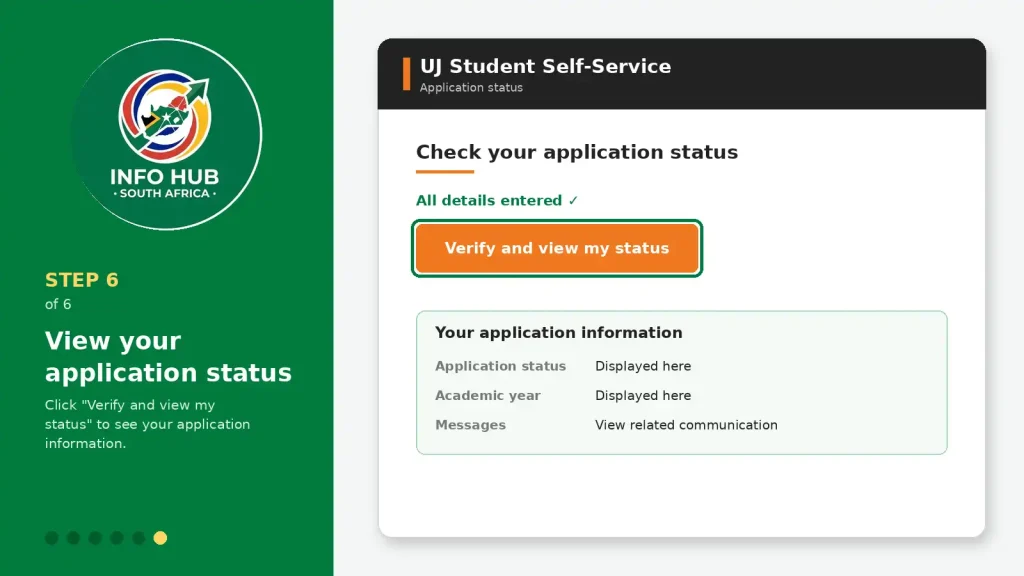
Once the required information has been entered, select “Verify and view my status”.
The UJ portal will then process the information and display the available application information. The Student Self-Service Portal is also designed to provide access to relevant communication associated with the application.
Tip: Take a screenshot or save important correspondence when you receive an admission-related update. Keep checking the official portal and your registered email for further instructions.
UJ Login vs UJ Application Status
One common source of confusion is the difference between UJ login, the application-status service and the UJ iEnabler system.
They are not necessarily the same thing.
The application-status page is specifically designed to verify an applicant’s admission/application information. The UJ iEnabler login, meanwhile, uses a student number and PIN and is a separate student login service.
If your goal is simply to find out whether your application has been processed, start with the UJ status check portal rather than assuming you need to log into iEnabler.
UJ application status at a glance
| What you need | Where to go |
|---|---|
| Check application status | UJ Student Self-Service Status Portal |
| Check with ID/passport | UJ Status Portal |
| Student login with PIN | UJ iEnabler |
| General UJ information | UJ official website |
| Admission enquiries | UJ Call Centre / official contact channels |
The university’s official contact information lists +27 (0)11 559 4555 and [email protected] for admission enquiries.
Understanding Your UJ Application Status
After completing your UJ status check, the result shown on the portal tells you where your application currently stands. The wording can vary depending on the application type and stage of processing, so read the message carefully rather than relying on a single word such as “accepted” or “pending”.
A status may indicate that UJ is still assessing your application, that you have received an offer, that further information is required, or that your application was not successful.
Common UJ Status Outcomes
| Status | What it generally means | What you should do |
|---|---|---|
| Pending / Under Review | Your application is still being assessed. | Continue checking the official portal and your registered contact details. |
| Provisionally Accepted | You may have met the initial requirements, but final conditions or documents may still apply. | Check carefully for outstanding results or documents. |
| Accepted / Admitted | UJ has made an admission offer. | Follow the instructions provided by the university to accept the offer and continue with the next stage. |
| Waitlisted | You may meet the relevant requirements, but available places are limited. | Monitor your status for further communication. |
| Declined / Unsuccessful | Your application has not resulted in an offer at that stage. | Review the admission information and consider whether UJ provides another suitable option. |
Remember: your exact status message and any accompanying communication should take priority over general explanations. UJ may provide additional instructions depending on your programme and application.
What Does “Pending” Mean on UJ Status Check?
If your UJ status check shows that your application is pending or under review, it usually means the assessment process has not been completed.
There is no need to submit a second application simply because the status has not changed. Instead, make sure your contact details are correct and continue monitoring the official portal.
Admission decisions can depend on programme requirements, available capacity and the information submitted with your application. For 2026 undergraduate admission, UJ reported exceptionally high application demand, so applicants should not assume that a pending result automatically means admission is guaranteed.
Best practice: check the status periodically instead of repeatedly submitting the same application or creating unnecessary accounts.
What If UJ Shows “Provisionally Accepted”?
A provisional admission outcome should be read carefully. It can mean that you have satisfied an initial part of the selection process but that UJ still needs final results, supporting documents or another condition before your admission can be finalised.
If your portal provides an instruction or letter, read it from beginning to end. Look for:
Do not ignore an outstanding-document request. A provisional outcome is not the same as completing every admission requirement.
What Happens After UJ Accepts Your Application?
If your UJ status check confirms that you have been admitted, the next step is to follow the instructions supplied by UJ.
Your admission communication should tell you what needs to happen next. Depending on your circumstances, this can include accepting an offer, preparing for registration and supplying any remaining documentation.
Keep the admission correspondence for your records. If the portal provides an official letter, save a copy so you can refer to the instructions later.
A useful post-admission checklist
UJ Status Check iEnabler: Are They the Same?
Searches for UJ status check iEnabler can be confusing because UJ uses more than one online service.
The important distinction is this:
UJ status check:
Used to verify the progress or outcome of an application through the relevant status service.
UJ iEnabler:
A separate university self-service/login environment where users may be asked for a student number and PIN.
If you are simply trying to find your admission outcome, begin with the status-check service rather than assuming that iEnabler is required.
Why applicants sometimes search for “UJ login application”
People often use searches such as UJ login application, UJ login, and UJ status check iEnabler interchangeably. These searches can lead to different UJ pages.
Before entering your details, check the web address and make sure you are using an official uj.ac.za service. Avoid third-party pages that ask for your ID number, password, PIN or other private information.
Troubleshooting Problems With UJ Status Check
Sometimes the status page may not work as expected. A failed search does not necessarily mean that your application has been rejected.
1. Your details are not recognised
Check that:
Even a small difference in the information entered can prevent the system from locating the correct record.
2. CAPTCHA or security verification fails
If the security characters are difficult to read, try refreshing the verification image if the portal provides that option.
You can also reload the page and try again.
Avoid repeatedly submitting incomplete information, as this can make the process more frustrating.
3. The page does not load correctly
The UJ status portal currently recommends Google Chrome for optimal usage and indicates that the application may not be compatible with certain browsers.
If the page behaves unexpectedly, try:
- Opening the portal in Google Chrome.
- Refreshing the page.
- Opening a private/incognito window.
- Clearing cached browser data if necessary.
- Trying again later if the university system is temporarily unavailable.
What If You Forgot Your UJ Student Number or PIN?
If you have forgotten a login detail, do not guess repeatedly.
The relevant UJ login service provides recovery options for users who have forgotten their PIN or student number. Use the recovery facility provided on the official portal and follow the instructions shown there.
For an ordinary application-status search, remember that UJ’s status service also allows applicants to use an ID/passport number rather than relying only on a student number.
This is particularly useful if you have misplaced an old email or SMS containing your application reference details.
International Applicants: UJ Status Check With a Passport
Applicants from outside South Africa should not automatically enter a South African ID number if they applied using a passport.
The UJ status portal provides an identification option for applicants using a passport number. Use the passport information connected to the original application, together with the relevant registered contact information.
Before checking your result, make sure the passport number is entered exactly as it appeared in your application.
If you experience a problem that cannot be resolved through the portal, contact UJ using the official contact information rather than sending passport details to an unofficial website or social-media account.
What to Do If Your UJ Status Has Not Changed
A status that remains unchanged can be frustrating, but repeatedly checking the page within a few minutes will not normally make the university’s assessment process move faster.
Instead, use a sensible checking routine.
Keep an eye on three places:
- The official UJ status portal — for application updates.
- Your registered email address — for correspondence and documents.
- Your cellphone/SMS messages — if UJ uses the registered number for communication.
Also check whether UJ has requested additional information. An applicant who misses a document request may delay their own application unnecessarily.
Important
Do not pay someone who claims they can “change” your UJ status or guarantee admission. Admission decisions should come through official university processes.
UJ Admission Enquiries and Official Support
If you have followed the status-check instructions but your application cannot be located, the best next step is to contact UJ directly.
The information supplied for this guide lists the UJ Call Centre as:
+27 (0)11 559 4555
The supplied admission contact is:
When contacting the university, explain the problem clearly. If appropriate, have your application/student number available, but do not send your password or PIN to anyone.
UJ Status Check vs UL Status Check vs UFS Status Check
Applicants sometimes search for several university status systems at the same time, particularly when applying to more than one South African university.
For example, UL status check refers to the University of Limpopo’s application-status process, while UFS status check refers to the University of the Free State’s application-status process. These are separate universities and therefore use their own application systems.
Likewise, a UJ applicant should use UJ’s official platform when checking a University of Johannesburg application.
Why this distinction matters
Searching for “UL status check” or “UFS status check” when you actually need a UJ result can lead you to the wrong university’s portal.
Before entering your personal information, confirm the university name and official domain.
| Search term | University |
|---|---|
| UJ status check | University of Johannesburg |
| UL status check | University of Limpopo |
| UFS status check | University of the Free State |
| UJ status check iEnabler | UJ-related status/login searches |
This is especially important if you have submitted applications to several institutions.
Common Mistakes to Avoid During a UJ Status Check
A few small mistakes can make the process unnecessarily difficult.
Using an unofficial website
Search engines may display third-party websites alongside official university pages. Always check that you are using an official UJ service before entering personal information.
Entering the wrong contact number
The status portal may use the contact information connected to your application for verification. Use the same details you provided when applying.
Choosing the wrong academic year
If the portal asks for an academic year, make sure you select the year associated with the application you want to check.
Confusing application status with registration
Being able to access a UJ login page does not necessarily mean that your admission application has been finalised. Application status, admission and registration are related but separate stages.
Creating another application unnecessarily
If you have already submitted an application, do not immediately submit another one simply because you cannot see the result. First verify your information and use the official status-check facility.
Sharing your login information
Never give your UJ password, PIN or verification information to someone who claims they can improve your admission chances.
A Simple Checklist Before You Check Your UJ Status
Having the correct information ready can make the process much smoother.
Before opening the portal, check that you have:
Then open the official UJ status page and follow the verification instructions.
FAQs
Conclusion
The UJ status check service gives applicants a convenient way to track their University of Johannesburg application online. Whether you are searching for UJ status check 2026 undergraduate, trying a UJ status check using ID number, looking for UJ login application information, or trying to understand the difference between the status portal and UJ status check iEnabler, always use the correct official UJ platform.
For an ID-based check, keep your identification and registered contact details ready. International applicants should use the passport information connected to their application. If the portal does not recognise your details, check the information carefully before contacting the university for assistance.
For reliable guidance beyond the official university portals, Info Hub South Africa provides practical information to help South African readers understand application-status checks, university admissions, government services and other important online processes. Our aim is to make complicated procedures easier to follow by explaining the steps in clear, straightforward language.
However, Info Hub South Africa is an independent information website and is not affiliated with the University of Johannesburg. For final admission decisions, application updates and official requirements, applicants should always verify information directly through UJ’s official website and online portals.
Keep your application details secure, check your status regularly, and follow any instructions included in official UJ correspondence. This will help you stay informed throughout the admission process and avoid missing an important update.
Read More
GEHS Login South Africa 2026: Online Login, Password Reset & Status Check Guide
Television Licence South Africa: Online Application, Status Check & SABC TV Licence Guide 2026
UMP Moodle Login South Africa 2026: Student Portal Access Guide