PMPS Login South Africa: Complete Guide to Access the PMPS Portal
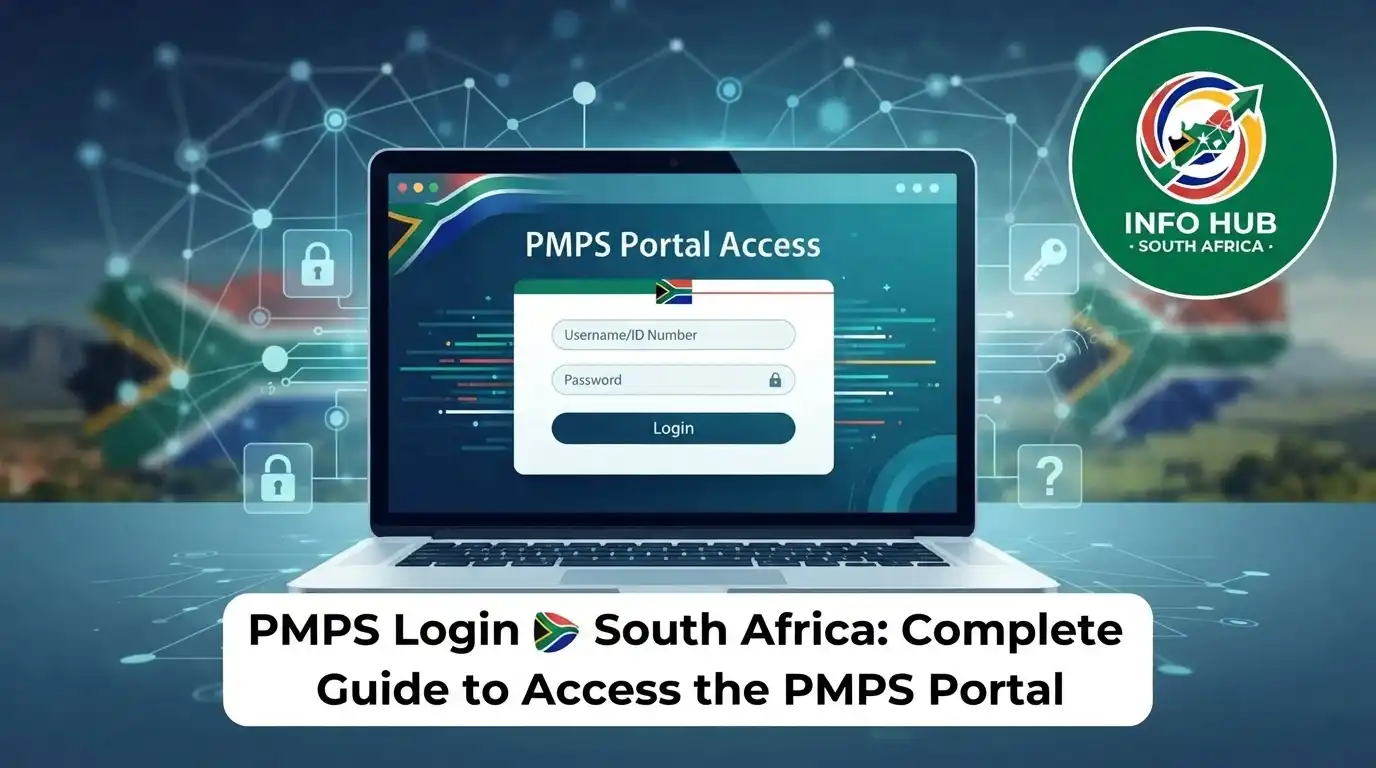
Searching for PMPS login usually means you need to access the Western Cape Government’s People Management Practices System for employee and personnel-related functions. The portal is designed for authorised users and provides access to information and administrative functions connected with people management.
The PMPS is particularly relevant to employees and authorised users working within the western cape government, including users associated with the dept of education western cape. The system has also been used for functions involving attendance, leave and other personnel administration within the Western Cape Education Department.”Visit Homepage for more”.
What Is PMPS?
PMPS stands for People Management Practices System. It is an online system used to support people-management and personnel administration within the Western Cape Government environment.
For users searching for PMPS login, the main purpose is straightforward: reach the authorised PMPS environment and sign in with the credentials assigned to you.
The system is associated with employee records and personnel information. The PMPS portal itself notes that employee records displayed in the system are received from PERSAL and may be subject to auditing. It also warns that leave information displayed may not necessarily mean that every leave transaction has already been processed on PERSAL.
Who Uses the PMPS Portal?
PMPS is intended for authorised personnel rather than the general public. Access can depend on a user’s role, registration and system permissions.
The Western Cape Education Department has identified people management as covering areas such as strategic people management, service benefits, recruitment and selection, and employee relations.
This is why PMPS login may be relevant to employees, school personnel and other authorised users connected with the Western Cape Government or dept of education western cape.
PMPS Login Requirements
Before attempting your PMPS login, prepare the information and equipment you are likely to need.
| Requirement | What you need |
|---|---|
| Official portal | PMPS website hosted on the Western Cape Government domain |
| User identification | Your assigned Persal number |
| Password or PIN | Valid PMPS login credentials |
| Browser | An up-to-date supported web browser |
| Internet | A stable internet connection |
| Access rights | An authorised PMPS account |
A Persal number is important because the PMPS environment connects personnel information with the relevant employee record. If your account has not been created or your access rights have not been approved, simply knowing the PMPS website address may not be enough to enter the system.
The PMPS user-rights documentation also shows that different user types and access actions exist, including new users, modifications and deactivation of user access.
How to Complete Your PMPS Login
If you already have an authorised account, the sign-in process is generally straightforward.
Step 1: Open the Official PMPS Website
Start by opening the official PMPS website:
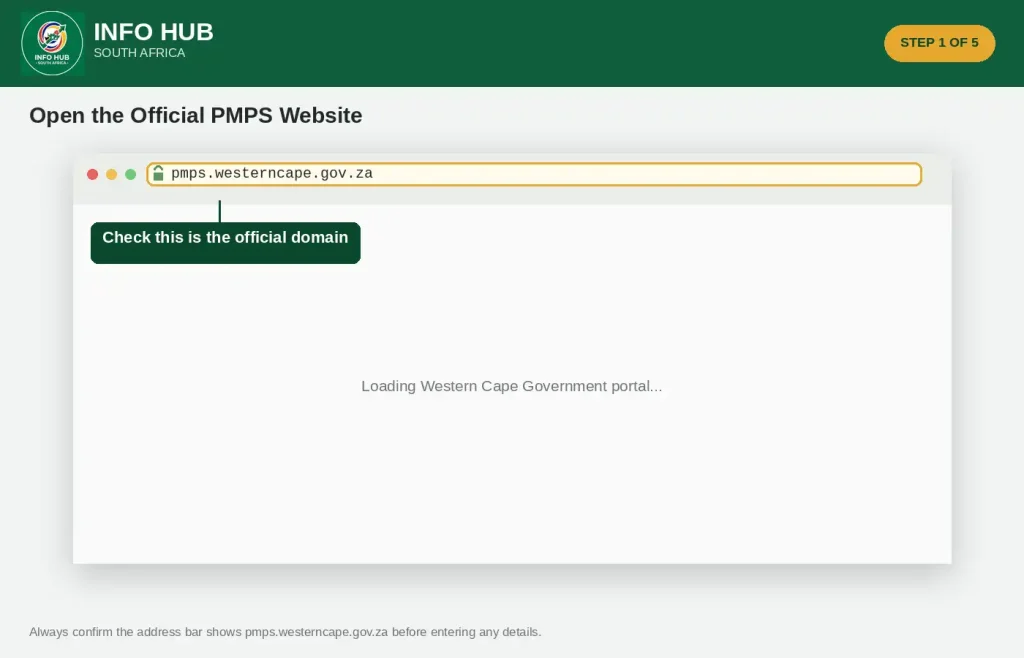
Using the official address is the safest way to avoid confusing PMPS with unrelated websites. The official login environment is hosted under pmps.westerncape.gov.za.
Step 2: Find the Login Area
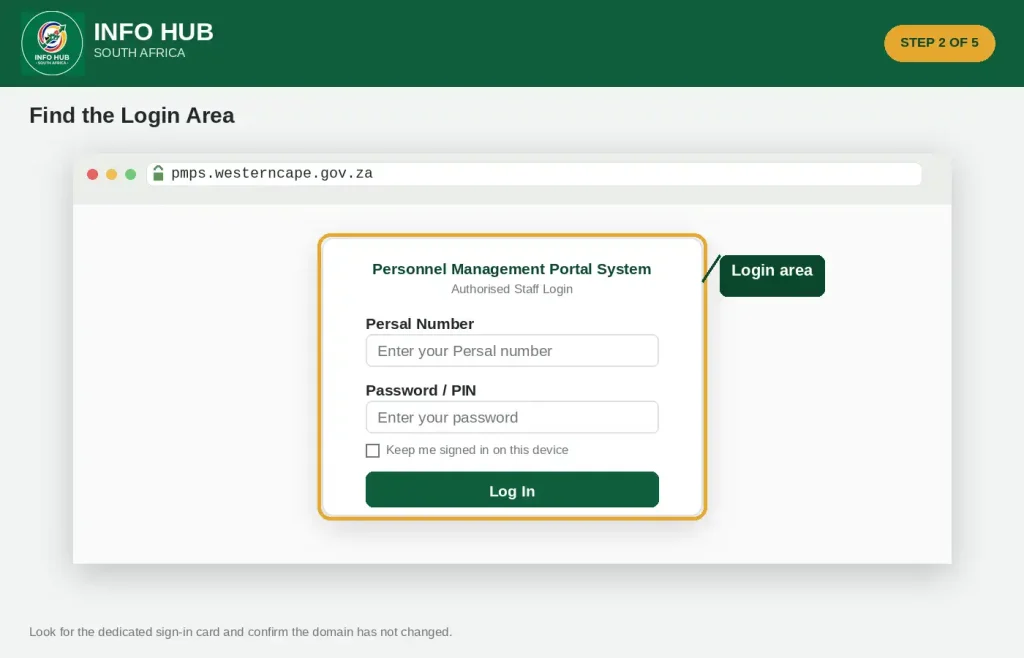
Once the PMPS website loads, look for the login section.
The portal provides a dedicated authentication page where authorised users can enter their account details. If you have reached the correct page, check that the domain remains pmps.westerncape.gov.za before entering your information.
Step 3: Enter Your Persal Number
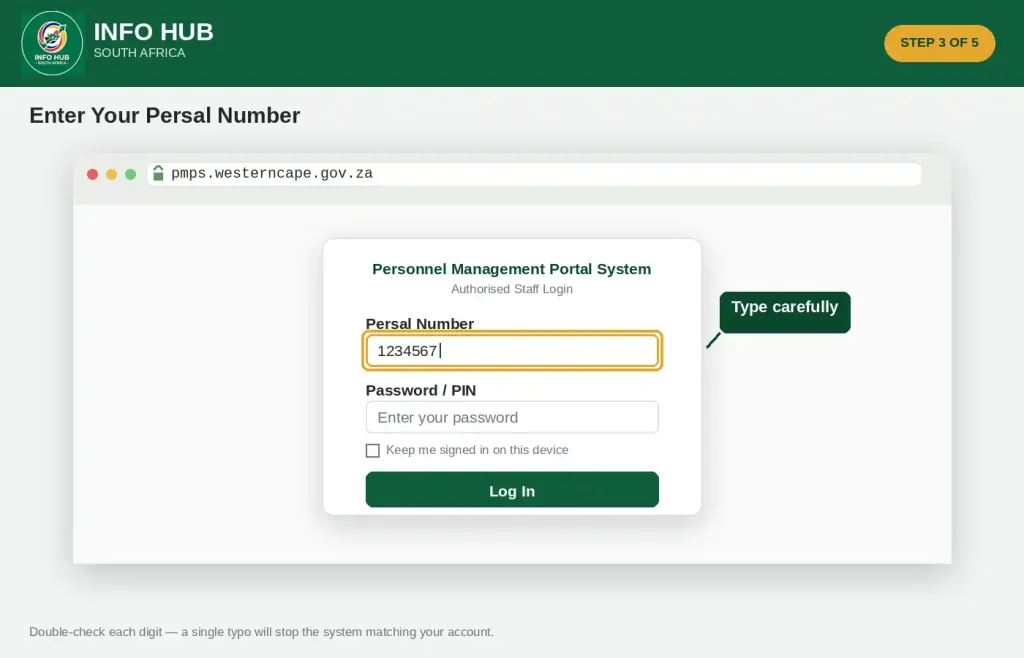
Enter your assigned Persal number in the appropriate username or identification field.
Take care when typing the number. An incorrect digit can prevent the system from matching your account, even if your password is correct.
Step 4: Enter Your Password or PIN
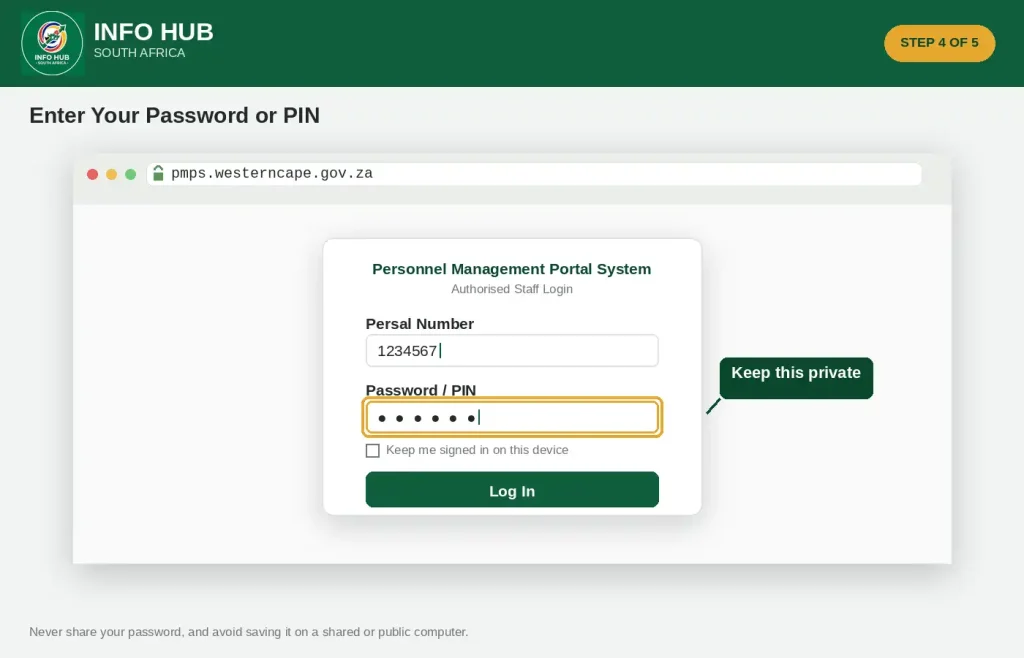
Enter the password or PIN associated with your PMPS account.
Avoid sharing your password with another person. If you are using a shared computer, do not allow the browser to save your PMPS credentials unless the device is properly secured and permitted for that purpose.
Step 5: Submit the Login
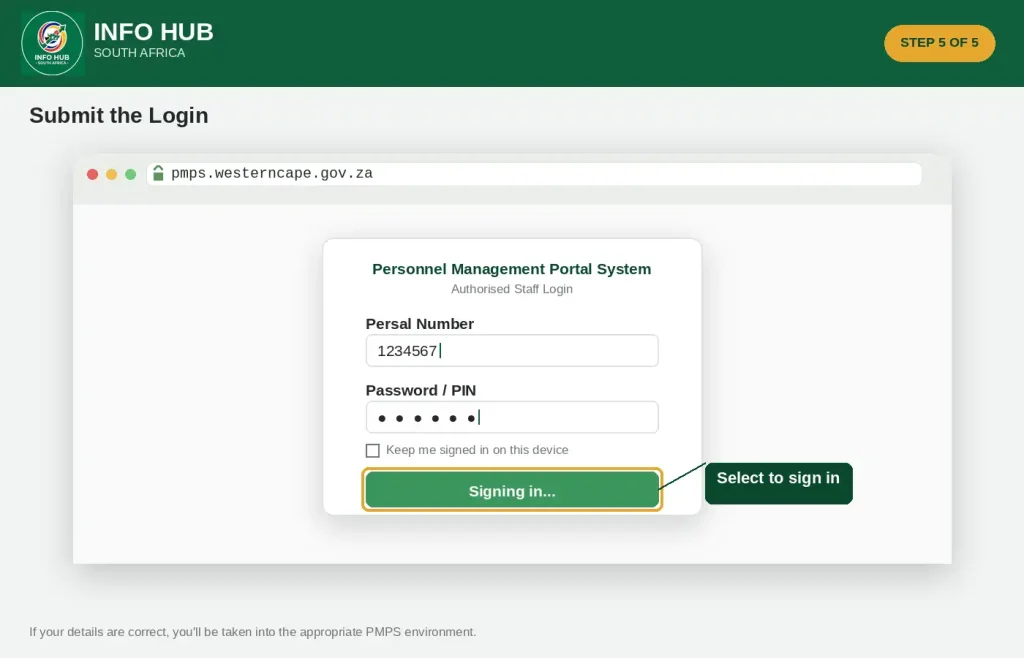
After checking your details, select the login option.
If your credentials are accepted and your account has the required permissions, you should be taken into the appropriate PMPS environment.
Quick tip: If the login fails, don’t repeatedly enter different passwords at random. First check your Persal number, password, Caps Lock setting and browser connection.
What Can You Find Inside PMPS?
The exact functions available to an individual user can depend on their role and permissions. PMPS has historically supported several people-management and administrative functions within the Western Cape environment.
A Western Cape Education Department circular explains that the system developed from the former Human Capital Leave Management System and was renamed the People Management Practices System. It was introduced to record attendance and provide online Paysheet Control, with further modules added over time.
The same WCED material describes functionality connected with areas such as:
The available features can vary according to your access level. Therefore, don’t assume that another employee’s PMPS dashboard will contain exactly the same options as yours.
PMPS and WCED Absenteeism
One related search term users may come across is wced absenteeism. This is relevant because attendance and leave administration have been among the functions associated with PMPS within the Western Cape Education Department.
The WCED circular explains that PMPS includes an Attendance Register and that enhancements were made to automate the submission of leave forms.
For someone searching for wced absenteeism, the important distinction is that PMPS is a broader people-management system rather than simply an absenteeism-checking website. Attendance and leave information form part of the wider personnel administration environment.
If your question concerns a particular absence, leave entry or employee record, use the information available through your authorised PMPS access and follow the applicable departmental process.
PMPS for the Western Cape Education Department
The dept of education western cape has a significant connection with PMPS because the system supports people-management activities within the education environment.
The Western Cape Government’s official People Management Practices information identifies functions covering strategic people management, service benefits, recruitment and selection, and employee relations.
WCED also publishes official documents relating to PMPS. Its document collection includes a circular specifically titled “People Management Practices System (PMPS): Access and functionality.”
For this reason, employees searching for terms such as PMPS login Western Cape, WCED PMPS login, PMPS login WCED or wced absenteeism are often looking for access to the same broader personnel-management environment.
What If You Cannot Log In?
A failed PMPS login does not always mean that your account has been permanently disabled. Several basic issues can interfere with access.
Check Your Persal Number
Make sure the Persal number has been entered correctly. A single incorrect number can cause authentication to fail.
Check Your Password or PIN
Confirm that you are using the current credential assigned to your account. Pay attention to capital letters, numbers and special characters where applicable.
Check Caps Lock
If your password is case-sensitive, having Caps Lock enabled can result in an unsuccessful login.
Try Another Browser
If the page does not behave correctly, try an updated version of another mainstream browser such as Chrome, Edge or Firefox.
Clear Browser Data
Old cached information can sometimes interfere with websites. Clearing relevant browser cache and cookies, then reopening the PMPS website, may help.
Check Your Network
If you are using PMPS from a workplace environment, network restrictions or internal access requirements may affect connectivity. If the portal works on one approved network but not another, contact your relevant technical support team rather than repeatedly changing your login details.
PMPS Password Reset
If you have forgotten your PMPS password, the official PMPS environment provides a Forgot Password route.
Open the PMPS login page and look for the password-recovery option. The official PMPS reset page currently provides a route back to the login screen as part of the recovery process.
When recovering access, use only the official PMPS website and avoid entering your Persal number or other account information into third-party pages claiming to provide PMPS login assistance.
If Password Recovery Does Not Work
If the password-recovery process does not resolve the problem, the issue may require assistance from the PMPS support team.
The current PMPS login page lists helpdesk hours as 08:00 to 15:00 on weekdays, along with the PMPS support email address and telephone number.
PMPS Helpdesk
When contacting support, explain the problem clearly and avoid sending your password or PIN by email.
PMPS Login, Account Access and WCED Attendance
Once you have completed the PMPS login, the information available to you depends on your authorised role within the system. PMPS is not a public portal where anyone can create an account and browse employee information. It is intended for authorised personnel working within the western cape government environment.
For employees connected with the dept of education western cape, PMPS can be relevant to attendance, leave and other people-management processes. The Western Cape Education Department has described PMPS as a system supporting functions such as attendance recording, leave administration and Paysheet Control.
Does Every Employee Have the Same PMPS Access?
No. PMPS access can vary according to a person’s responsibilities and permissions.
This is particularly important when searching for PMPS login instructions because seeing a particular PMPS function discussed online does not necessarily mean that the same function will appear on every employee’s account.
Your access may depend on:
If a feature is missing after you sign in, avoid assuming that the website is broken. Your account may simply not have permission to use that function.
PMPS and WCED Absenteeism Records
The phrase wced absenteeism is closely related to attendance management within the education environment. PMPS has been used to support attendance-related administration, including an Attendance Register.
For WCED personnel, attendance information can therefore form part of the wider people-management process rather than being treated as an entirely separate system. The department’s PMPS documentation describes functionality around attendance and leave administration.
When dealing with wced absenteeism, it is important to distinguish between an attendance record, a leave transaction and a final personnel record. Information shown in an online system may relate to a particular stage of administration.
Why Attendance Information Matters
Accurate attendance information helps the dept of education western cape maintain proper personnel administration. It can also support processes involving leave and employee records.
If you notice an attendance entry that appears incorrect, the appropriate response is to follow your departmental reporting process rather than attempting to alter information without authorisation.
PMPS Leave and Employee Information
PMPS is broader than wced absenteeism alone. Its purpose is connected with people-management practices, which can include employee administration and service-related processes.
The Western Cape Government describes its People Management Practices function as covering areas including strategic people management, service benefits, recruitment and selection, and employee relations.
This wider scope explains why the PMPS login portal may be useful for different administrative activities depending on the user’s role.
Important Point About Leave Information
Users should not automatically assume that every leave entry visible through PMPS has already completed every required processing stage.
The PMPS portal itself indicates that employee records are received from PERSAL and are subject to auditing. It also provides a notice concerning leave information displayed in the system.
If a leave record appears unusual, check the relevant departmental process or contact the appropriate support channel.
What Is a Persal Number?
A Persal number is the personnel identification number used within South African government employee administration.
For PMPS login, the Persal number is important because the portal uses personnel information associated with the employee record.
Before trying to sign in, make sure you know the correct number assigned to you. If you have recently changed departments, roles or employment circumstances, don’t assume that an old set of details will necessarily work.
PMPS Login Not Working? Try These Checks
A failed PMPS login can happen for several reasons. Work through the following checks before contacting support.
1. Confirm the Website
Make sure you are using the official PMPS address:
Check the domain carefully. Avoid websites that copy the appearance of government services but use a different address.
2. Recheck Your Persal Number
Carefully enter your Persal number again. Look for missing or additional digits.
If you copied the number from another document, make sure you did not accidentally include spaces or other characters.
3. Check Your Password
Passwords can be case-sensitive. Make sure that Caps Lock is not causing an unexpected change in the characters you enter.
Don’t keep guessing passwords repeatedly if you believe the account may be locked.
4. Refresh the Browser
If the login page has stopped responding, refresh the page and try again.
You can also close the browser completely and reopen the official PMPS website.
5. Try a Private Window
A private or incognito browser window can help determine whether cached information or an existing browser session is interfering with the PMPS website.
6. Clear Cached Data
If the website continues to behave unexpectedly, clearing the browser’s cache and relevant cookies may help.
7. Check Your Internet Connection
A slow or unstable connection can cause a login page to load incompletely. Confirm that other websites are working before assuming that your PMPS account is the problem.
When Should You Contact PMPS Support?
Contact the PMPS support team when ordinary troubleshooting does not resolve the issue, particularly if you cannot recover your password or believe your account requires administrative attention.
The PMPS login environment provides the following support details:
PMPS Helpdesk
These details are particularly useful if your PMPS login continues to fail after checking your credentials and browser.
When contacting support, describe the problem clearly. For example, explain whether you cannot open the login page, cannot authenticate, have forgotten your password or can log in but cannot access a particular function.
Security reminder: Never send your password or PIN to someone claiming to be support. If support needs to verify your identity, follow the official verification process provided to you.
PMPS Account Security Tips
Because PMPS relates to personnel information, account security should be taken seriously.
Follow these basic practices:
The safest approach to PMPS login is simple: start from the official Western Cape Government PMPS domain and only provide information on the genuine login page.
PMPS Login vs Other Western Cape Government Services
A common source of confusion is assuming that every Western Cape Government employee service uses the same login system.
They don’t necessarily work in the same way.
The western cape government provides different online services for different administrative purposes. PMPS specifically relates to people-management functions, while other government websites may provide information or services for citizens, businesses or departmental operations.
For employees of the dept of education western cape, this distinction matters because WCED has its own broader online information environment while PMPS provides a specific people-management function.
If your search is specifically for PMPS login, go directly to the PMPS portal rather than searching through unrelated government services.
A Simple PMPS Login Checklist
Before you contact support, run through this checklist:
| Check | What to confirm |
|---|---|
| Website | You are using the official PMPS domain |
| Persal number | Your number is entered correctly |
| Password/PIN | You are using the current credential |
| Browser | Your browser is updated |
| Connection | Your internet connection is stable |
| Access | Your account is authorised for PMPS |
| Recovery | You have tried the official password-recovery option |
| Support | You have the PMPS helpdesk details if further assistance is needed |
This can save time because many basic PMPS login problems can be identified before contacting the helpdesk.
Information for WCED Employees
If you work within the dept of education western cape, PMPS may be one part of your wider employee administration.
Searches for wced absenteeism, WCED attendance, PMPS leave and PMPS login can therefore overlap. However, each issue should be handled according to the relevant departmental process.
For example, being unable to sign in is an access problem. Finding an incorrect attendance entry is a personnel-record issue. A missing leave transaction may require a different administrative response.
Understanding that difference can help you contact the right people and avoid submitting unnecessary requests.
Key Points to Remember
The most important information for anyone searching for PMPS login is:
Info Hub South Africa recommends checking the official portal before relying on third-party PMPS login instructions, especially when entering personnel credentials.
PMPS Login Support Details
If basic troubleshooting and password recovery haven’t solved the issue, the PMPS support details are useful to keep available.
| Support option | Details |
|---|---|
| PMPS telephone | 021 467 2092 |
| PMPS email | [email protected] |
| Support hours | Monday to Friday, 08:00–15:00 |
| Official portal | pmps.westerncape.gov.za |
When contacting support, explain the exact stage where the problem occurs. For instance, tell them whether the PMPS website won’t load, your credentials aren’t accepted, password recovery isn’t working or a specific function isn’t available after signing in.
How to Avoid PMPS Login Problems
A few habits can make future access easier.
Keep your credentials secure. Your password or PIN should remain private. Don’t send it through email, messaging apps or social media.
Bookmark the official portal. Saving the genuine PMPS address can reduce the chance of accidentally visiting an unofficial website when searching for PMPS login.
Keep your browser updated. An outdated browser can sometimes cause compatibility or page-loading problems.
Check details before submitting. A quick check of your Persal number and password can prevent repeated failed attempts.
Use the correct support route. If you have a departmental attendance or leave question, explain the actual issue instead of describing everything as a login problem.
PMPS, WCED and Western Cape Government: How They Relate
Understanding the terminology makes it easier to find the right information online.
Western Cape Government is the provincial government environment under which various departments and public services operate.
Dept of Education Western Cape, commonly referred to as the Western Cape Education Department or WCED, is responsible for education administration in the province.
PMPS refers to the People Management Practices System, which supports authorised people-management activities.
WCED absenteeism is a search term associated with attendance and absence matters within the education environment.
These terms can appear together in searches, but they don’t mean the same thing. Someone looking for PMPS login is primarily trying to reach the personnel-management system, while someone searching for wced absenteeism may be looking for information about attendance or absence administration.
Final PMPS Login Checklist
Before finishing your PMPS login task, make sure you have:
For employees associated with the dept of education western cape, understanding the difference between PMPS access, attendance administration and wced absenteeism can also make it easier to identify the right process.
FAQs
Conclusion
The PMPS login portal gives authorised Western Cape Government personnel access to important people-management functions. For WCED users, PMPS can be relevant to areas such as attendance and leave administration, including information related to wced absenteeism. The wider western cape government and dept of education western cape websites provide additional official information and departmental resources.
If you’re having trouble signing in, begin with the official PMPS website, check your Persal number and login credentials, and use the available password-recovery or support options when required. Always keep your account details private and use official government websites when accessing personnel services.
Info Hub South Africa provides practical, easy-to-understand guides covering South African government portals, online services, applications, employee resources and other useful public information. Our aim is to help readers understand where to find official services and how to use them correctly, while encouraging users to verify important information through the relevant government websites.
Read More
Majuba Student Portal South Africa 2026: Student Login, Registration & Complete Portal Guide
Matric Results 2026 Online Check South Africa: Get Your NSC Results Instantly
CUT Status Check South Africa 2026: Complete Application and Admission Guide
SANC eRegister South Africa 2026: Login, Registration & Status Check
Learners Licence Booking South Africa 2026: Requirements, Steps & Fees