Smart ID Online Application South Africa: 2026 Guide
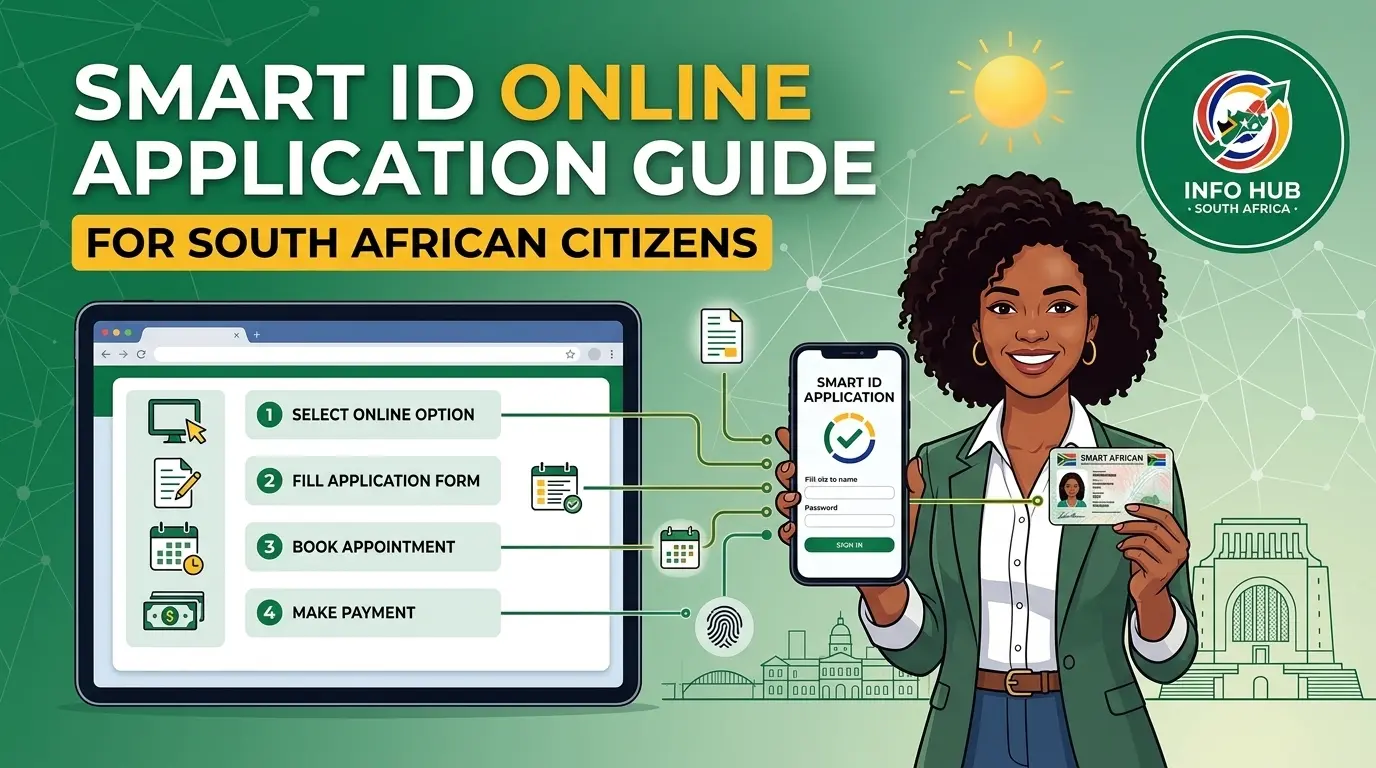
If you need a new South African ID or want to replace your old green ID book with a Smart ID card, you may be able to start the process online. The Department of Home Affairs offers online services that allow eligible South Africans to apply for certain ID services and find participating branches.
You can start by visiting the official My Home Affairs Online portal. Depending on the service you need, you may be able to enter your details, follow the payment instructions and choose an available appointment at a participating branch.
Please remember: Applying online does not always mean you can finish everything from home. You may still need to visit a Home Affairs office or participating branch to have your photo taken, provide fingerprints and complete other identity checks.
This article explains how to access the Smart ID online application service, what information you may need and how to follow the next steps.
What Is a Smart ID Card?
A Smart ID card is an official South African identity document issued by the Department of Home Affairs. It is replacing the older green barcoded ID book and provides South African citizens with a modern form of identification.
You may need a Smart ID if you are applying for your first ID, replacing an old green ID book or requesting a replacement for a lost or damaged card.
Who Can Apply for a Smart ID Online?
The online service may be useful if you:
The services available to you will depend on your circumstances. Some applications may require different documents, payments or appointments, so always follow the instructions on the official Home Affairs website.
What You Need Before Applying for a Smart ID
Before starting your Smart ID online application, prepare your personal details and any documents you may need. Having everything ready can help you avoid mistakes and delays.
You may need:
You should also check which online service is suitable for your application. The My Home Affairs Online portal provides access to certain Smart ID services through participating partner branches, while the separate eHomeAffairs website supports online applications for eligible citizens.
How to Log In to the Smart ID Online Application Portal
To start, open the official Home Affairs website and choose the service that matches your needs. Make sure you are using a government website before entering your personal information.
Step 1: Visit the Official Home Affairs Portal
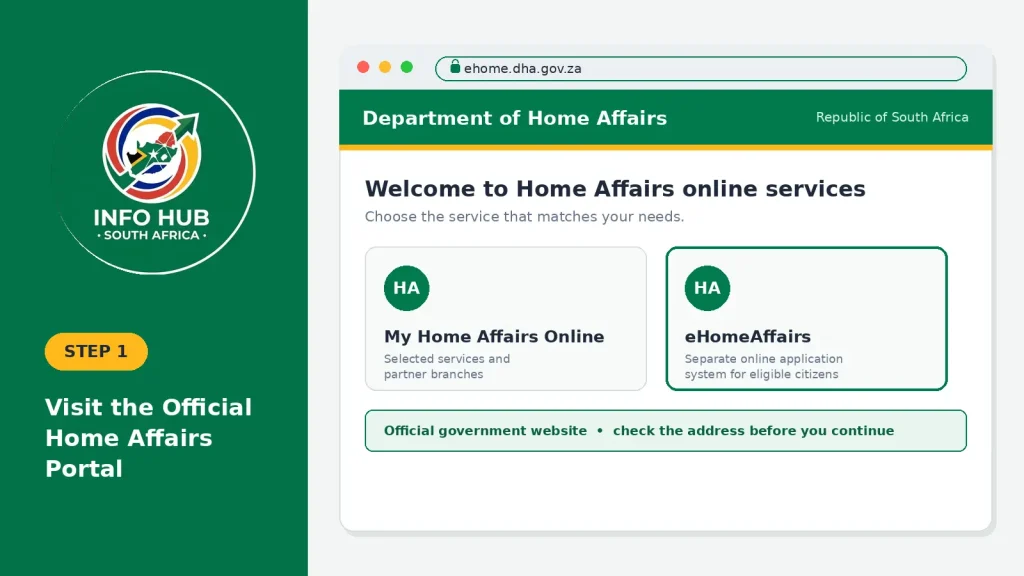
This portal provides information about selected Home Affairs services and participating partner branches. If you need to apply through the separate eHomeAffairs system, visit ehome.dha.gov.za.
These websites offer different services, so check the available options before continuing.
Step 2: Register or Log In to Your Account
If you are a new user, select the registration option available on the website and enter the information requested. If you already have an account, choose the login option and enter your registered details.
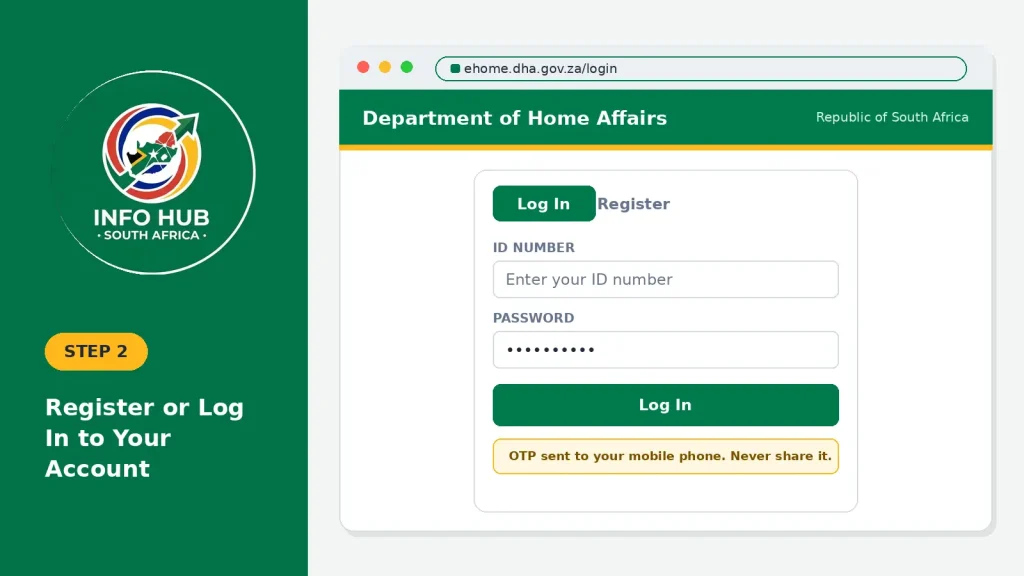
The system may ask you to verify your identity using a one-time PIN (OTP) sent to your mobile phone.
Safety tip: Never share your password or OTP with another person. Use your own contact details and avoid websites or individuals who promise to speed up your Smart ID application in exchange for money.
Step 3: Choose the Correct Smart ID Service
After logging in, check which services are available.
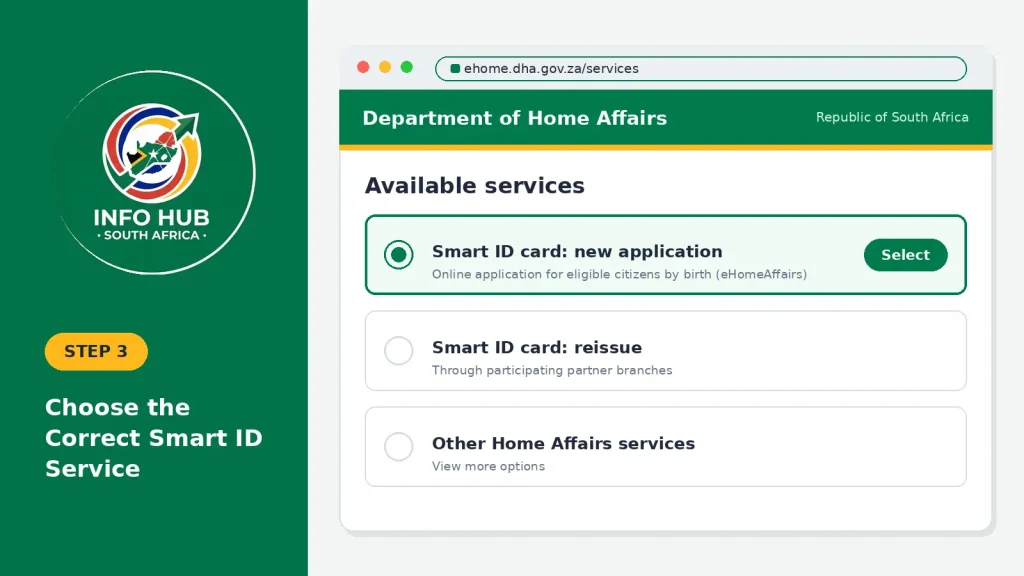
For example, the My Home Affairs Online portal lists a Smart ID card reissue service through participating partner branches. The eHomeAffairs platform offers a separate online application process for eligible South African citizens by birth.
Choose the option that matches your situation. If you need a new application, do not select a reissue service unless it applies to your circumstances.
Step 4: Enter Your Personal Information
Fill in the details requested on the screen. These may include your ID number, full names and contact information, depending on the service.
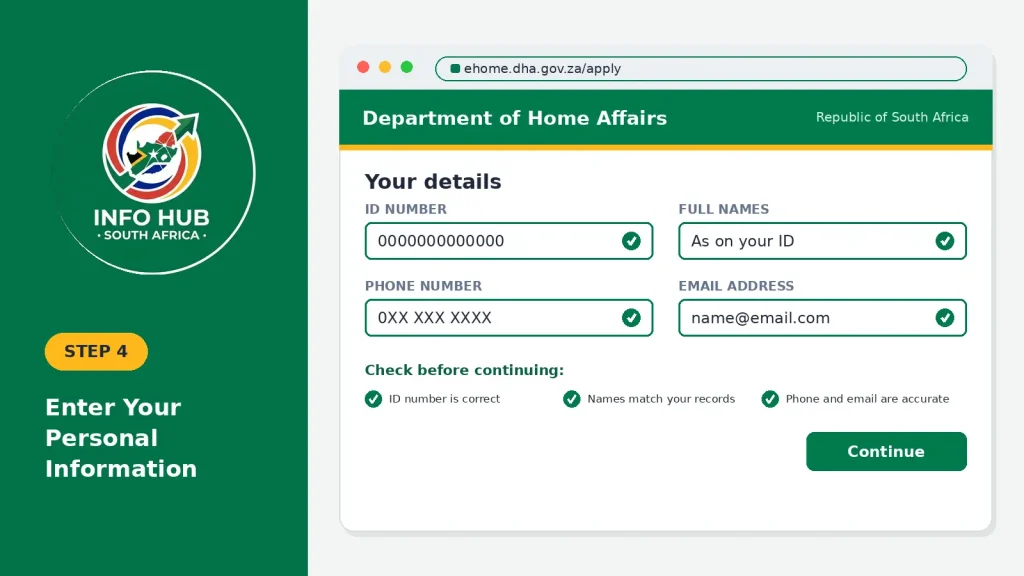
Before continuing, check that:
Correct any mistakes before submitting your information. If you cannot change details after submission, contact Home Affairs through its official support channels rather than submitting another application unnecessarily.
How to Complete Your Smart ID Online Application
Once you have selected the correct service, follow the instructions provided by Home Affairs. The steps may differ depending on whether you are applying through eHomeAffairs or using a partner branch service for an eligible Smart ID reissue.
For applications through eHomeAffairs, the process may include completing an online form, providing supporting documents, making a payment and arranging an appointment where available. The partner branch service may be intended specifically for eligible reissues.
Use the official eHomeAffairs application portal for its online application services. For participating branches and the Smart ID reissue service, use the My Home Affairs Online partner branch portal.
Step 5: Upload Supporting Documents if Required
Some applications may require additional documents. If the website asks you to upload files, make sure they are clear and that all the information can be read.
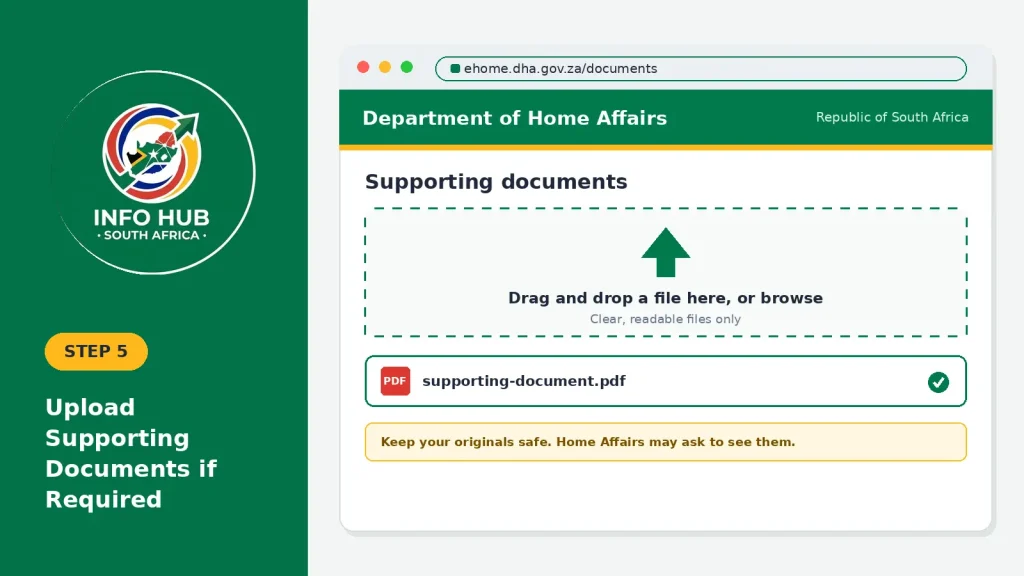
You may need supporting documents if your circumstances require them, such as records relating to a change of name. Keep your original documents safe because Home Affairs may ask to see them in person.
Only submit sensitive personal information through the official government website. Avoid sending copies of your ID or other documents to unknown people or unofficial websites.
Step 6: Check Your Application Before Submitting
Before finishing the online process, review all the information you have entered. Make sure you have completed the required fields and followed the instructions for any documents, payments or appointments.
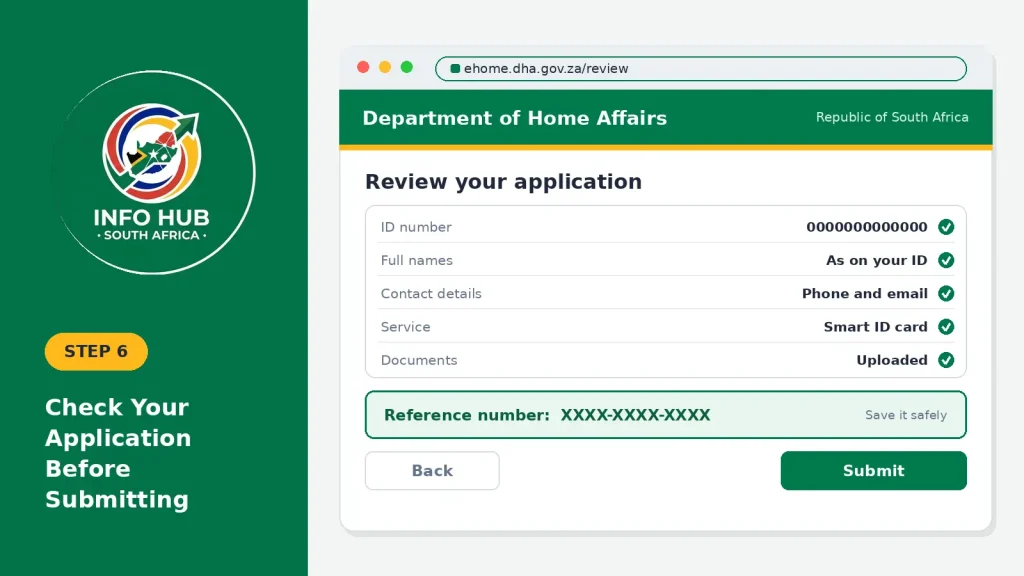
If the system provides a confirmation or reference number, save it somewhere safe. You may need these details later to follow up on your application or ask Home Affairs for assistance.
How to Book a Smart ID Appointment Online in South Africa
If you need a Smart ID card, you may need to book an appointment before visiting Home Affairs or a participating bank branch. However, not every Smart ID service requires an appointment. The process depends on the type of application and the branch you want to visit.
Step 1: Open the official website
Visit the My Home Affairs Online portal. Check the available Smart ID services and sign in if the website asks you to do so.
Step 2: Find a participating branch
Use the branch locator to find a suitable Home Affairs office or participating bank branch near your town or suburb.
Remember that not every bank branch offers Smart ID services. Check that your chosen branch can help with your specific application before travelling.
Step 3: Choose an appointment if required
If the online system offers appointment booking for your application, select an available date and time that suits you.
If no appointments are available, check other participating branches or try again later. Some direct bank services may accept eligible Smart ID replacement applicants without an advance appointment.
Step 4: Save your confirmation
If you receive a booking confirmation or reference number, save it on your phone. Check the appointment date, time and branch address before leaving home.
Standard Bank Smart ID Services
If you want to apply for or replace a Smart ID through Standard Bank, first check whether the service is available at your preferred branch.
Not every Standard Bank branch necessarily provides Home Affairs services, and the requirements may differ depending on the type of application.
Before visiting:
- Open the official Home Affairs partner branch portal.
- Check whether your preferred Standard Bank branch offers the required Smart ID service.
- Follow the instructions about applications, payments and appointments.
- Prepare the documents requested for your application.
- Keep your confirmation details available if a booking is required.
Having a Standard Bank account or online banking profile does not automatically mean you can use its Home Affairs services. Confirm the requirements before travelling.
Capitec Branches Offering Smart ID Services
Capitec has partnered with the Department of Home Affairs to provide selected Smart ID services at participating branches. Its published information describes a replacement service for eligible applicants who need to replace a green ID book or a lost, stolen or damaged Smart ID card.
The service involves visiting a participating branch so the required identity checks and biometric details, such as a photograph, fingerprints and signature, can be captured.
How to Find a Capitec Smart ID Branch
Follow these steps to find a branch that offers the service:
- Visit the My Home Affairs Online portal.
- Open the partner branch locator.
- Search for a participating Capitec branch in your area.
- Check whether the branch offers the service you need.
- Read the latest requirements before visiting.
You can also check Capitec’s official Smart ID service information for details about its service and participating branches.
Do you need a Capitec account? Capitec’s published guidance has stated that applicants need a bank account to use its Smart ID replacement service. Check the latest requirements before making your visit, as service arrangements may change.
Do You Need an Appointment for a Smart ID at a Bank?
Not always. According to the information provided for this article, a digital partnership model introduced by Home Affairs in March 2026 allows eligible applicants to complete supported Smart ID replacement applications directly at participating bank branches without booking an appointment in advance.
However, this does not mean that every bank branch accepts walk-in applicants or offers every type of Smart ID application.
There are three main routes to consider:
| Application route | What you should do |
|---|---|
| Direct Smart ID service at a participating bank | Check the bank’s latest instructions to see whether you can visit without an appointment. |
| eHomeAffairs online application | Complete the online steps and book an appointment if the system offers one. |
| Home Affairs office | Check the official booking service to find out whether an appointment is required. |
What Should You Bring When Visiting a Smart ID Branch?
The documents you need depend on the service you are using. Before leaving home, check the requirements provided by Home Affairs or the participating bank.
Where applicable, prepare the following:
Do not assume that every applicant must bring the same documents. For example, Capitec’s published guidance for its direct replacement service states that applicants generally do not need to bring supporting documents for that process. Other application routes may have different requirements.
Check the instructions for your chosen branch before travelling.
Common Smart ID Online Booking Problems and How to Fix Them
You may experience a problem when booking your Smart ID appointment or completing an online application. These are some common issues and what you can do about them.
No appointment dates are available: Look for another participating branch or check the portal again later. If your application qualifies for a direct bank service, check whether walk-ins are accepted.
Your application does not appear after payment: Keep your payment receipt and application reference number. If your application does not update after a reasonable period, contact the relevant official support service.
Your preferred bank branch is not listed: Not all branches provide Home Affairs services. Use the official locator to look for another participating location.
You cannot log in: Make sure you are using the correct Home Affairs website and the details linked to your account. Use the official password recovery option if available.
The branch does not accept your application type: Some locations may only handle specific Smart ID services, such as eligible replacements. Check the branch’s service details before visiting.
Taking a few minutes to confirm the correct application route, branch and appointment requirements can save you time and prevent an unnecessary trip.
How Much Does a Smart ID Cost in South Africa?
The cost depends on the service you choose. For example, Capitec’s published Smart ID replacement service lists a total fee of R150, consisting of the R140 Department of Home Affairs fee and a R10 Capitec service fee. Other application routes may have different charges or requirements.
Before paying, confirm the current fee on the official website or with the participating bank. Do not transfer money to an individual who claims they can guarantee an appointment or speed up your application.
How to Check Your Smart ID Application Status
After submitting your Smart ID application, you may want to know whether it has been processed and when you can collect your card.
The My Home Affairs Online portal provides account and application-tracking facilities for supported services. The options available depend on how you applied.
Follow these steps:
- Open the official My Home Affairs Online website.
- Sign in using your registered account details, if required.
- Look for the application-tracking or progress option.
- Enter or select the reference details requested by the system.
- Read the latest status and follow any instructions provided.
If you applied directly through a participating bank, check whether that bank provides an SMS notification or another collection update. For example, Capitec says applicants are notified when their Smart ID is ready for collection.
If the status has not changed for an extended period, contact the relevant Home Affairs office or participating bank with your application reference. Avoid submitting a second application unless the official service advises you to do so.
How to Collect Your Smart ID Card
The collection process depends on the route you used to apply. If you applied through a bank’s direct Smart ID service, the bank may notify you when your card is ready and tell you where to collect it.
For an application submitted through eHomeAffairs, follow the collection instructions supplied by Home Affairs or the branch where your application was finalised.
Before visiting, check:
Do not travel to a different branch based on an assumption that your card will be available there. Confirm the collection location first.
Final Smart ID Application Checklist
Before applying for your Smart ID or visiting a Home Affairs office or participating bank branch, check the following:
Taking these steps before you apply can help you avoid unnecessary delays and trips to Home Affairs.
FAQs
Conclusion
Applying for a Smart ID in South Africa can be easier when you know which service to use and what to expect before visiting a branch. Some applicants may be able to complete part of the process online, while eligible applicants can use supported services at participating bank branches.
Whether you are looking for the Smart ID online application, appointment booking instructions, Standard Bank Smart ID services or Capitec branches offering Smart ID replacements, always check the latest requirements through official sources. Branch services, payment arrangements and appointment rules may differ depending on your application.
At Info Hub South Africa, our aim is to help South Africans understand education and government portals through clear, practical guides. Before submitting your personal details or making a payment.
Read More
GEHS Login South Africa 2026: Online Login, Password Reset & Status Check Guide
Television Licence South Africa: Online Application, Status Check & SABC TV Licence Guide 2026
Passport Renewal South Africa: Online Application, Fees & Banks