PSIRA Renewal Online 2026: How to Renew Your PSIRA Certificate & Registration in South Africa

If you work in South Africa’s private security industry, keeping your PSIRA renewal up to date is essential. Every registered security officer, security business, and service provider must renew their registration to remain compliant with the Private Security Industry Regulatory Authority (PSIRA).
Whether you’re renewing your certificate for the first time or you’ve done it before, understanding the online process can save you time and prevent unnecessary delays. Through the official digital platform, you can complete your PSIRA renewal, access your PSIRA login, check your registration status, update personal information, and submit supporting documents without visiting a PSIRA office in many cases.
This guide explains everything you need to know, including how to use the official PSIRA renewal portal, complete PSIRA booking, perform a Private Security Industry Regulatory Authority (PSIRA) login with ID number, verify your profile using an OTP, make payments securely, and check your registration status online.
What Is PSIRA?
The Private Security Industry Regulatory Authority (PSIRA) is the government body responsible for regulating South Africa’s private security industry under the Private Security Industry Regulation Act 56 of 2001.
Its responsibilities include:
Anyone working legally in the private security industry must maintain an active PSIRA registration through regular Private Security Industry Regulatory Authority (PSIRA).
Why Is PSIRA Renewal Important?
Your PSIRA certificate is not a once-off document. It must remain valid to continue working legally within South Africa’s private security industry.
Renewing your registration ensures:
Many employers perform a PSIRA check with ID number online before hiring security personnel, making an active registration extremely important.
Who Needs to Renew Their PSIRA Registration?
You should complete your Private Security Industry Regulatory Authority (PSIRA) Renew if you are:
Foreign nationals should ensure their work visa, residence permit, or Department of Home Affairs authorisation remains valid before beginning the renewal process.
Requirements Before Starting Your PSIRA Renewal
Preparing your documents before logging into the portal helps avoid session timeouts and application errors.
| Requirement | Details |
|---|---|
| Identity Document | South African ID or Foreign Passport |
| Work Authorisation | Valid visa or work permit (foreign nationals) |
| PSIRA Certificate | Current or previous registration certificate |
| Passport Photograph | Recent colour photograph |
| Proof of Address | Less than three months old |
| Mobile Number | Required for OTP verification |
| Email Address | Registered with your PSIRA profile |
| Payment Method | Visa, Mastercard or EFT |
| Internet Connection | Stable connection using an updated browser |
Using Google Chrome, Microsoft Edge, or Mozilla Firefox generally provides the best experience when accessing the portal.
How to Complete Your PSIRA Renewal Online
After signing in to your account, the next step is to submit your Private Security Industry Regulatory Authority (PSIRA) application. The official Digital Services Portal is designed to make the process straightforward, allowing registered security officers to renew their certificates, upload documents, and track their application from one place.
If you’re using the PSIRA login portal for the first time, take a few minutes to review your profile before proceeding. Accurate information reduces the chances of delays or rejected applications.
Step-by-Step PSIRA Renewal Process
Follow these steps carefully to complete your PSIRA renewal successfully.
Step 1: Open the Renewal Section
After logging into your dashboard, locate the menu on the left-hand side.
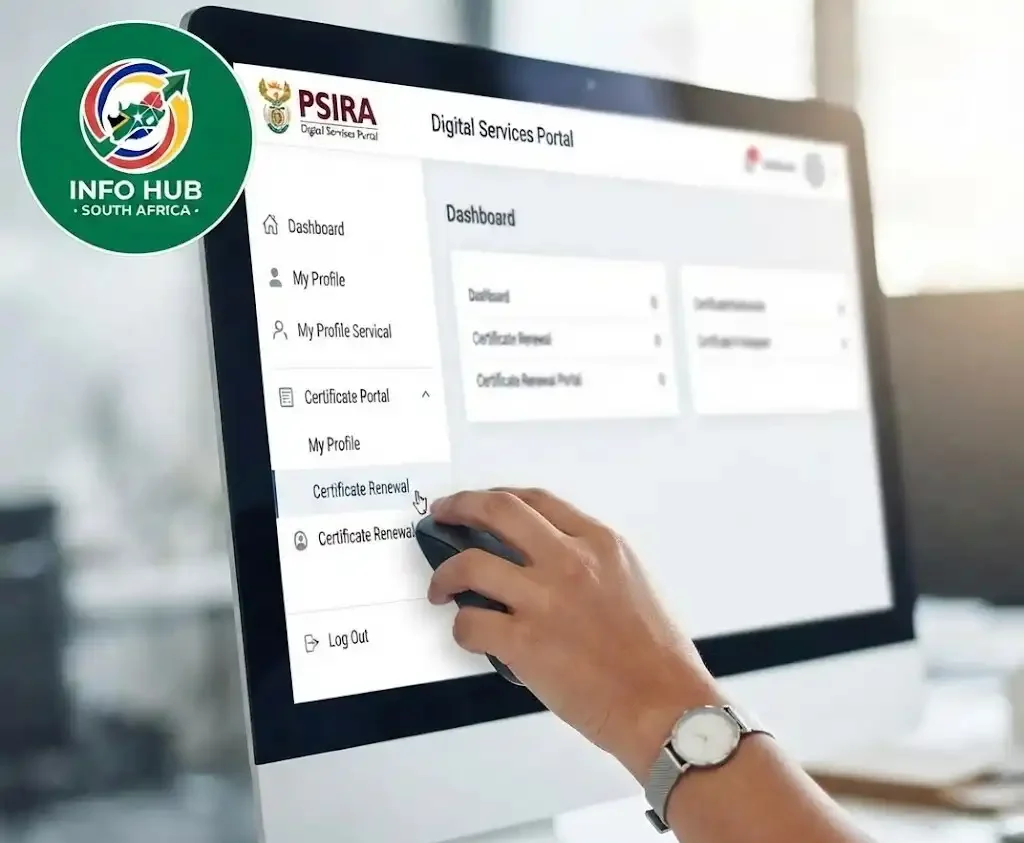
Select one of the available options, such as:
The wording may vary slightly as the portal is updated, but these sections will take you to the renewal page.
Step 2: Review Your Personal Information
Before continuing, check every detail displayed on your profile.

Confirm that your:
If you notice incorrect information, update it before submitting your PSIRA renewal.
Step 3: Choose Certificate Renewal
Select Apply for Certificate Renewal.
The system will automatically retrieve your registration information, including your security grades (such as Grade E, D, C, B, or A) and calculate any outstanding renewal fees.

Before continuing, carefully review the displayed information to ensure everything is correct.
Step 4: Upload Supporting Documents
Depending on your profile, you may be asked to upload supporting documents.
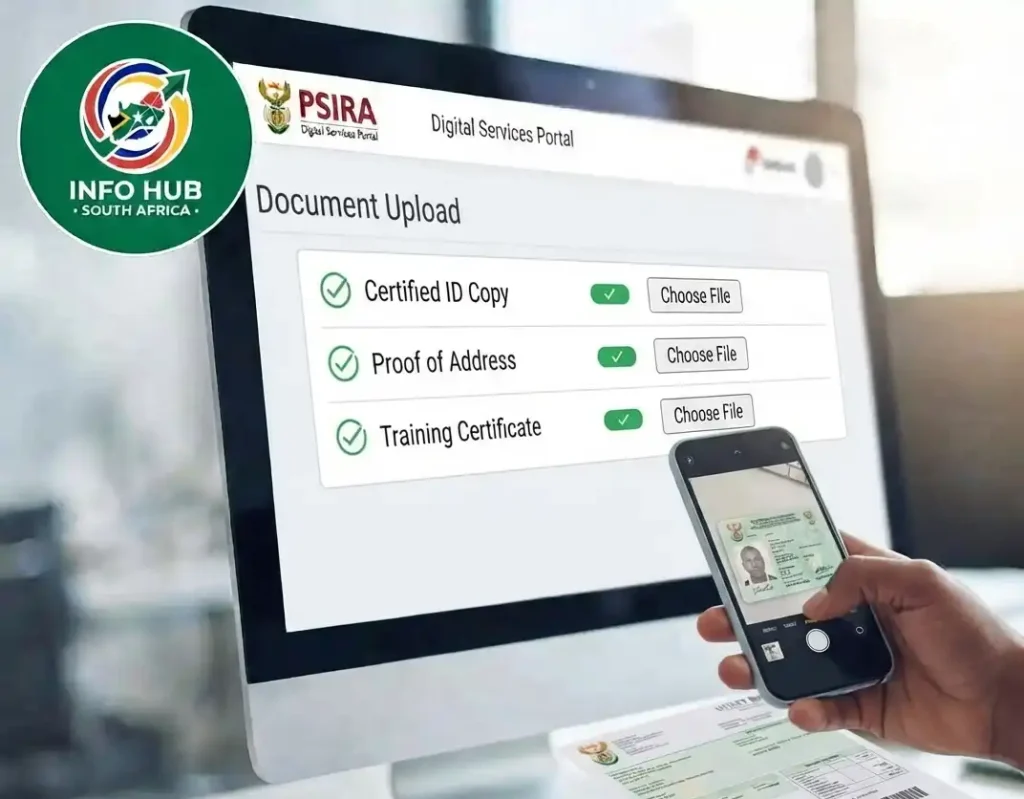
These commonly include:
| Required Document | Notes |
|---|---|
| South African ID or Passport | Clear scanned copy |
| Previous PSIRA Certificate | If requested |
| Passport-size Photograph | Recent photograph with a plain background |
| Proof of Address | Not older than 3 months |
| Valid Work Permit or Visa | Required for eligible foreign nationals |
For faster processing:
Blurry or incomplete documents are one of the most common reasons applications are delayed.
PSIRA Renewal Booking
Many applicants search online for Private Security Industry Regulatory Authority (PSIRA) booking before renewing their certificates.
The official Digital Services Portal allows eligible users to manage their renewal application online. Depending on the service required and current operational procedures, some services may require an appointment or additional instructions.
Always use the official portal when searching for www Private Security Industry Regulatory Authority (PSIRA) online booking:
Official Digital Services Portal
Avoid third-party websites claiming to offer faster bookings or guaranteed approvals.
How to Check Your PSIRA Renewal Booking Date
If your renewal process requires an appointment, you’ll want to confirm your Private Security Industry Regulatory Authority (PSIRA) booking date through your account.
To do this:
- Sign in to your PSIRA account.
- Open your dashboard.
- Navigate to your application or booking section.
- Review any appointment details or notifications.
- Follow the instructions displayed for your application.
If no booking date appears, your renewal may still be under review or may not require an appointment.
Making Your Renewal Payment
Your Private Security Industry Regulatory Authority (PSIRA) renewal will only be finalised after the applicable fees have been paid.
The Digital Services Portal offers secure payment options for eligible transactions.
Online Card Payment
Many applicants choose to pay online using:
After entering your card details, your bank may send a One-Time Password (OTP) to confirm the payment.
Once authorised, your payment will be processed and linked to your renewal application.
EFT or Bank Transfer
If EFT is available for your renewal, make sure you:
Using an incorrect reference number may delay payment allocation.
Important: Never transfer money to bank accounts advertised on unofficial websites or social media. Always verify payment instructions through the official PSIRA website or Digital Services Portal.
How to Track Your Renewal Status
After submitting your application, you can monitor its progress online.
Simply:
- Visit the official portal.
- Complete your PSIRA login.
- Open your dashboard.
- View your renewal application status.
Depending on processing, you may see updates such as:
Checking your account periodically helps you respond quickly if additional information is requested.
PSIRA Check with ID Number Online
Many employers and security professionals perform a PSIRA check with ID number online to confirm registration details.
This allows users to verify whether a registration remains active before employment or contract renewals.
Always use official PSIRA services when carrying out a PSIRA check with ID number online, as unofficial websites may display outdated or inaccurate information.
Fingerprint Verification for PSiRA Registration
Fingerprint verification is a compulsory step for anyone applying for PSiRA registration. It allows PSiRA to conduct the required criminal background checks before approving an application.
After completing your online application, you will need to:
Fingerprint records are processed through AfriSwitch. If your fingerprints cannot be verified successfully, PSiRA may ask you to visit a branch again to submit a new set.
Who May Not Qualify for PSiRA Registration?
Not every applicant is eligible to register with PSiRA. An application may be declined if any of the following conditions apply:
Meeting all eligibility requirements and submitting accurate information can help prevent unnecessary delays or rejection of your application.
Common Mistakes That Delay PSIRA Renewal
Many renewal delays happen because of simple mistakes that can easily be avoided.
Here are the most common issues:
Checking everything carefully before submitting your application can help your renewal move through the system more smoothly.
Helpful Tips for a Faster Renewal
To improve your experience with the online system:
These small steps can save time and reduce unnecessary follow-ups.
Troubleshooting Common PSIRA Renewal Problems
Although the online system is designed to simplify the psira process, applicants may occasionally experience login issues, document upload errors, or payment delays. Understanding the most common problems—and how to resolve them—can help you complete your renewal with less frustration.
The table below outlines frequent issues and practical solutions.
| Problem | Possible Cause | Recommended Solution |
|---|---|---|
| OTP not received | Incorrect mobile number or network delay | Wait a few minutes, select Resend OTP, and ensure your registered number is active. |
| Unable to log in | Incorrect username or password | Reset your password using the official portal or verify your login details. |
| Document upload fails | Unsupported format or file size too large | Upload PDF or JPEG files and keep them within the portal’s size limit. |
| Payment not reflecting | Incorrect payment reference | Keep your proof of payment and contact PSIRA if the payment remains outstanding. |
| Profile information is incorrect | Outdated personal details | Update your profile before submitting your PSIRA renewal. |
| Renewal application still pending | Application is under review | Continue checking your dashboard for status updates. |
What to Do If You Don’t Receive the OTP
Many users search for Private Security Industry Regulatory Authority (PSIRA) renewal with OTP because the verification code is required before accessing their account.
If the One-Time Password doesn’t arrive:
Without OTP verification, you won’t be able to complete your PSIRA login securely.
Forgot Your PSIRA Login Details?
If you cannot access your account:
- Visit the official Digital Services Portal.
- Select Forgot Password.
- Enter your registered email address or required account information.
- Follow the password reset instructions.
- Log in again once your password has been updated.
If you are unable to recover your account, contact PSIRA through the official support channels for further assistance.
PSIRA Renewal for Foreign Nationals
Foreign nationals working legally in South Africa can also complete Private Security Industry Regulatory Authority (PSIRA) renewal, provided they meet the required immigration requirements.
Before applying, ensure you have:
If your visa has expired, renew your immigration documents before submitting your Private Security Industry Regulatory Authority (PSIRA) renewal application. The portal may request updated supporting documents before processing your renewal.
Security Tips When Using the PSIRA Portal
Protect your account and personal information by following these best practices:
Being cautious helps protect you from scams and phishing attempts.
FAQs
Conclusion
Keeping your PSIRA registration active is important for anyone working in South Africa’s private security industry. A valid PSIRA registration helps ensure that security officers remain compliant with industry requirements and can continue working without unnecessary interruptions.
The official PSIRA Digital Services Portal allows users to access several important services online. You can manage your account, sign in securely, book appointments, complete OTP identity verification, check your booking date, and check your PSIRA registration status using your ID number.
Before starting the process, make sure you have the necessary documents and information available. Always use the official PSIRA platform when submitting personal details or making payments, and keep your payment receipt for your records.
If you need a simple guide on how to check your PSIRA registration status, Info Hub South Africa provides helpful and easy-to-follow information about PSIRA services, application status checks, and other important South African online services.
Checking your registration status regularly can help you stay updated and identify any issues early. By completing the required steps on time and keeping your registration details up to date, you can help ensure that your PSIRA registration remains active while continuing your career in South Africa’s private security sector.
Read More
TUT Status Check 2026/2027: How to Check Your Application Status Online
WSU Student Portal Login 2026 South Africa: Complete Walter Sisulu University Guide
Matric Results 2026 Online Check South Africa: Get Your NSC Results Instantly