NaTIS Online Booking: Licence Renewal & Learner’s Test
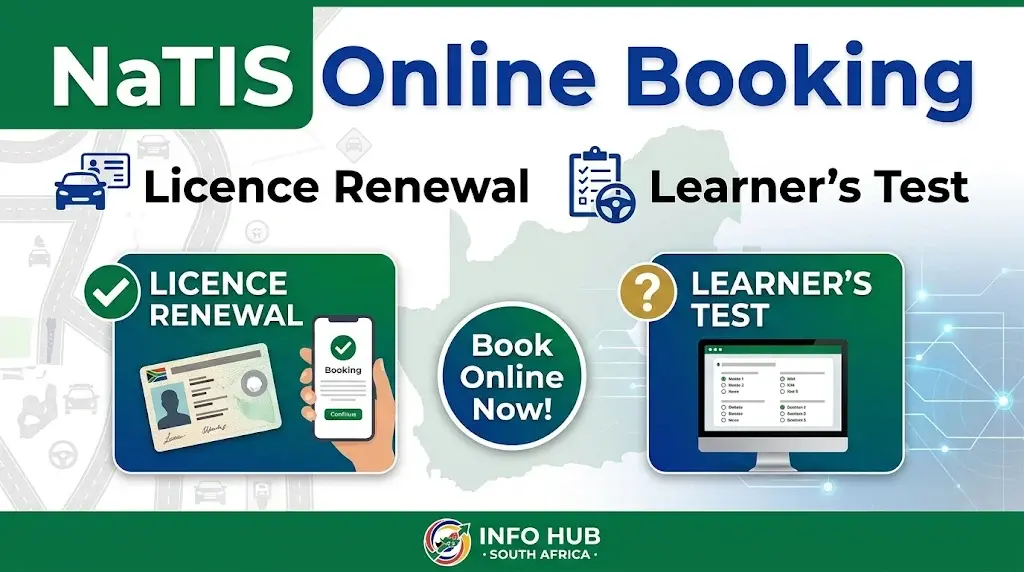
Getting a learner’s licence, booking a practical driving test or renewing a driving licence card in South Africa requires an appointment at a Driving Licence Testing Centre (DLTC). The NaTIS online booking portal allows motorists to check available appointments and access supported driving licence services online, saving them the trouble of visiting a testing centre just to enquire about bookings.
The National Traffic Information System (NaTIS) is the official South African platform for traffic and motor vehicle services. By visiting the NaTIS website, users can register or log in, choose the service they need and check available appointment slots at participating centres. Whether you need a NaTIS online booking for a learner’s licence, driver’s licence renewal, practical driving test or a booking in Gauteng, knowing how to use the portal can help you arrange your appointment before visiting your nearest DLTC.
What Is NaTIS Online Booking?
NaTIS online booking is an internet-based appointment system connected to South Africa’s National Traffic Information System. It allows members of the public to access supported driving and vehicle-related services without first having to visit a testing centre to arrange an appointment.
The system is associated with the Road Traffic Management Corporation (RTMC) and supports selected services, including:
One important distinction is that an online appointment does not mean every part of the licensing process can be completed online. For example, applicants still need to attend their scheduled testing centre when a physical examination, eye test, photograph, document verification or driving test is required.
Is NaTIS Online Booking Free?
Making an appointment through the NaTIS online booking portal allows you to secure an available time slot, but it does not mean that the entire licensing process is free. Application fees, learner’s licence test charges, driving test fees and driving licence card renewal costs may still apply, depending on the service you select and the relevant Driving Licence Testing Centre (DLTC).
Always follow the payment instructions provided by the official portal or testing centre. Be cautious of individuals or unofficial agents who charge extra money in exchange for guaranteed appointments. Use the official NaTIS website to access available services and avoid unnecessary payments to third parties.
Which Services Are Available Through NaTIS Online Booking?
NaTIS supports several traffic and licensing services, but the options displayed may differ depending on the service and centre. Before making a reservation, check that you are selecting the correct category for your application. For example, a first-time learner’s licence appointment is different from a driving licence card renewal.
| NaTIS service | What it is used for |
|---|---|
| Learner’s licence booking | Scheduling a learner’s licence test appointment. |
| Driving licence test | Arranging a practical driving test after meeting the necessary requirements. |
| Driving licence renewal | Booking an appointment to renew an existing driving licence card. |
| PDP-related services | Checking whether the relevant service or appointment is supported by the portal. |
| Vehicle-related services | Accessing supported vehicle transactions where available. |
Important: Not every service will necessarily appear in your NaTIS account. If you cannot find the option you need, contact your preferred DLTC to confirm the correct application and booking procedure rather than assuming the service is unavailable.
Documents and Information Required for NaTIS Online Booking
Having your identification details and supporting documents ready can help you avoid delays when arranging an appointment. Requirements depend on whether you are applying for a learner’s licence, taking a practical driving test or renewing your driving licence card.
1. Learner’s Licence Booking Requirements
If you are booking a learner’s licence test, prepare the following:
2. Driving Licence Renewal Requirements
For a driving licence card renewal appointment, have these documents ready:
3. Practical Driving Test Requirements
Before attending your practical driving test, make sure you have:
For foreign nationals and international students: Your document requirements may differ from those of South African citizens. You may need a valid passport and relevant residence documentation. Contact your chosen DLTC before your appointment to confirm which documents are accepted, particularly if your identification details are not recognised during online registration.
How to Make a NaTIS Online Booking in South Africa
Motorists can use the official NaTIS portal to arrange supported learner’s licence tests, practical driving tests and driving licence card renewal appointments. The process starts with accessing your NaTIS account, selecting the correct service and choosing a participating Driving Licence Testing Centre (DLTC) with an available appointment.
Follow these steps to make your NaTIS online booking without selecting the wrong service or testing centre.
Step 1: Visit the Official NaTIS Booking Portal
OFFICIAL WEBSITE
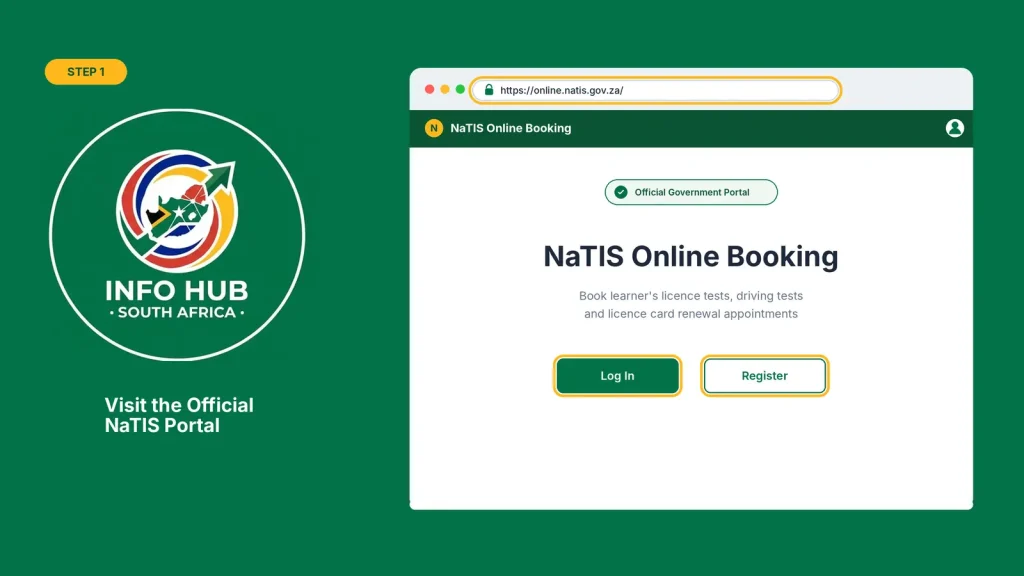
Open the NaTIS website at and look for the registration or login option. Always check that you are using the official government portal before entering your personal information.
Step 2: Register or Log In to Your Account
New users should select the registration option and provide the personal and contact details requested by the portal. If you already have an account, sign in using your existing credentials instead of registering again.
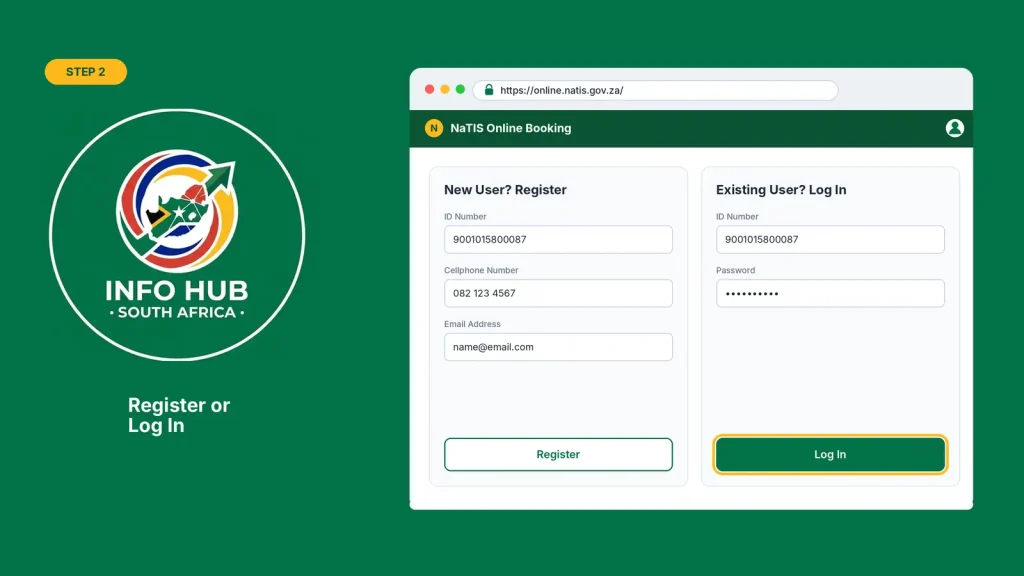
Make sure your ID details, cellphone number and email address are entered correctly so you can access your booking information.
Step 3: Select the Required Licensing Service
Once logged in, find the relevant service on your dashboard and select the option that matches your application:
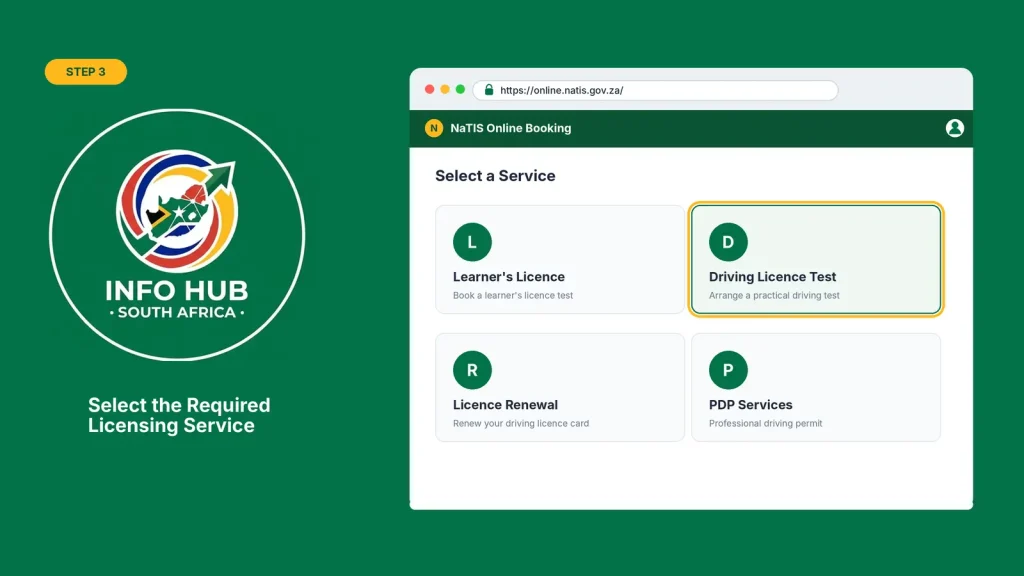
Choose carefully because a learner’s licence appointment, practical driving test and licence renewal are different services.
Step 4: Choose Your Province and DLTC
Select your province and preferred Driving Licence Testing Centre from the available options. If you are using NaTIS online booking in Gauteng, choose the appropriate Gauteng location and check whether the selected centre provides your required service.
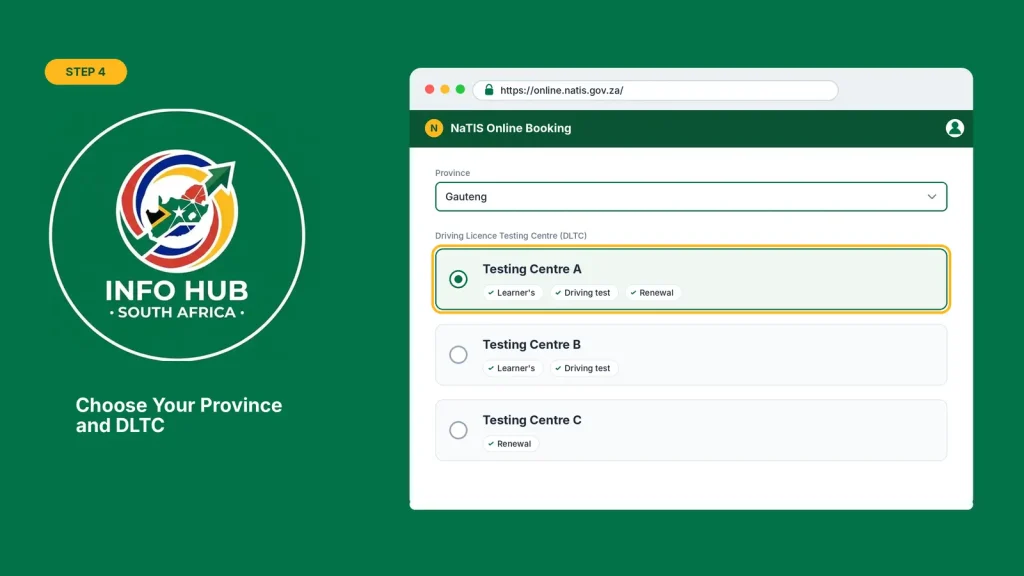
Consider the distance, available services and travel arrangements before choosing a centre.
Step 5: Select an Available Date and Time
Check the appointment calendar and choose an available date and time that suits your schedule. If your preferred date is fully booked, try another date or check a nearby participating testing centre.
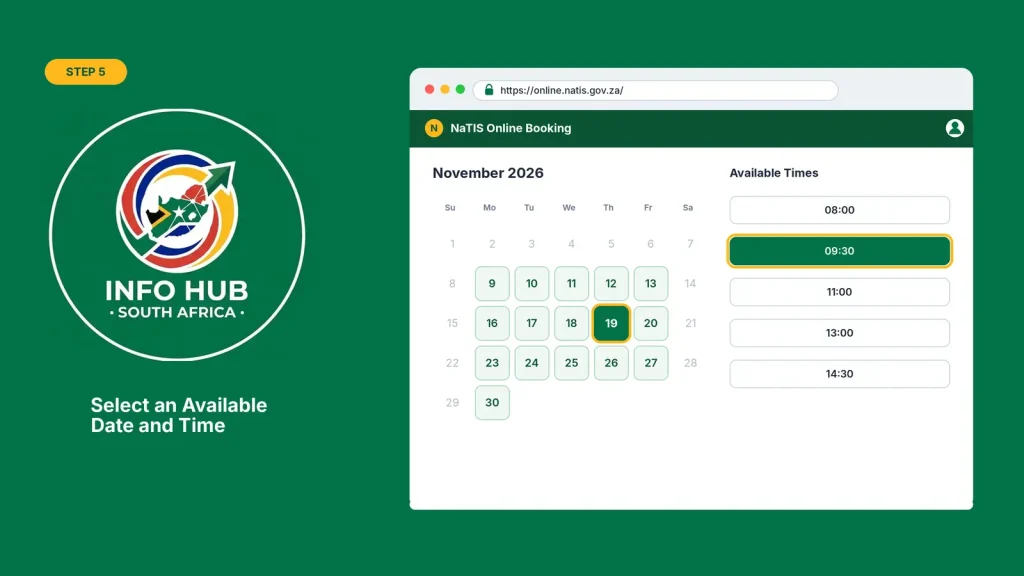
Remember that appointment availability can change as other motorists make or cancel bookings.
Step 6: Confirm Your Appointment
Review all the information before submitting your booking. Check your personal details, selected service, testing centre, appointment date and time.
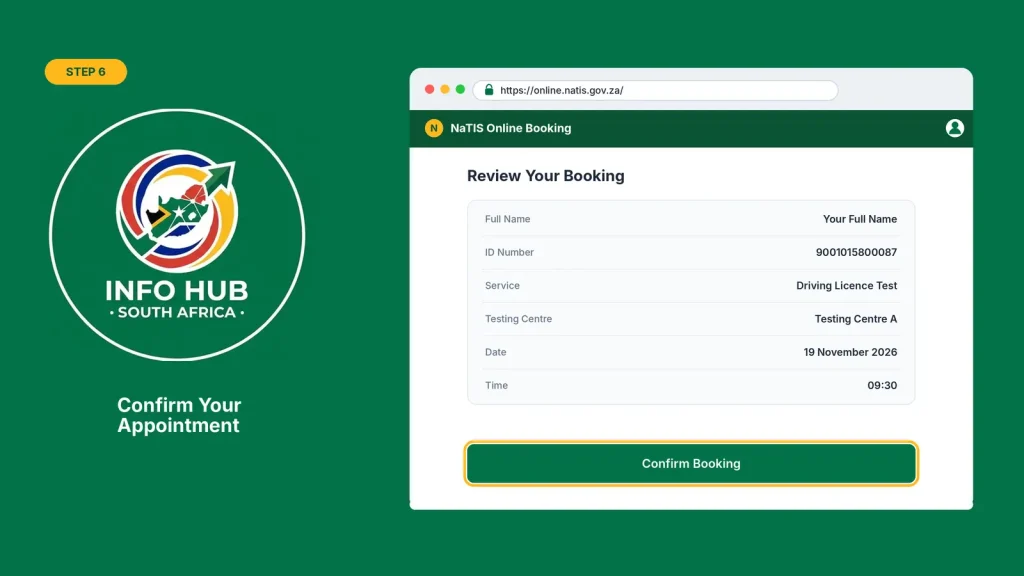
After the portal confirms your appointment, save your booking confirmation or reference number. Keep a screenshot or printed copy for your visit.
Step 7: Visit the Testing Centre
Attend your appointment at the selected DLTC with your original identification document, booking confirmation and other supporting documents required for your particular service.
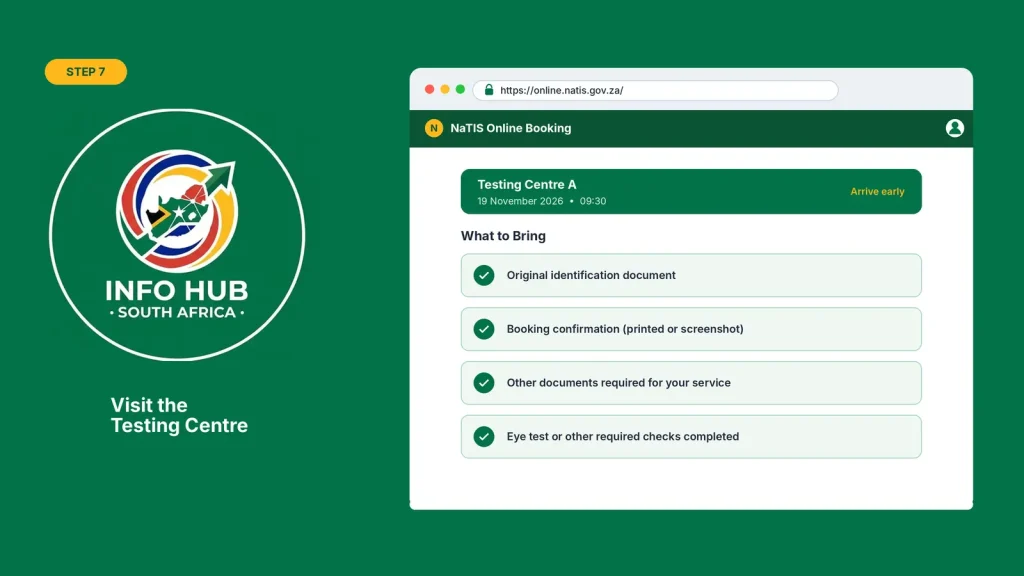
Arrive early and make sure you have completed any necessary preparations, including the required eye test or other applicable checks. An online appointment does not replace the physical application or testing requirements.
NaTIS Online Booking for a Learner’s Licence
Getting a learner’s licence is the first step towards obtaining a driving licence in South Africa. Before taking the learner’s test, applicants need to arrange an appointment at a Driving Licence Testing Centre (DLTC). The NaTIS online booking portal allows applicants to select the learner’s licence test service, check available appointment dates and reserve a suitable time.
A South African learner’s licence is valid for 24 months and cannot be renewed or extended. For this reason, it’s important to prepare for the examination and secure an appointment in good time rather than leaving the application until the last minute.
How to Book a Learner’s Licence Test Online
If you want to make a learner’s licence booking online, follow these steps:
- Visit the official NaTIS online booking portal.
- Register for an account or sign in if you already have one.
- Select the learner’s licence test booking option.
- Choose your province and preferred Driving Licence Testing Centre (DLTC).
- Check the available appointment dates on the calendar.
- Select a suitable date and time.
- Review your personal details and appointment information.
- Submit your booking and save the confirmation for reference.
For Gauteng applicants: Learner’s licence test appointments are arranged online through the NaTIS portal. Check the available testing centres and appointment slots before selecting your preferred location.
Documents Required for a Learner’s Licence Test
Before visiting your selected DLTC, prepare the necessary documents to avoid delays during the application process. The following items are generally required:
Proof of address: If your utility bill is not registered in your name, the account holder may need to provide an affidavit confirming that you live at the stated address, together with the utility bill. Applicants living in informal settlements may be required to submit a stamped address confirmation letter from their ward councillor.
How to Prepare for the Learner’s Licence Test
Securing an appointment through NaTIS is only the beginning. You must still pass the learner’s licence examination to qualify for a learner’s licence.
Before your test, spend time studying:
Check your appointment details before travelling and take all the required documents with you.
Driving Licence Renewal Online Booking Through NaTIS
If your South African driving licence card is approaching its expiry date, you should arrange a renewal appointment before it expires. The recommended time to apply is approximately four weeks before the expiry date, giving you time to complete the renewal process and receive your replacement card. You can use the NaTIS online booking portal to select a participating Driving Licence Testing Centre (DLTC) and secure an available appointment.
How to Book a Driving Licence Renewal Online
Follow these steps to arrange your driving licence card renewal appointment through NaTIS:
- Visit the official NaTIS online booking website.
- Log in using your registered account details.
- Select the driving licence card renewal service.
- Choose your preferred province and DLTC.
- Check the available appointment dates and times.
- Select a suitable appointment slot.
- Verify your personal information and booking details.
- Submit the request and save your appointment confirmation.
Important: Select the driving licence card renewal option, not the practical driving test service. You do not have to take another practical driving test simply because your existing driving licence card is expiring.
Documents Required for Driving Licence Renewal
Before attending your renewal appointment, prepare the following documents:
You will also need to complete the DL1 driving licence renewal application form and check that your personal information is correct.
Eye Test and Fingerprint Verification
An eyesight examination and fingerprint verification form part of the driving licence renewal process. Your eyesight can be tested at the DLTC or by a qualified optometrist, with the results submitted according to the centre’s requirements.
Make sure you confirm the accepted eye test procedure before your appointment so you do not have to make another visit.
How Long Does a Renewed Driving Licence Card Take?
The replacement driving licence card generally takes approximately four to six weeks to become available. The actual collection time may vary, so keep your booking and application details safe.
If your existing driving licence card has already expired, you may need to apply for a temporary driving licence while waiting for your replacement card. Arrange this through the relevant licensing centre and confirm the applicable requirements and fees.
NaTIS Online Booking for a Driving Licence Test
After obtaining a valid learner’s licence, the next step is to book and pass your practical driving test. The NaTIS online booking portal allows eligible applicants to arrange a driving test appointment by selecting their licence category, preferred testing centre and an available date. Making your appointment in advance gives you time to prepare your documents and arrange a suitable vehicle for the examination.
How to Book a Practical Driving Test
Follow these steps to arrange your driving licence test appointment:
- Open the NaTIS online booking portal.
- Sign in using your registered account.
- Select the driving licence test booking service.
- Choose the appropriate driving licence category.
- Select your province and preferred Driving Licence Testing Centre (DLTC).
- Check the appointment calendar for available dates and times.
- Select a suitable appointment and review your details.
- Submit your booking and save the confirmation.
Documents and Requirements for Your Driving Test
Before attending your practical driving test, make sure you have the following:
What Happens After Passing the Driving Test?
During the practical examination, the examiner assesses your ability to control the vehicle, follow traffic rules and drive safely under different road conditions.
If you pass the test, you will need to complete the required fingerprint verification and eyesight checks before your driving licence card can be issued. After paying the applicable issuing fee, you will generally receive a temporary driving licence while waiting for your permanent card.
Your permanent driving licence card must be collected from the Driving Licence Testing Centre where you submitted your application. Keep your temporary licence safe and check with the centre when your permanent card is ready for collection.
NaTIS Online Booking for PDP
A Professional Driving Permit (PDP) is required for drivers operating certain categories of vehicles for professional or public transport purposes in South Africa. If you are looking for NaTIS online booking for PDP, first check whether the relevant permit application or appointment service is available through your account.
To check the available options, follow these steps:
- Open the NaTIS online booking portal.
- Log in using your registered account details.
- Navigate to the available licensing and permit services.
- Look for the Professional Driving Permit (PDP) option.
- Select the relevant service if it appears.
- Follow the instructions provided by the system.
- Confirm an available appointment, if required, and save your booking reference.
Important: A PDP application is different from a driving licence card renewal. Make sure you select the correct service to avoid arranging an appointment for the wrong transaction.
If the PDP option does not appear on your dashboard, contact your nearest licensing office to confirm the application procedure, eligibility criteria and supporting documents required.
NaTIS Online Check Status: How to Check Your Booking
After making an appointment or submitting a driving licence application, you may want to know whether your booking has been confirmed or your licence card is ready. A NaTIS online check status enquiry can involve different types of information, so it is important to check the correct status.
How to Check Your NaTIS Booking Status
If you have already requested an appointment, follow these steps:
- Visit the NaTIS online booking portal.
- Sign in using your registered account.
- Open your appointment or booking information.
- Check whether your appointment has been confirmed.
- Verify the selected date, time and testing centre.
- Keep your booking reference for future enquiries.
If your appointment details are not displayed, check the email address and cellphone number linked to your account for confirmation messages. You can also contact the selected DLTC if you cannot establish whether your booking was successful.
How to Check Your Driving Licence Card Status
A driving licence card status enquiry is different from checking an appointment. After completing your renewal or practical driving test, you may need to wait for the permanent card to be produced.
A replacement driving licence card generally takes around four to six weeks to become available. If this period has passed and you have not received an update, contact the Driving Licence Testing Centre where you submitted your application.
Remember that receiving a booking confirmation does not mean your permanent driving licence card is ready for collection.
NaTIS Online Booking in Gauteng
Motorists living in Gauteng can use the NaTIS online booking system to arrange supported learner’s licence tests, practical driving tests and driving licence card renewal appointments. Applicants should select their preferred testing centre and check which services and appointment dates are available.
If you are searching for NaTIS online booking in Gauteng, keep these points in mind:
Appointment availability is not the same at every testing centre. Your options will depend on the location, service and available time slots displayed by the system.
Common NaTIS Online Booking Problems and How to Fix Them
Although the NaTIS portal allows motorists to arrange appointments online, you may occasionally experience problems during registration, login or booking confirmation. The following solutions can help you identify what to do next.
| Common problem | Possible solution |
|---|---|
| No appointments available | Check again later or select another participating DLTC. |
| Website not loading | Refresh the page or try accessing the portal through another browser. |
| Login unsuccessful | Verify your login details and use the available account recovery option. |
| Personal details not recognised | Check your information for errors and contact the DLTC if the problem continues. |
| Booking confirmation missing | Check your registered email, SMS messages and account information. |
| Wrong service selected | Review the available booking options and confirm the correct procedure before making another appointment. |
| Portal running slowly | Try again later and avoid submitting the same request repeatedly. |
What if no appointment slots are available?
Do not assume that appointments are released at a fixed time every day. There is no guaranteed midnight or early-morning release time established here. Instead, check the portal periodically, consider nearby testing centres and select another available date if your preferred appointment is fully booked.
FAQs
Conclusion
NaTIS online booking provides a convenient way for South African motorists to arrange appointments for learner’s licence tests, practical driving tests and driving licence card renewals. By using the official portal, choosing the correct service and checking available Driving Licence Testing Centres (DLTCs), you can plan your visit more easily and avoid relying on unofficial booking agents.
Before going to your appointment, make sure you have all the required documents, your identification details and your booking confirmation. Check the appointment date, time and testing centre carefully. If you cannot find an available slot or experience problems accessing your account, contact the relevant DLTC for assistance.
For more helpful guides on South African government services, education portals and online applications, visit Info Hub South Africa.
Read More
GEHS Login South Africa 2026: Online Login, Password Reset & Status Check Guide
Television Licence South Africa: Online Application, Status Check & SABC TV Licence Guide 2026
Coastal College Online Application 2027: How to Apply & Check Status