Coastal College Online Application 2027: How to Apply & Check Status
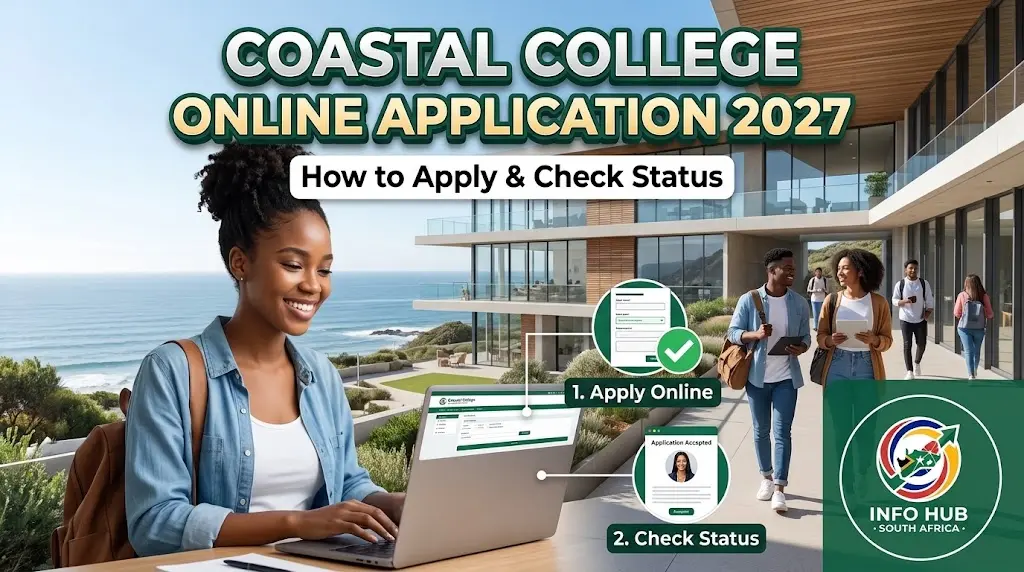
Students planning to study at a public TVET college in KwaZulu-Natal can use the Coastal College online application process to explore available programmes and submit their admission details. Coastal KZN TVET College serves students through several campuses, including Umlazi V, Umlazi BB, Durban, Swinton, Appelsbosch, As-Salaam and Umbumbulu.
Whether you are applying for the first time or returning to continue an unfinished application, it is important to follow the correct steps. You should prepare your documents, create an online profile, complete the required assessments and submit the formal application before the relevant closing date.
Coastal College Online Application 2027: Quick Overview
Here are the main details prospective students should understand before beginning the application process.
| Application detail | Information |
|---|---|
| Institution | Coastal KZN TVET College |
| Application period | Check the official website for the 2027 intake dates |
| Application method | Online application |
| Application fee | The supplied college information states that no application or administration fee is charged |
| Available programme types | NCV, NATED (Report 191) and occupational programmes, subject to availability |
| Application documents | Identification, academic results and proof of residence, as applicable |
| Application tracking | Log in to your registered online profile |
| Financial assistance | Eligible students may apply for NSFAS funding |
| Official website | coastalkzn.co.za |
Please note: The opening and closing dates for the 2027 intake should be confirmed directly with the college. Do not assume that an application is open simply because an online portal is accessible.
What Is Coastal KZN TVET College?
Coastal KZN TVET College is a public technical and vocational education and training institution in KwaZulu-Natal, South Africa. It provides vocational and career-focused learning opportunities for students who want to develop practical skills and pursue further education or employment.
The college has multiple campuses, so applicants should check which campus offers their preferred programme before applying. A course may not be available at every campus, and programme availability can change between application periods.
Students searching for Coastal College online application for 2027 should also understand the difference between the college’s main website, its online application system and the student portal. The main website provides institutional information, while the application system is used to register, complete assessments and submit admission details. The online profile may also be used to return to an unfinished application or check updates.
Which Campuses Can You Apply To?
The campus names provided for Coastal KZN TVET College include:
If you are searching for Umlazi V Coastal College online application 2026 or Swinton College online application 2026, make sure you select the correct campus and confirm the programme’s availability for your intended intake. These search terms may help you find campus-specific information, but they do not mean that applications for 2026 are still open.
Requirements Before You Start Your Application
Preparing your information before opening the online application system can help prevent delays. Make sure you can access your email address, mobile number and the documents required for your chosen programme.
1. Identification documents
South African applicants should prepare their South African identity document or the identification details requested by the application system. Foreign applicants should check the college’s requirements for a valid passport, permit or other accepted documentation.
The documents accepted may depend on your citizenship and application circumstances. Do not upload an unrelated document simply because it is available.
2. Academic records
Prepare the school or academic results relevant to your current level of education. Depending on your circumstances, these may include:
Check the admission requirements for your selected course before submitting your documents. Meeting the general application requirements does not automatically guarantee admission.
3. Proof of residence
Keep a clear copy of your proof of residence ready if the application system requests it. Check that the document is readable and that the details match the information you provide in your application.
4. Digital copies of your documents
The supplied application guidance specifies PDF documents for uploads. Scan or photograph your documents clearly, save them in the required format and check the portal’s file-size limits before uploading them.
Application tip: Use a device with a stable internet connection and keep copies of your documents. Avoid creating duplicate profiles unless the college instructs you to do so.
How to Apply at Coastal College Online
The Coastal College online application process involves more than entering your personal details. According to the supplied application guidance, applicants must create a profile, complete pre-entry activities and assessments, and then submit the formal application with the required documents.
Follow the steps below, and use the options displayed on the official portal if its layout differs from these instructions.
Step 1: Visit the Official Website and Register
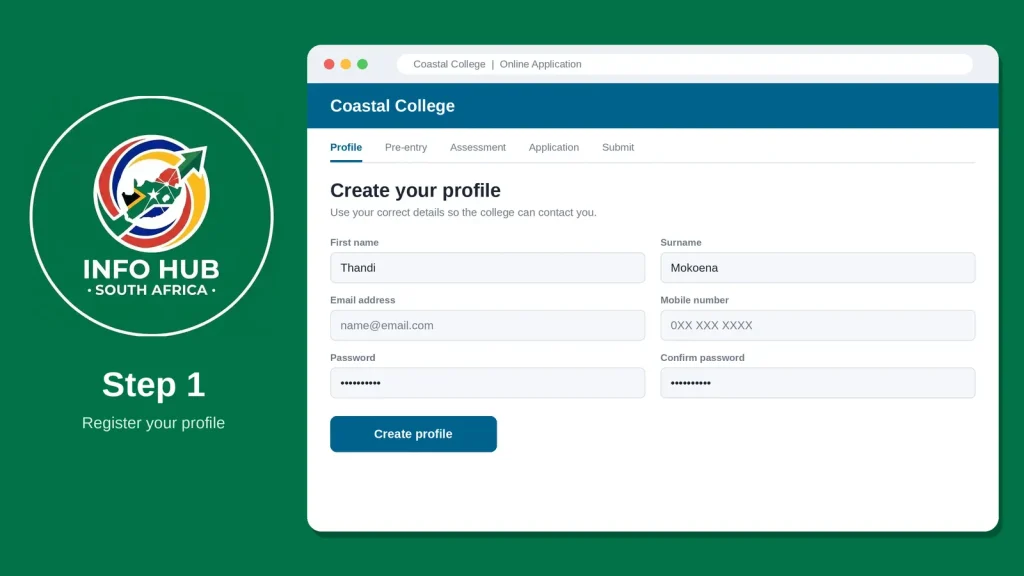
Visit the Coastal College official website and open the online application section. Create a new profile using your correct personal details, email address and mobile number.
Step 2: Log In and Complete Pre-Entry Activities
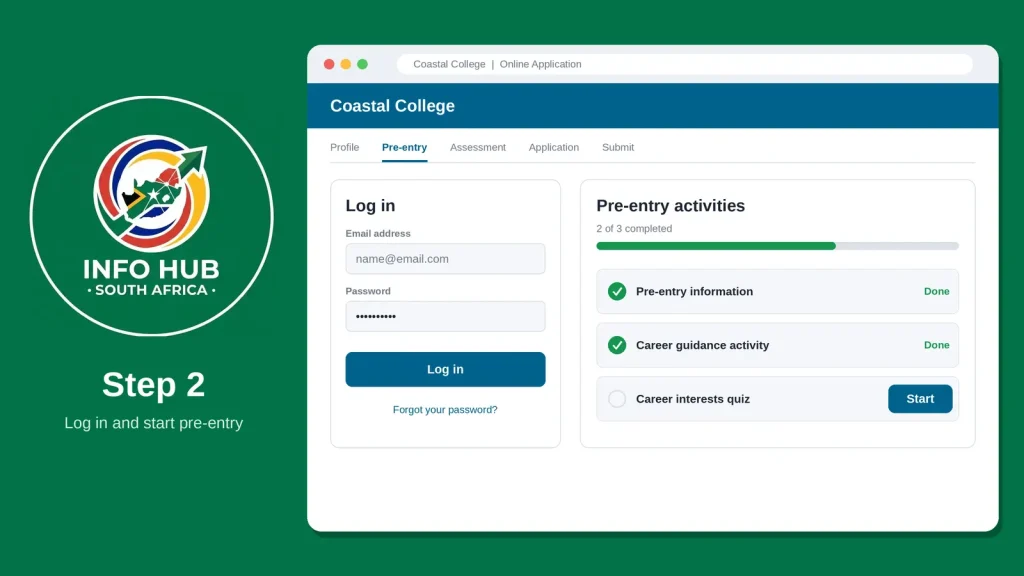
Log in to your profile using your registered credentials. Complete the required career guidance activities and pre-entry information displayed on the portal.
Step 3: Complete the Placement Assessment
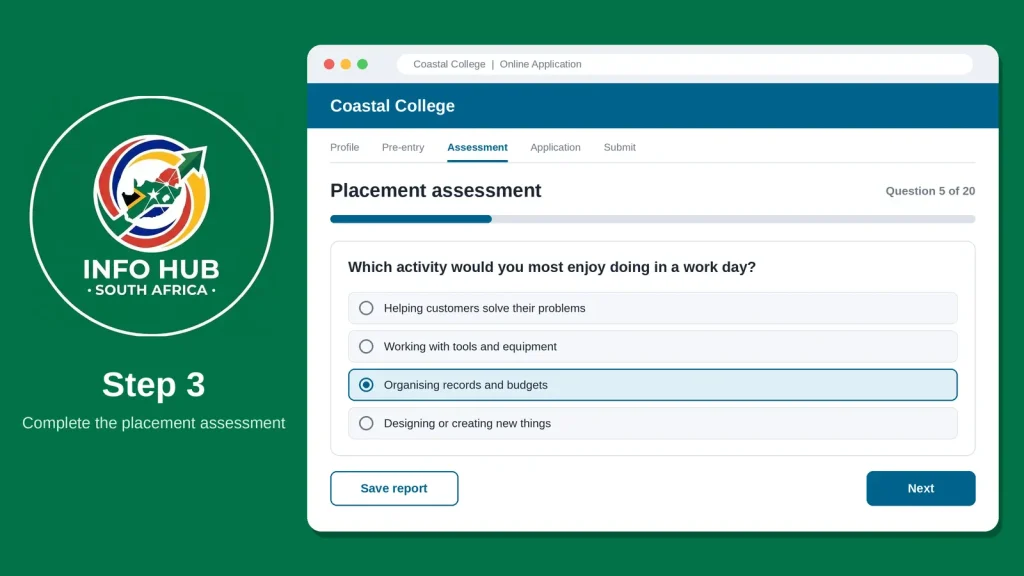
Open the assessment section and complete all compulsory questions honestly. Finish each required activity and save your report if the system provides one.
Step 4: Complete the Application and Upload Documents
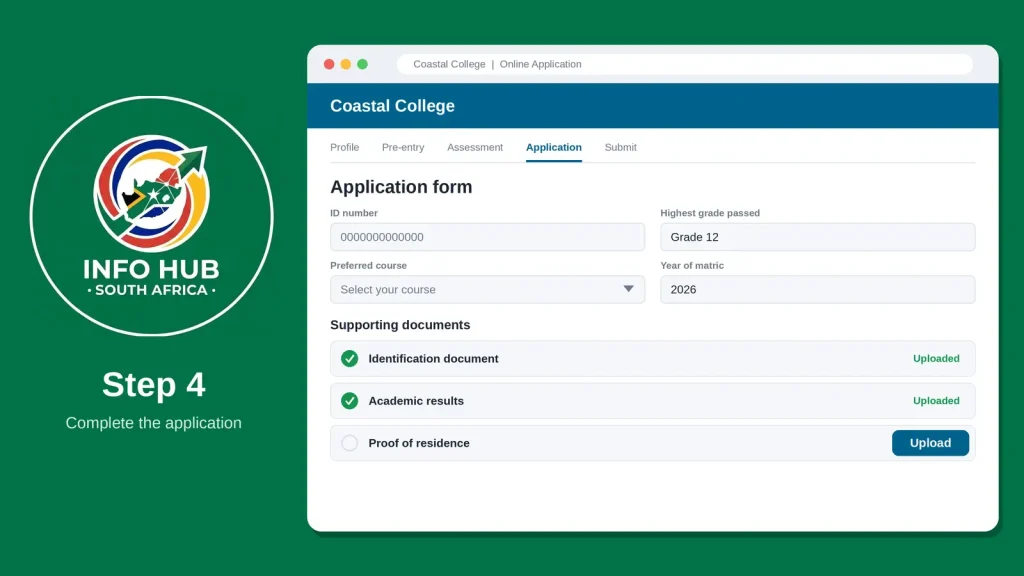
Enter your personal information, academic history and preferred course. Upload the required supporting documents, such as your identification document, academic results and proof of residence, according to the portal’s instructions.
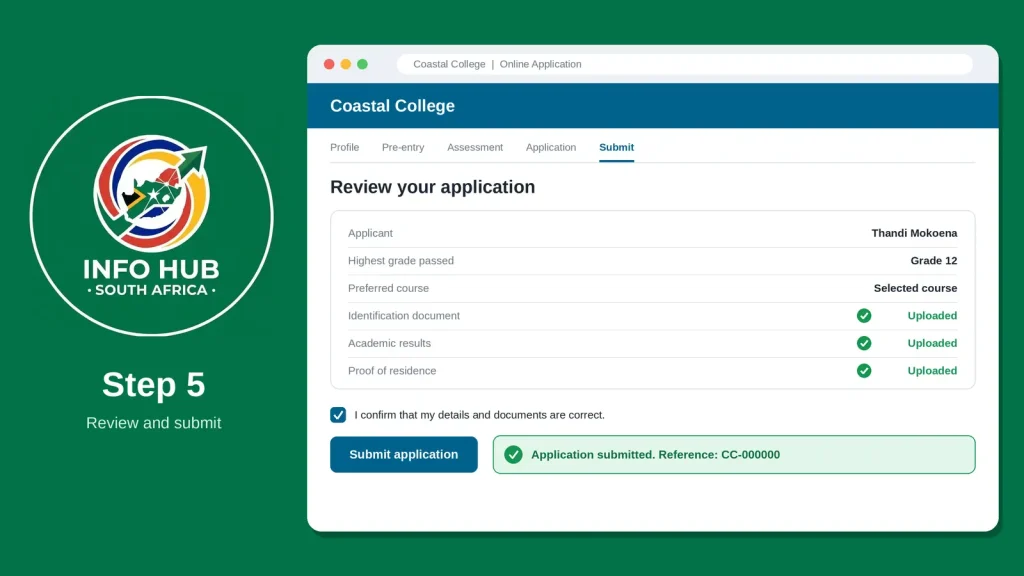
Step 5: Review and Submit Your Application
Check all your details and uploaded documents carefully before submitting the application. Save your application reference number or confirmation message, if provided, so you can follow up on your application status.
Important: Check the official Coastal College website for the latest application dates, available courses and requirements for your intended intake.
How to Check Your Coastal College Application Status
After submitting your application, you may want to know whether the college has received your details and made an admission decision. The Coastal College student portal is the place to start if your registered profile provides application tracking.
Use these steps to check your progress:
- Open the college’s online application system.
- Select the returning-user login option.
- Enter the username and password associated with your existing profile.
- Open your application or status section, if available.
- Review any messages, outstanding requirements or admission updates.
- Follow the college’s instructions if additional information is requested.
Keep in mind that the exact status labels and portal layout may change. If your profile does not display a status, contact the college to find out how applicants for your intake receive updates.
Coastal College Application Problems and Solutions
Applicants sometimes experience difficulties while registering, uploading documents or returning to an existing profile. The following suggestions may help you identify the next step.
| Problem | What to do |
|---|---|
| Cannot create an account | Check that all required fields are completed and that your details have been entered correctly. |
| Forgotten password | Use the returning-user recovery option if one is available. |
| Application will not submit | Review required fields, incomplete assessments and missing documents. |
| Document upload fails | Check the accepted file format, size and document readability. |
| No application status appears | Sign in again and check the available application sections, or contact the college. |
| No admission message received | Verify your contact details and check your email’s spam folder. |
| Unsure about the correct campus | Confirm the programme’s campus availability with the college before applying. |
Coastal KZN TVET College Contact Details
If you cannot resolve an application problem online, the contact details supplied for this guide are:
Confirm that these details are current before relying on them, particularly if you need help with a time-sensitive application.
When contacting the college, explain the problem clearly. Include your application reference number if you have one, but avoid sending passwords or unnecessary sensitive information.
FAQs
Conclusion
The Coastal College online application process is easier to manage when you prepare your documents, register your profile carefully and complete every required stage before submitting your details. Applicants planning to study in 2027 should confirm the current intake dates, programme availability and campus requirements before beginning.
For more South African education guides, application instructions and student portal information, Info Hub South Africa provides independent informational resources designed to help students navigate education and government services. Always verify admission decisions, deadlines and funding requirements with the relevant institution.
Read More
GEHS Login South Africa 2026: Online Login, Password Reset & Status Check Guide
Television Licence South Africa: Online Application, Status Check & SABC TV Licence Guide 2026
Passport Renewal South Africa: Online Application, Fees & Banks