CPUT Blackboard Login South Africa 2026: Complete Student Guide

Cape Peninsula University of Technology (CPUT) provides students with Blackboard as a central online learning platform. Through CPUT Blackboard, students can access course resources, submit assignments, view grades and stay connected with their academic work from almost anywhere.
If you’re trying to find the cput blackboard login, checking your account through cput sos, or looking for a cput status check, knowing which CPUT online service to use can save time. This guide covers the key information students need to access and use cput blackboard effectively.”Visit Homepage for more”.
How to Access CPUT Blackboard
Getting into your online classes starts with the correct cput blackboard login details. Follow these steps to reach your courses and learning materials.
1. Open the CPUT Blackboard Portal

Go to the official CPUT Blackboard portal using blackboard.cput.ac.za, or access Blackboard through the main Cape Peninsula University of Technology website. Use the official route whenever possible to avoid entering your details on an unfamiliar login page.
2. Sign In With Your CPUT Details

Enter your CPUT student number in the username field, followed by the password assigned to your university account. Make sure your credentials are entered correctly before selecting the sign-in option.
3. Find Your Registered Courses
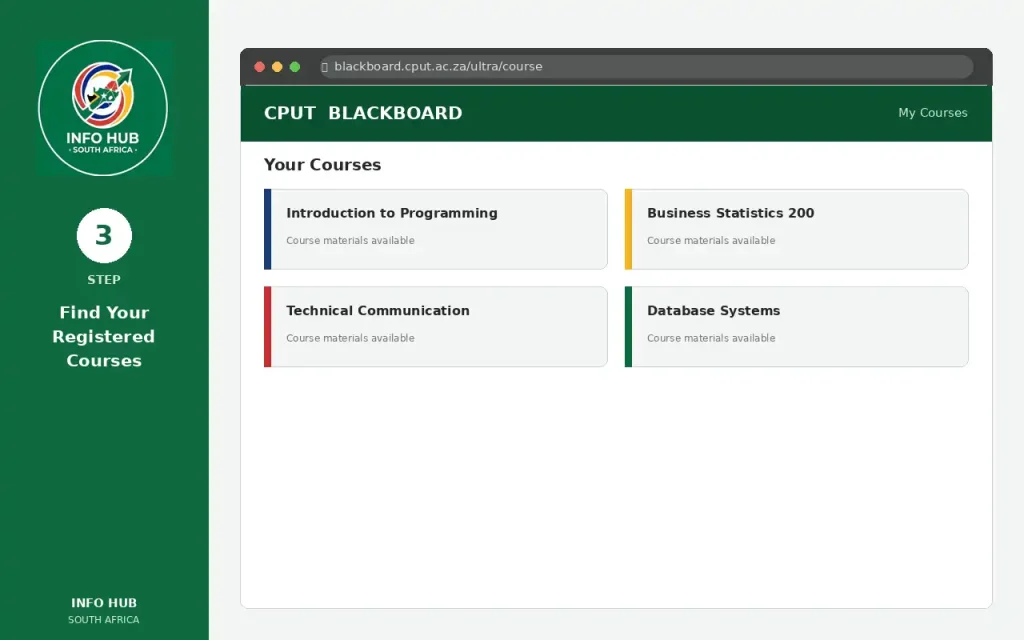
After a successful cput blackboard login, the Blackboard dashboard will display the courses associated with your student account. Select the relevant course to continue.
4. Open Your Course Materials

Inside a course, you can access available lectures, assignments and other learning resources. The content you see may depend on your current course registration and what has been made available by your lecturers.
What You Need for CPUT Blackboard Login
Before trying to access cput blackboard, make sure you have:
Helpful tip: If you’re checking other CPUT student services, such as cput sos or a cput status check, use the university’s official website and verify that you’re using the correct service before entering your account details.
What Can You Do on CPUT Blackboard?
CPUT Blackboard brings several learning tools together in one online space, making it easier for students to manage their coursework and stay updated throughout the academic term.
Access Course Materials
Students can find lecture notes, presentations, reading resources and other study materials uploaded by their lecturers. Course content is organised within the relevant subject area for easier access.
Submit Assignments Online
Blackboard allows students to submit assignments electronically when online submission is required. You can also check submission information and keep track of important deadlines.
Check Grades and Feedback
The Grade Center provides access to available marks, lecturer feedback and other academic results. Checking this area regularly can help you monitor your progress.
Take Part in Discussions
Course discussion forums give students a place to contribute to academic conversations, exchange ideas and interact with classmates. Lecturers may also use these forums for course-related discussions.
Stay Updated With Announcements
Important notices from lecturers can appear through Blackboard announcements. These may include course updates, reminders or information students need to know.
Join Virtual Classes
Where virtual classroom tools are integrated into a course, students can use Blackboard to access online lectures, webinars and other virtual learning activities.
What Is MyClassroom CPUT?
MyClassroom is an online learning platform provided by Cape Peninsula University of Technology (CPUT) to support students throughout their studies. It brings key learning activities into one place, including announcements, course resources, communication and assignment-related tasks.
The platform also supports tools such as online assessments and discussion boards, giving students a virtual learning environment where they can interact with course content and participate in academic activities.
How to Log In to MyClassroom CPUT Blackboard
Accessing MyClassroom is straightforward. Use the following process:
- Open the official CPUT MyClassroom website.
- Enter your CPUT username and password in the appropriate fields.
- Select Sign in to access your account and available courses.
If you’re looking for a cput blackboard login, make sure you’re using the correct CPUT learning platform and your active university credentials.
Using the MyClassroom Blackboard App
The mobile learning option is useful for students who need to access their coursework while away from a computer. The CPUT Blackboard App is available through the App Store and provides mobile access to courses, assignments and assessments.
Using the app can make it easier to keep up with course activity when you’re travelling or don’t have regular access to a desktop computer.
Troubleshooting CPUT Blackboard Login Problems
A failed cput blackboard login can happen for several simple reasons, such as incorrect credentials, browser problems or an unstable internet connection. Try these checks before contacting support.
Common Login Fixes
If you cannot access CPUT Blackboard, work through the following:
CPUT IT Help Desk
If you have tried the basic troubleshooting steps and still cannot access your account, contact the IT Help Desk:
Phone: 021 460 3911
Email: [email protected]
Student Support
For issues that require student services assistance, you can contact Student Support:
Phone: 021 460 3838
Email: [email protected]
FAQs
Conclusion
CPUT Blackboard is an important online learning platform for students at the Cape Peninsula University of Technology. It gives students convenient access to course materials, assignments, announcements, online activities, and other academic resources in one place. By using Blackboard regularly and keeping their login details secure, students can stay updated with their coursework and manage their studies more effectively.
If you are having trouble accessing CPUT Blackboard, start by checking your login details and internet connection. If the problem continues, contact the appropriate CPUT support service for assistance. Students should also check Blackboard frequently so they do not miss important announcements, deadlines, or learning materials.
About Info Hub South Africa
Info Hub South Africa is an informational website created to help students and everyday users find useful information about South African university portals, student services, applications, results, online learning platforms, and government-related information.
Our goal is to make complicated online processes easier to understand by providing simple, practical guides and helpful information. Whether you are looking for information about a university student portal, checking how to access an online academic service, or searching for South African government information, Info Hub South Africa aims to provide clear guidance in one convenient place.
For students, the website can be a useful starting point for understanding different university portals and online services across South Africa.
Read More
Majuba Student Portal South Africa 2026: Student Login, Registration & Complete Portal Guide
Matric Results 2026 Online Check South Africa: Get Your NSC Results Instantly
CUT Status Check South Africa 2026: Complete Application and Admission Guide
TUT Late Applications 2026 in South Africa: Complete Guide to Apply Before the Closing Date
MyTutor South Africa: Login, Registration, Online Tutoring & Student Guide 2026