eFundi Login South Africa 2026: Access the NWU Student Portal
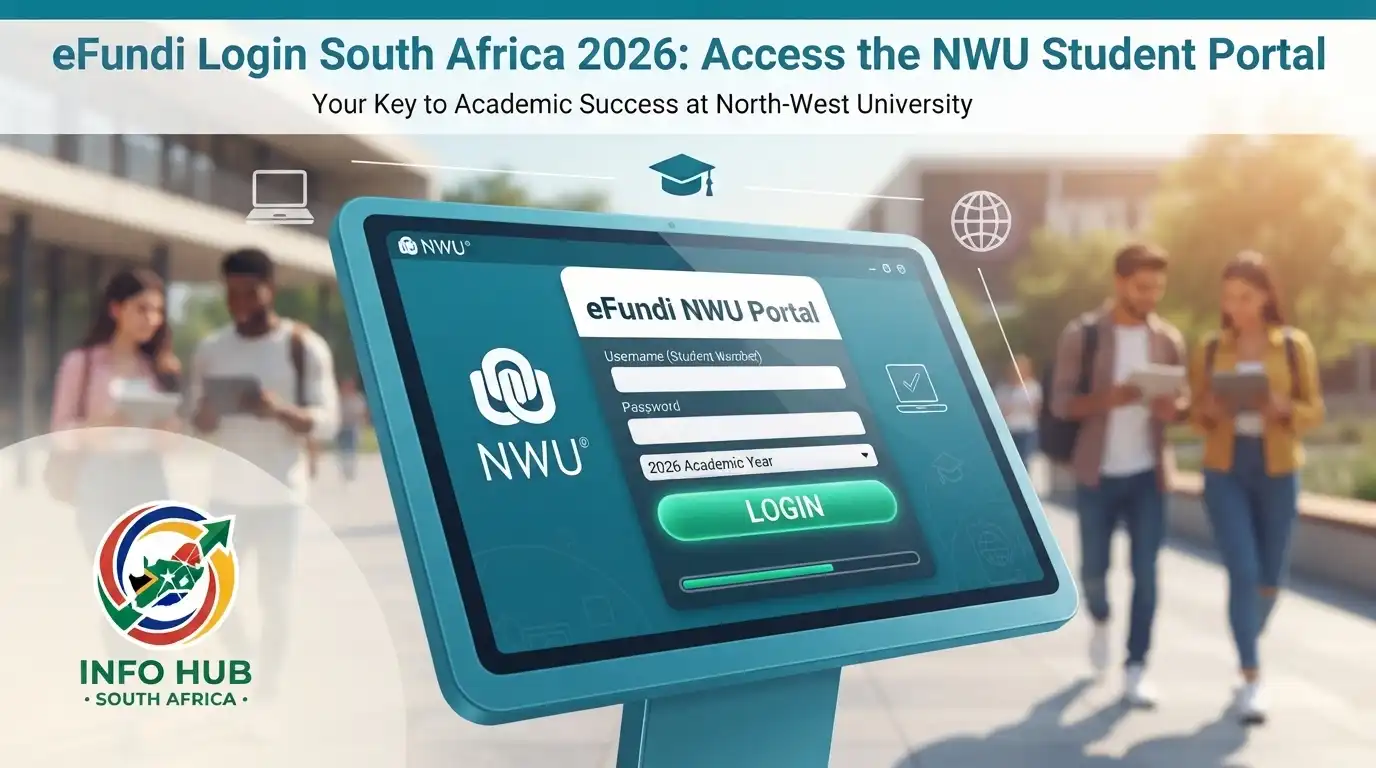
If you are looking for nwu efundi login, the official eFundi portal for North-West University (NWU). eFundi is NWU’s official online learning management system, where students and lecturers can access module sites, learning materials, announcements, assignments, assessments and other teaching and learning tools.
The safest way to access eFundi NWU is to use the official portal rather than an unfamiliar third-party website. NWU’s own website directs students to eFundi, and the current portal identifies itself as the North-West University Learning and Collaboration Environment.
This guide covers the nwu efundi login process, what credentials you need, how to find your modules, what to do when you cannot sign in, and how eFundi relates to other NWU online services.”Visit Homepage for more”.
Quick answer: Visit the official eFundi NWU portal at https://efundi.nwu.ac.za/portal/ and select Login. Students use their NWU login credentials to access their eFundi account. NWU currently identifies the student number as the eFundi username, while its current password guidance explains that new students’ initial password is linked to their identity or passport number.
What Is eFundi at NWU?
eFundi is the official Learning Management System (LMS) used by North-West University (NWU). It provides an online environment where students and lecturers can manage many parts of the academic learning process.
After signing in, students may use their module sites to find course information, learning resources, announcements, assignments, tests, discussion activities and grades. NWU also describes eFundi as a platform for managing teaching and learning activities, including content, communication, assessments and collaboration.
For students, this means the portal can become an important part of everyday university work. If a lecturer publishes material or an assessment through eFundi, you may need to sign in regularly to see the latest information.
eFundi and NWU Are Connected
The terms NWU, eFundi, and eFundi NWU are often used together because the service is operated as part of North-West University’s digital learning environment.
However, eFundi is not the same thing as every NWU online service. For example, NWU also provides systems for registration, student information, Microsoft 365 and other university services. NWU’s current IT information explains that students may use different login identifiers for different systems, so it is important to use the credentials requested by the particular service.
What You Need Before an eFundi NWU Login
Before starting the efundi nwu ac za login process, make sure you have the information needed for your NWU account.
You will generally need:
NWU’s current login information states that the primary account used for eFundi is connected to the NWU account system. Its current guidance lists the student number as the eFundi username and explains that passwords for new students are initially linked to the identity number or passport number before being changed.
Important Password Update
Older NWU eFundi manuals describe an initial-password process using an identity or passport number followed by @Nwu. However, current NWU login guidance should be followed if it differs from an older manual. The university now advises students to use their current NWU password and provides official password-reset guidance.
This distinction matters because login instructions can change as university authentication systems are updated.
How to Complete the NWU eFundi Login
Once you have your current NWU credentials, accessing the portal is straightforward.
Step 1: Open the Official eFundi Website
Open Chrome, Firefox, Microsoft Edge, Safari or another supported modern browser.
Type the official address into the browser:
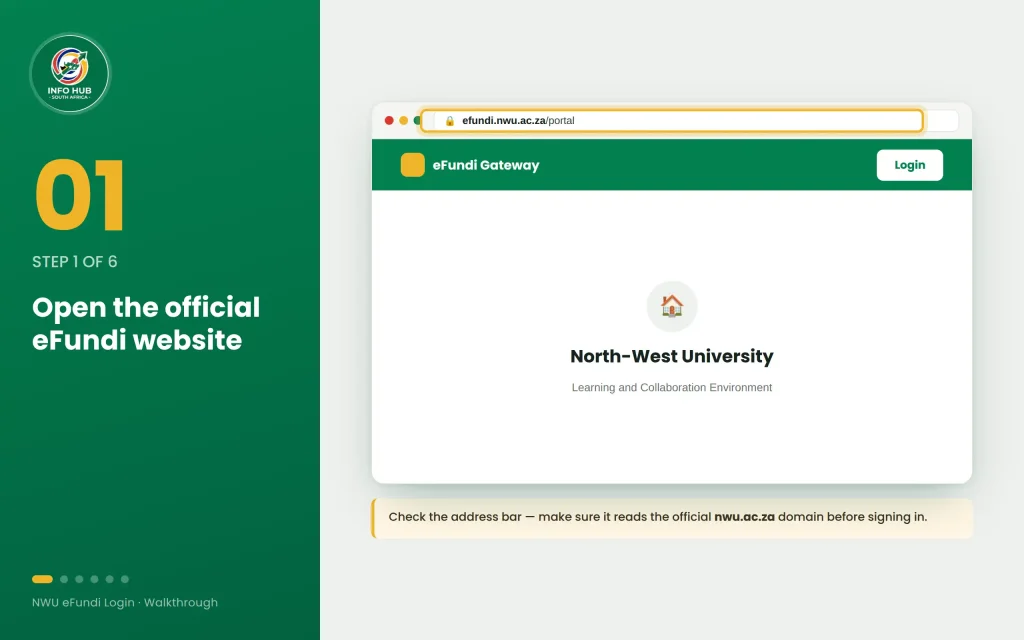
The official portal currently displays eFundi: Gateway and identifies itself as the North-West University Learning and Collaboration Environment.
Avoid relying on a random website that uses phrases such as “NWU login” or “eFundi login” without checking that you are actually on the nwu.ac.za domain.
Step 2: Select Login
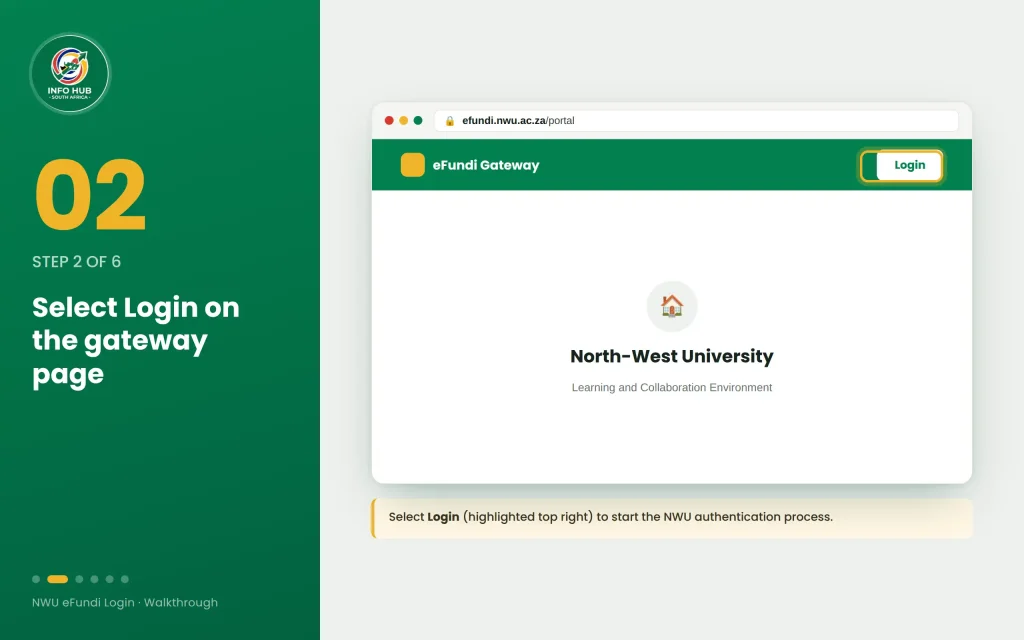
When the eFundi landing page opens, look for the Login option.
Select Login to begin authentication. The current eFundi portal provides a Login option directly from the gateway page.
This takes you towards the NWU authentication process where your university credentials are checked.
Step 3: Enter Your NWU Username
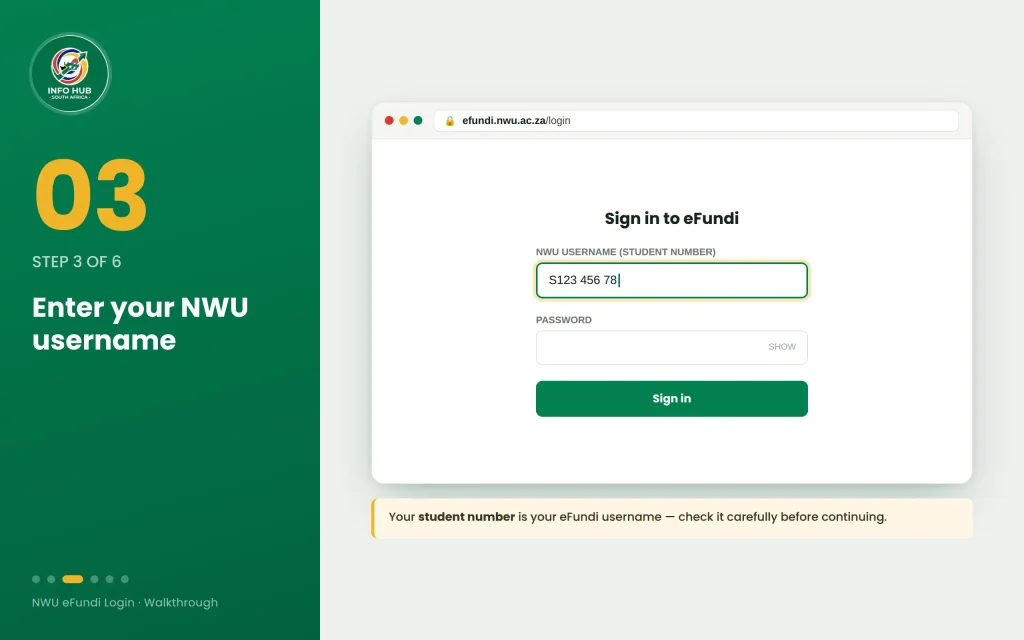
Enter the username requested by the NWU login screen.
For eFundi, NWU’s current password and username information identifies the student number as the eFundi username.
Make sure the number is entered correctly. A typing error can cause the login to fail even when the password is correct.
Step 4: Enter Your Current Password
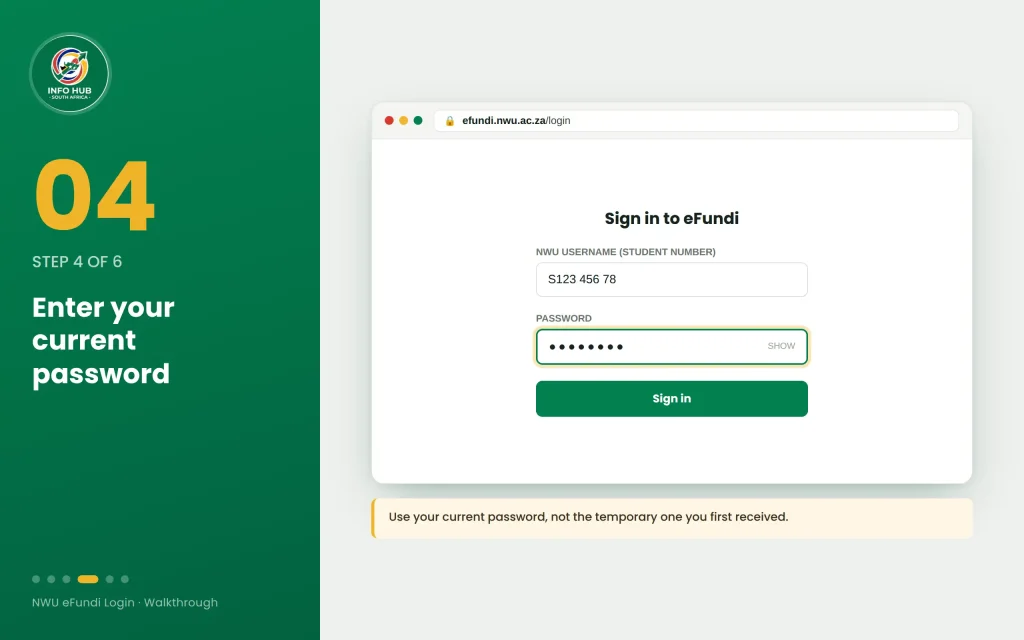
Type your active NWU password into the password field.
Do not share your password with another person, and avoid saving it on a public or shared computer. If you have previously changed the temporary password provided when setting up your account, use the new password rather than the original one.
NWU states that passwords expire periodically and provides an official process for resetting or requesting a new password if you cannot remember yours.
Step 5: Complete Any Security Verification
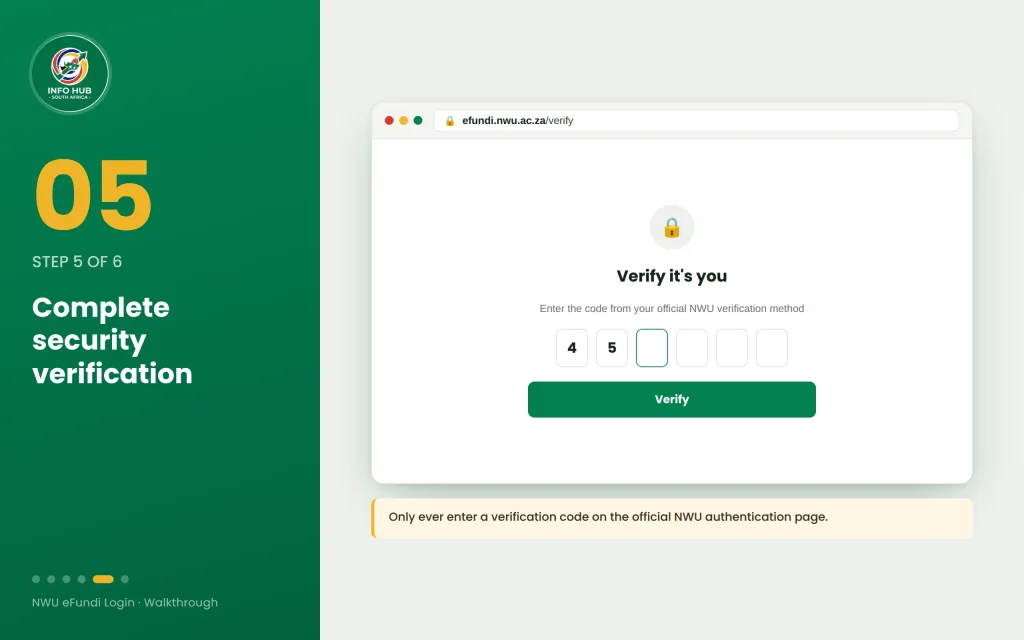
If NWU presents an additional security or multi-factor authentication step, follow the instructions shown on the official authentication page.
The exact verification method can depend on your NWU account and the university’s current authentication configuration. Do not enter verification information on a page that is not part of the official NWU login process.
Step 6: Open Your eFundi Dashboard
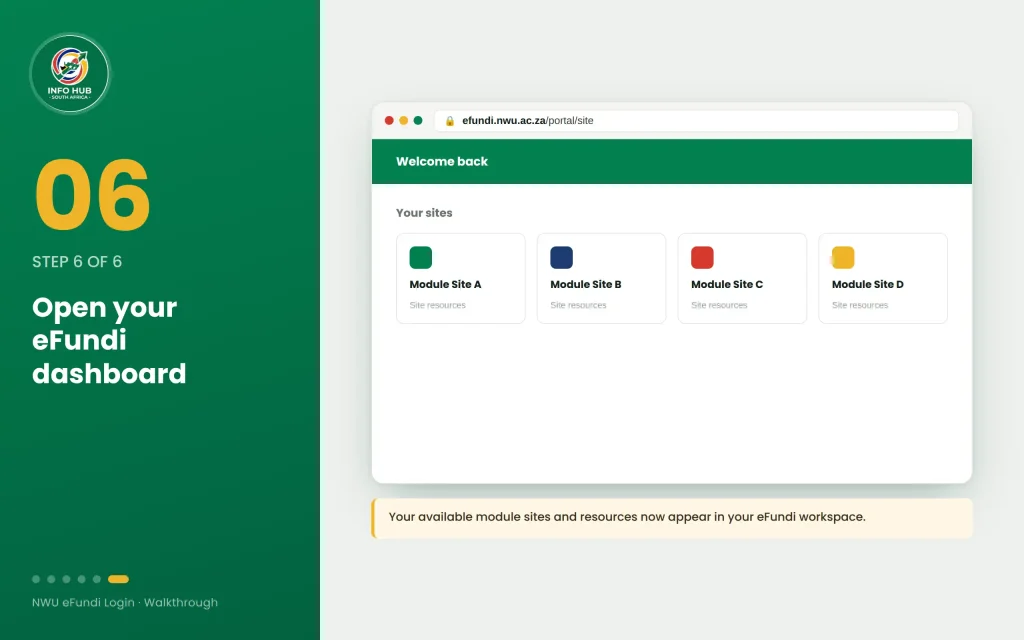
After successful authentication, you should return to the eFundi environment.
Your available module sites and other resources can then be accessed through your eFundi workspace. What you see may vary according to your registration, academic role and the sites available to your account.
Finding Modules and Using the eFundi Dashboard
Once the nwu efundi login has been completed, the next step is to check that your eFundi workspace contains the modules linked to your academic record. The exact appearance of the dashboard can vary depending on your role and the sites made available to your account.
Check Your Available Modules
After signing in to eFundi NWU, look through the available sites or module area for the subjects you are currently taking. A module site may contain learning resources, lecturer announcements, assessments and other activities.
If you have recently registered for a module and it does not appear immediately, avoid assuming that your registration has failed. First check your registration information through the appropriate NWU student system and, where necessary, contact the relevant university support service.
What Can You Do on eFundi?
The NWU eFundi environment is designed to support online teaching and learning. Depending on the module, you may use it for several academic activities.
| eFundi area | What it may be used for |
|---|---|
| Module sites | Open the online space for a particular subject |
| Learning resources | Read or download materials supplied for your course |
| Assignments | View assessment instructions and submit required work |
| Announcements | Read messages and updates from lecturers |
| Discussions | Participate in online academic conversations |
| Assessments | Complete online activities or tests where provided |
| Grades | Check marks or assessment information when published |
| Calendar | Keep track of relevant academic dates and activities |
The tools available are not necessarily identical for every module. Your lecturer or faculty may choose which eFundi functions are used.
How to Find Your Course Materials
Finding your learning material after an efundi nwu ac za login is usually one of the first tasks students need to complete.
Start by opening the relevant module site from your eFundi workspace. Once inside, review the navigation options provided by that module. Lecturers may organise content into folders, sections, weekly topics or other categories.
Look for areas containing:
The organisation can differ between subjects, so do not expect every NWU module to have exactly the same layout.
Keep Track of Announcements
The announcement area deserves regular attention. A lecturer may use it to communicate changes to an assessment, provide additional information, announce deadlines or share other module-related updates.
Checking announcements regularly is particularly useful when you are studying through an online or distance-learning arrangement.
Submitting Assignments Through eFundi
Some NWU modules use eFundi for assignment submission. If an assignment is available, open the relevant activity and carefully read the instructions before uploading anything.
Before submitting, check:
- The assignment requirements.
- The closing date and time.
- The accepted file format.
- Whether more than one document is required.
- Whether the submission has been successfully recorded.
If your module uses a specific assessment or plagiarism-checking tool, follow the instructions provided inside the module site. Do not assume that every assignment follows the same submission process.
A useful habit is to keep a copy of the document you submitted. This gives you a personal record if you later need to confirm what was uploaded.
What If Your Module Is Missing?
One of the most common concerns after an nwu efundi login is finding that a registered module is not visible.
There can be several reasons for this. Your registration may still be processing, the module site may not yet be available to students, or there may be an issue connecting your academic registration to eFundi.
Try These Checks
First, confirm your registration. Make sure the module is actually listed in your official NWU registration information.
Next, check eFundi again later. Newly registered modules may not necessarily appear at exactly the same time as your registration is completed.
Check your other modules. If some subjects are visible but one particular module is missing, the issue may be specific to that module rather than your entire account.
Contact NWU support if the problem continues. Give the support team enough information to identify the issue, but never send your password.
eFundi Login Not Working? Try These Solutions
A failed nwu efundi login does not always mean that the eFundi website is unavailable. Login problems can be caused by incorrect credentials, an expired password, browser problems or account-related issues.
1. Check Your Username
Make sure you are using the correct NWU username or student number requested by the current login page.
Pay attention to extra spaces, missing digits and typing mistakes. If you have copied your username from another application, check that no unwanted spaces were included.
2. Check Your Password
Passwords are case-sensitive. Confirm that Caps Lock is not affecting what you type.
If you recently changed your NWU password, use the new password rather than an older saved password.
3. Reset Your Password When Necessary
If you cannot remember your NWU password, use the university’s official password-management information rather than using an unofficial password-reset website.
NWU’s current information explains that students can follow the university’s password process when they need to reset or obtain a new password.
4. Try a Different Browser
If the efundi nwu ac za login page does not work correctly, try an updated version of Chrome, Edge, Firefox or Safari.
You can also try opening the portal in a private or incognito window. This can help identify whether stored cookies or browser-session data are interfering with the login.
5. Check Your Internet Connection
A weak or unstable connection can prevent the login page from loading correctly or interrupt the authentication process.
If possible, switch to a more stable connection and reload the official eFundi page.
6. Avoid Repeated Incorrect Attempts
If you are unsure about your password, do not repeatedly enter guesses. Use the official NWU password-support process instead.
This is safer than repeatedly attempting credentials that may not be correct.
Is eFundi the Same as the NWU Student Portal?
No. eFundi is primarily the university’s learning and collaboration environment, while NWU has other online systems for different student services.
This distinction is important when searching for nwu efundi login because students may encounter several NWU online services in search results.
For example, eFundi can be used for learning activities and module resources, while other NWU systems may handle student administration or account-related services.
Always check that you are entering the correct official NWU system for the task you want to perform.
What About NWU Online Application?
The phrase unw online application is sometimes used when people search for university applications, but the university is North-West University (NWU). An application for admission is separate from signing into eFundi.
In other words:
NWU online application → applying to study at North-West University
NWU eFundi → accessing the online learning environment
A person who is applying to NWU should therefore not expect the eFundi login page to function as the university’s general application portal.
For admission-related information, use the official NWU website and follow the current application instructions provided there.
Security Tips for eFundi Users
Your NWU account can provide access to university resources, so treat your login details as private information.
Keep these points in mind:
A useful rule is simple: if a website asks for your NWU password, first check its domain and make sure you are on an official NWU service.
eFundi NWU Login: Quick Checklist
Before contacting support about an efundi nwu ac za login problem, run through this short checklist:
FAQs
Conclusion
For students at North-West University, eFundi is an important digital learning environment for accessing module information and completing online academic activities.
If your eFundi NWU account works but a module, assignment or resource is missing, check your registration and the relevant module information before assuming there is a technical fault. For password problems, follow the current NWU support instructions instead of relying on outdated login guides.
Students should also remember that NWU eFundi and an NWU online application serve different purposes. eFundi is primarily for the learning environment after access has been provided, while admission applications are handled through the university’s relevant application services.
For students looking for nwu efundi login, keeping the official portal bookmarked is one of the easiest ways to return to the correct service. If you are also searching for efundi nwu ac za login, use the same official eFundi address.
For more South African university portal guides, student information and official government-service information, visit Info Hub South Africa.
Read More
Majuba Student Portal South Africa 2026: Student Login, Registration & Complete Portal Guide
Matric Results 2026 Online Check South Africa: Get Your NSC Results Instantly
CUT Status Check South Africa 2026: Complete Application and Admission Guide
SANC eRegister South Africa 2026: Login, Registration & Status Check
Learners Licence Booking South Africa 2026: Requirements, Steps & Fees