UCT Online Application 2027: Undergrad, Postgrad & Fees
If you’re planning to study at the University of Cape Town, the UCT online application is the first step towards securing your place. Undergraduate and postgraduate applications are submitted through the university’s official online system at applyonline.uct.ac.za.
The process covers several stages, from creating your applicant profile and entering your personal and academic details to uploading supporting information, paying the required fee and checking your application after submission. The same system is used by school leavers, postgraduate applicants and international students, although document requirements can vary.
Quick answer: Visit applyonline.uct.ac.za, create an account, work through the 10-step application, pay the applicable fee and submit your required certified PDF documents to [email protected]. Once your application has been submitted, you can monitor its progress through the UCT self-service portal.
Get Your Information Ready First
Having your details and documents available before you begin can make the application process much smoother. You should have the following ready:
Allow roughly 30 to 45 minutes if you intend to work through the form in one sitting. Keep your academic results, contact information and details of the person responsible for payment nearby so you don’t have to stop halfway through.
Setting Up Your UCT Applicant Account
New applicants need to create an account before they can access the application form. The registration process starts on the official UCT application website.
- Go to https://applyonline.uct.ac.za/ using your web browser.
- From the public homepage, find Public Services and select Create Account.
- Enter your legal name, date of birth, citizenship information and ID or passport number.
- Provide your active email address and telephone contact details.
- Create a secure password using a combination of letters, numbers and special characters.
- Check your inbox for the UCT verification email and select the activation link.
Your account cannot be used for login until the email verification step has been completed. If the verification message does not appear after a few minutes, check your spam or junk folder before attempting to create another account.
Important: Make sure your name matches the name shown on your official ID or passport. Differences between your application details and identity documents can cause problems when your certified documents are checked.
Who Uses the UCT Online Application System?
The official application portal supports several types of applicants. These include:
While applicants use the same online system, the documents and information required can differ depending on your applicant category and programme.
Complete the 10-Step UCT Online Application
Once your account is active, log in at applyonline.uct.ac.za and complete the 10 sections. Enter your information carefully and check each section before moving on.
Steps 1–3: Personal and Study Details
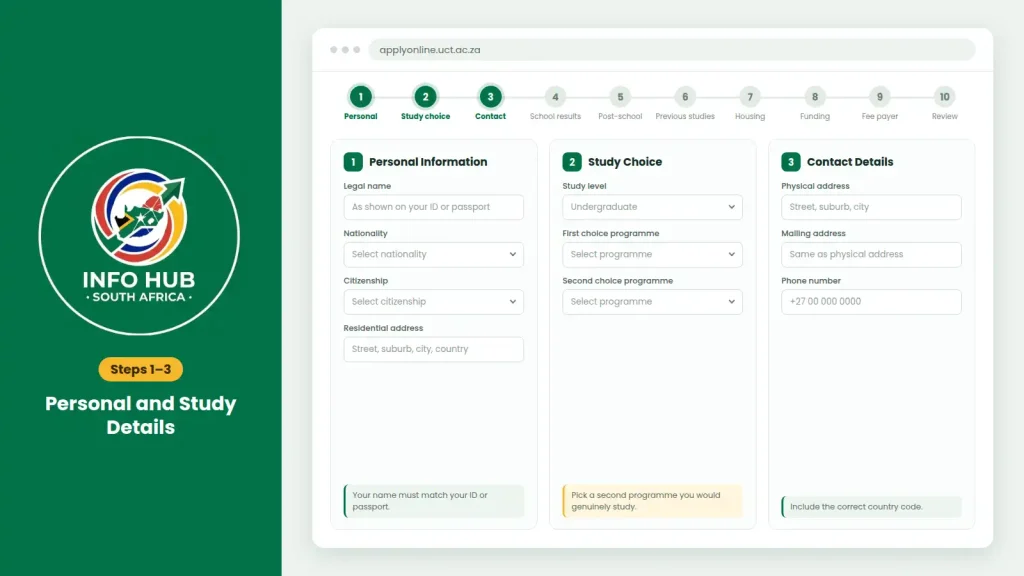
Tip: Choose a second programme that you would genuinely be willing to study if your first choice isn’t offered.
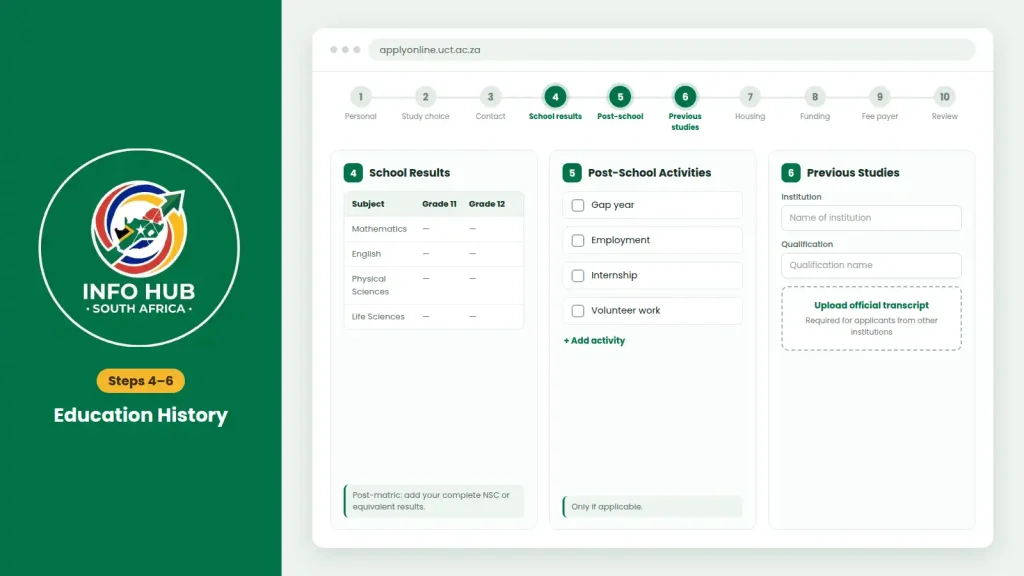
Steps 4–6: Education History
Steps 7–9: Housing, Funding and Payment Details
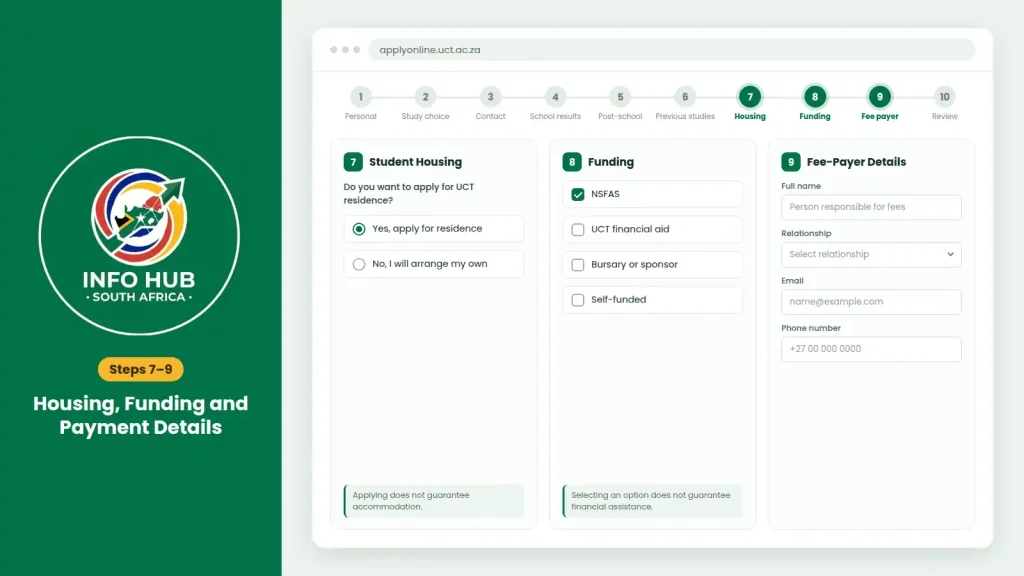
| Step | Section | What to Do |
|---|---|---|
| 7 | Student Housing | Indicate whether you want to apply for UCT residence. |
| 8 | Funding | Select the relevant funding options, such as NSFAS or UCT financial aid. |
| 9 | Fee-Payer Details | Enter the details of the person responsible for your fees. |
Selecting housing or funding options does not guarantee accommodation or financial assistance.
Step 10: Review and Submit
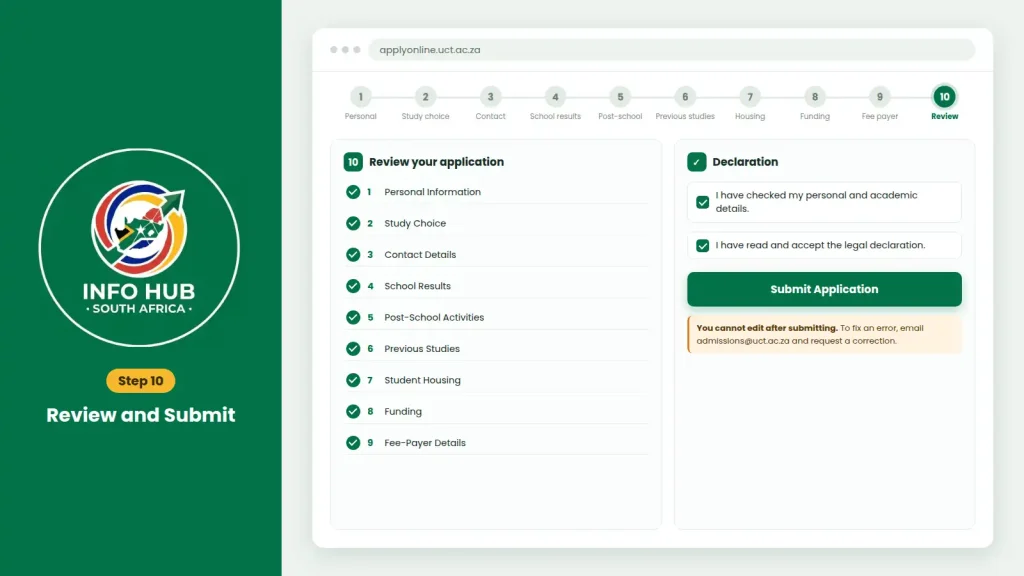
Before submitting:
- Check all information from Steps 1–9.
- Confirm your personal and academic details.
- Read and accept the legal declaration.
- Click Submit Application.
Important: You cannot edit the application online after submission. If you find an error, contact [email protected] and request a correction.
Errors to Check Before You Submit
A few simple mistakes can cause problems during the UCT online application process. Before submitting, make sure you haven’t:
Supporting Documents You Need for a UCT Online Application
Submitting the online form is only part of the process. UCT also needs the required supporting documents before your application can be treated as complete. Certified copies should be sent as PDF attachments to [email protected], and your UCT Applicant Number should be included in the email.
| Requirement | What UCT Requires |
|---|---|
| File format | PDF only; do not send JPEG, PNG or Word files |
| Maximum size | 2MB per document |
| Certification | Commissioner of Oaths, Police or Notary Public |
Documents Required for Different Applicants
The documents you need depend on your applicant category and educational background.
South African Undergraduate School Leavers
If you’re applying as a South African school leaver, prepare:
International and Foreign-Resident Applicants
International applicants should have:
Postgraduate Applicants
Postgraduate applications may require:
UCT Online Application Fee and Payment Options
The applicable UCT online application fee needs to be paid before the university can process your application. UCT alumni and current students are exempt from the standard application fee, although this exemption does not apply to Graduate School of Business (GSB) applications.
| Applicant Category | Application Fee |
|---|---|
| South Africa and SADC region | R100 |
| Non-SADC / international applicants | R300 |
| GSB: South African / African residents | R1,000 |
| GSB: non-African international applicants | USD $100 |
Bank Details for EFT and International Transfers
If you’re paying by EFT or wire transfer, use the relevant details below.
| Detail | Standard Application | GSB Application |
|---|---|---|
| Bank | Standard Bank of South Africa | Standard Bank of South Africa |
| Account name | University of Cape Town | UCT Graduate School of Business |
| Branch code | 051001 | 051001 |
| SWIFT code | SBZAZAJJ | SBZAZAJJ |
| Reference | 11196 + Applicant Number | GSB + First Name + Last Name |
| Example | 11196 ABCDEF001 | GSB Betty Brown |
Payment tip: Application fees and banking information may change from one intake period to another. Before making a payment, confirm the current details through the official UCT application portal and keep your payment confirmation for your records.
When Does the UCT Online Application Close?
There isn’t one closing date that applies to every UCT application. Deadlines depend on the level of study and the specific programme.
Undergraduate applications generally close around the middle of the year, while postgraduate deadlines can differ between faculties and departments. Certain competitive programmes and applications from international students may also have earlier deadlines.
For this reason, check the UCT online application closing date for your particular programme through applyonline.uct.ac.za and the main UCT website. Don’t wait until the final day, especially if you still need to have documents certified.
How to Check Your UCT Online Application Status
After submitting your application, you can follow its progress through the UCT self-service system.
1. Look out for your acknowledgement email
UCT normally sends an acknowledgement within 3 working days of submission. The message includes your official Student/Applicant Number and PeopleSoft login information.
2. Access the self-service portal
Use peoplesoft.uct.ac.za to sign in with the details provided by UCT.
3. View your application decision
Once logged in, you can check the current status and decision information associated with your application.
If three working days have passed and you haven’t received the acknowledgement email, check your spam or junk folder first. If the message still isn’t there, contact the admissions office for assistance.
Official UCT Admissions Contact Details
If you need help with an application, document submission or another admissions matter, use the relevant contact below:
FAQs
Conclusion
The UCT online application involves several important steps, including creating an account, selecting your programme choices, entering your academic details, submitting the required documents and paying the applicable application fee. Applicants should also check their information carefully before submitting and use the official self-service portal to monitor their application status.
For the latest deadlines, fees and application requirements, always verify the information through UCT’s official channels, as requirements may change. Info Hub South Africa provides easy-to-follow guides on university applications, student portals and South African government services, helping applicants understand online processes and access the information they need more easily.
Read More
GEHS Login South Africa 2026: Online Login, Password Reset & Status Check Guide
Television Licence South Africa: Online Application, Status Check & SABC TV Licence Guide 2026
UMP Moodle Login South Africa 2026: Student Portal Access Guide