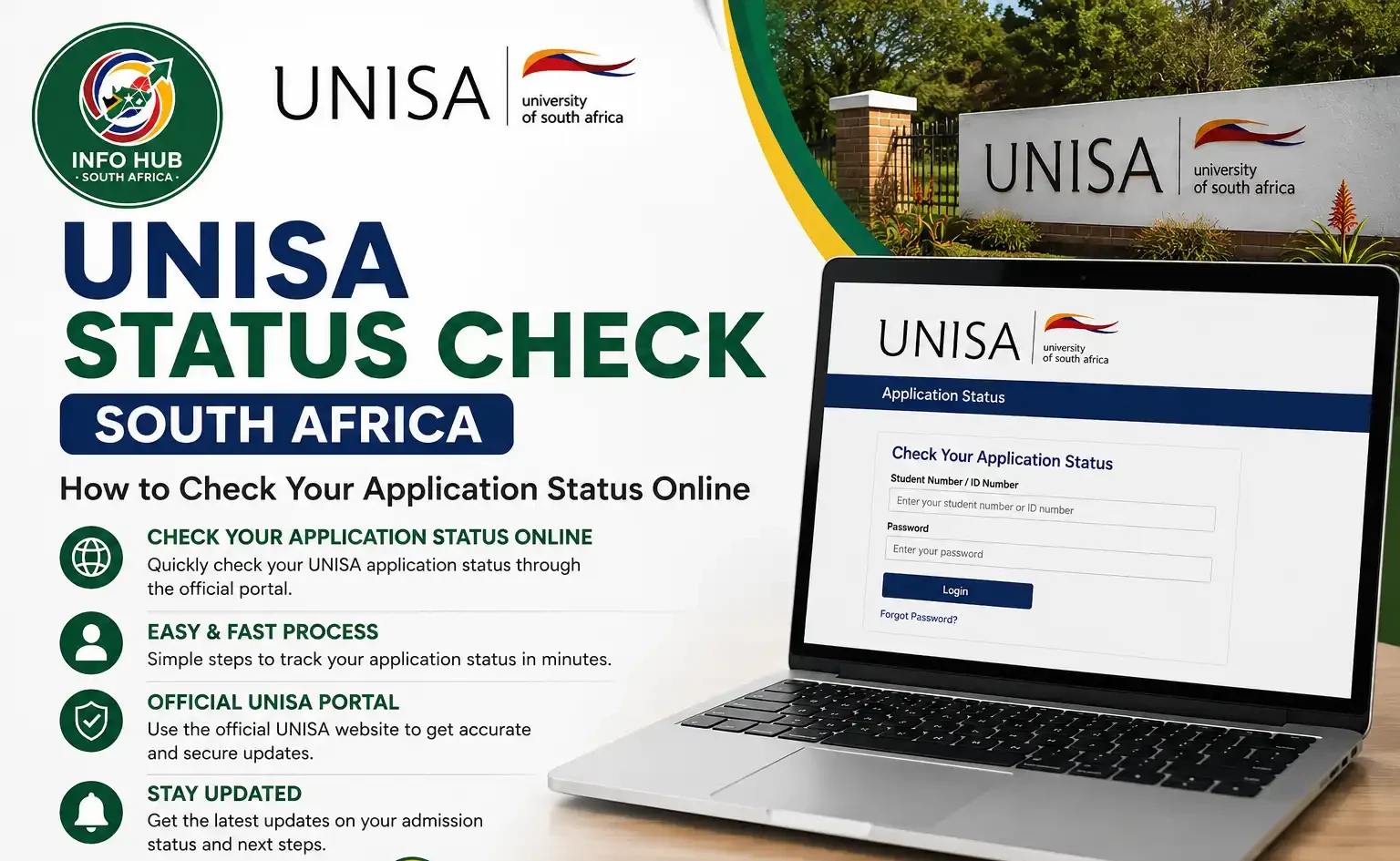
UNISA Status Check South Africa: How to Check Your Application Status Online
This website is an independent educational and informational resource that helps students access the official University of South Africa (UNISA) online platforms safely. We do not conduct UNISA status checks, handle admission applications, or collect students’ personal information.
Our aim is to explain how applicants can check their UNISA application status, understand admission updates, and find the appropriate channels for support. Whether you are looking for the UNISA check status option or want to learn how to track your UNISA application status, our content provides clear, practical guidance without asking for your login credentials or personal documents.
For your security, always confirm that you are visiting an official UNISA website before entering personal details. Avoid unofficial services that promise admission assistance or request unnecessary payments or sensitive information.
Understanding UNISA Application Status
A UNISA Status Check allows applicants to follow the progress of their admission applications online using the University of South Africa’s official system. The status displayed helps you understand whether your application is still under review, whether further documents are needed, or whether an admission decision has been made.
By checking your UNISA application status regularly, you can keep track of updates, identify any outstanding requirements and understand what steps to take next. Depending on your application, the result may indicate that it is being processed, provisionally accepted, approved or declined.
How to Check Your UNISA Application Status Online
A UNISA application status check allows you to monitor the progress of your admission application at any time. Whether you want to complete a UNISA status check, UNISA check status, or My UNISA status check, the official UNISA website provides a quick and secure way to view the latest updates.
Follow these simple steps to check your UNISA application status online.
Step 1: Visit the Official UNISA Website
Open the official UNISA website using a reliable internet connection. This is the safest place to perform your UNISA application status check and receive accurate information about your application.
Step 2: Open the Application Status Page
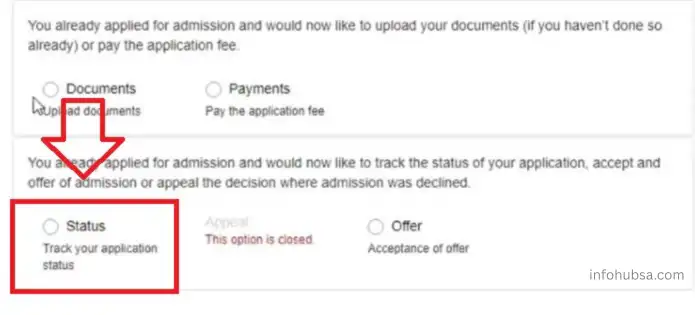
On the homepage, click the Apply for Admission menu. From the available options, select Application Status to access the UNISA check status portal.
Step 3: Sign In to Your myUNISA Account
You will be redirected to the myUNISA login page.
Enter the following details:
- Student number
- Application password
If you cannot remember your login details, use the Forgotten Student Number or Forgotten Password option to recover your account before continuing with your My UNISA status check.
Step 4: Select “Track My Application”
After signing in, locate the Track My Application option on your dashboard and click it. This page displays the latest progress of your admission application.
Step 5: Enter Your Student Number
Type your Student Number in the required field and click the Continue button to proceed with your UNISA application status check.
Step 6: Verify Your Identity
To protect your information, UNISA will ask you to confirm your identity by entering:
- South African ID or passport number
- Surname
- Date of birth
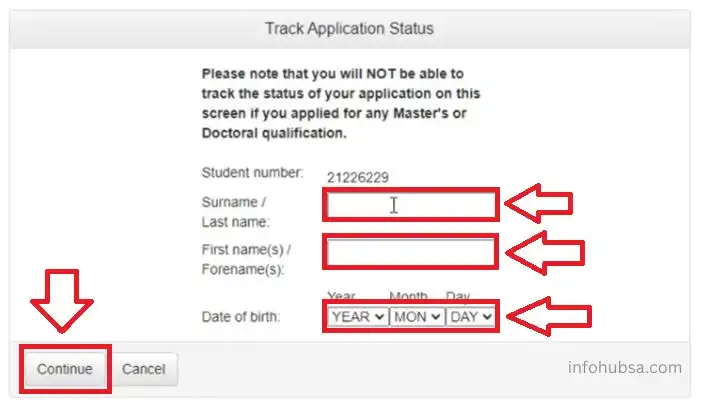
After entering the required information, click Continue to view your application details.
Step 7: Check Your UNISA Application Status
Your UNISA application status will appear on the screen. Below are the most common status messages and what they mean.
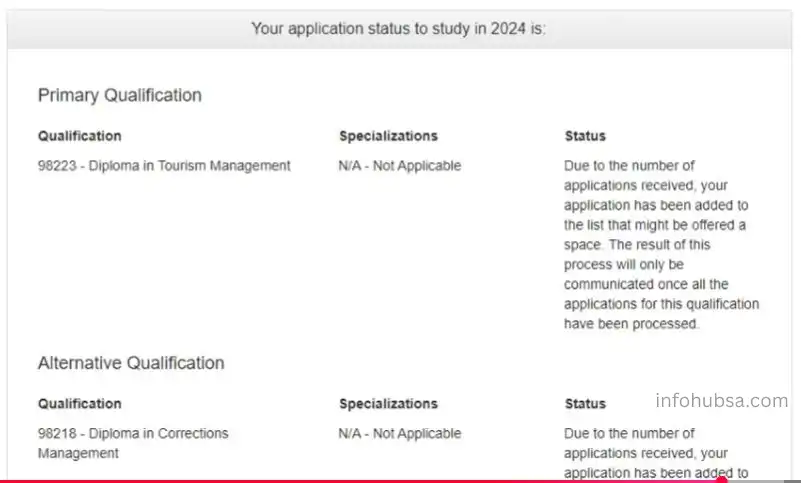
| UNISA Status | Meaning |
|---|---|
| Application Received | UNISA has successfully received your application and supporting documents. |
| Application in Progress | Your application is currently being reviewed by the admissions team. |
| Awaiting Documents | Additional documents are required before your application can continue. Upload the missing documents as soon as possible. |
| Condition Met | You have met the admission requirements, and your application is being processed for a final decision. |
| Accepted | Congratulations! Your application has been approved. The next step is to complete your UNISA registration status check and register for your chosen qualification. |
| Rejected | Your application was unsuccessful. Review the reason provided by UNISA and check whether you qualify to submit a new application in the future. |
This UNISA application status check process is available for both new and returning students. By checking your status regularly, you can respond quickly to any requests from the university and avoid missing important admission or registration deadlines.
UNISA Registration Dates for 2026 and Expected 2027 Applications
UNISA’s 2026 academic calendar includes several important application, registration and payment deadlines. Semester 1 registration for semester modules ran from 7 January to 20 February 2026, while year-module registration had separate closing dates for undergraduate and postgraduate students.
The table below summarises the dates provided and the status labels in the original information. Since some dates have already passed, check the official UNISA website for the latest announcements before making plans.
| Milestone | Date | Status |
|---|---|---|
| Limited application window for 2026 | 3 November – 19 December 2025 | Closed |
| Semester 1 and year-module registration opened | 7 January 2026 | Closed |
| Semester 1 registration deadline | 20 February 2026 | Closed |
| Undergraduate year-module registration deadline | 20 March 2026 | Past deadline |
| Honours and postgraduate diploma year-module registration deadline | 31 March 2026 | Past deadline |
| Semester 1 fee payment dates | 31 March and 15 May 2026 | Past dates |
| Expected Semester 2 registration | Around July 2026 | Date to verify |
| Semester 2 fee payment deadline | 15 August 2026 | Past date |
| Expected 2027 undergraduate applications | Around July–October 2026 | Confirm current availability |
What Applicants Should Know About 2027
Students planning to apply to UNISA for the 2027 academic year should monitor official announcements for application opening dates, registration periods and programme-specific requirements. The July–October 2026 period listed above is an estimate, not a confirmed application window.
Important: Application and registration dates may differ by qualification and academic period. Always verify the latest information through UNISA’s official website before submitting an application, registering for modules or making payments.
UNISA Application Status Check Using Your ID Number
A UNISA application status check using your South African ID number is one of the quickest ways to track your admission progress. Whether you want to complete a UNISA status check, UNISA check status, or My UNISA status check, the official UNISA portal lets you see the latest update on your application in just a few minutes.
Step 1: Visit the Official UNISA Application Status Portal
Open the official myUNISA application status portal in your web browser. This is the official platform where applicants can securely perform a UNISA application status check and monitor their admission progress.
Step 2: Enter Your Student Number
Type your Student Number into the required field and click the Continue button to move to the next step.
Step 3: Provide Your Personal Information
To verify your identity, enter the following details exactly as they appear on your application:
- South African ID number
- Surname
- Date of birth
These details allow the system to locate your application and display the correct information.
Step 4: Click “Continue”
After entering your information, select the Continue button. Double-check that all details are accurate before submitting, as incorrect information may prevent your UNISA application status check from being completed.
Step 5: View Your UNISA Application Status
Once your identity has been verified, your UNISA application status will be displayed on the screen. You can immediately see whether your application is:
- Under review
- Provisionally accepted
- Fully accepted
- Declined
- Awaiting additional documents
Checking your UNISA application status regularly helps you stay informed about any updates or document requests. If your application is accepted, you can proceed with your UNISA registration status check and complete your registration within the required deadlines.
Check Your UNISA Application Status Using the UNISA Student App
The UNISA Student App offers a quick and convenient way to complete a UNISA application status check from your smartphone. Whether you want a UNISA status check, UNISA check status, or My UNISA status check, the app lets you monitor your admission progress anytime without visiting the website.
Step 1: Download the UNISA Student App
Install the official UNISA Student App from your device’s app store:
- Google Play Store (Android)
- Apple App Store (iPhone and iPad)
Search for “UNISA Student App” and download the official application.
Step 2: Open the App
After installation, launch the app on your mobile device. You’ll find several student services, including the option to check your admission progress.
Step 3: Select “Track Application Status”
From the main menu, tap Track Application Status to begin your UNISA application status check.
Step 4: Enter Your Student Number
Type your Student Number into the required field. Double-check the number before continuing to ensure the system can locate your application.
Step 5: Tap “Continue”
Press the Continue button to move to the identity verification page.
Step 6: Enter Your Personal Details
To verify your identity, provide the following information:
- Surname
- Full name
- Date of birth
Make sure the details match the information you used when submitting your application.
Step 7: Continue to View Your Status
After entering your information, tap Continue again. The app will securely verify your details and retrieve your latest application update.
Step 8: View Your UNISA Application Status
Your UNISA application status will appear on the screen. Depending on the progress of your application, you may see one of the following updates:
- Application Received
- Application In Review
- Pending Documents
- Accepted
- Rejected
- Application Still Being Processed
Checking your UNISA application status through the app helps you stay informed wherever you are. If your application is approved, you can continue with your UNISA registration status check and complete your registration before the university’s deadlines.
Check Your UNISA Application Status at a Campus or In Person
If you prefer face-to-face assistance, you can complete a UNISA application status check by visiting a UNISA campus or regional service centre. This option is helpful if you need personal assistance with your application or want to resolve any admission-related issues directly with a university representative.
What to Do After Your UNISA Application Status Check
After completing your UNISA application status check, the next steps depend on the status shown in your application. Whether your application has been accepted, is still under review, or has been declined, taking the appropriate action can help you avoid delays and prepare for the next stage.
If Your Application Is Accepted
Congratulations! If your UNISA application status shows Accepted, you should:
If Your Status Is Pending or In Progress
If your UNISA application status check shows Pending or Application in Progress, there’s usually no need to worry. Your application is still being processed.
If Your Application Is Rejected
A rejected application does not necessarily mean the end of your study plans. Review the outcome carefully and consider your next options.
No matter what your UNISA application status check shows, checking your application regularly and responding promptly to any requests from the university will help ensure a smoother admission process.
How to Accept Your UNISA Offer
If your UNISA application status check shows Accepted, you must accept your admission offer before you can register for your qualification. Follow these steps:
Important: Accepting your offer is a required step after your UNISA application status check. If you do not accept your admission offer, you will not be able to register or begin your studies at UNISA.
What to Do If Your UNISA Application Status Doesn’t Appear
Sometimes your UNISA application status check may not display any results or the page may fail to load. This is usually caused by a temporary system issue, incorrect details, or missing documents. Before contacting UNISA, try the following solutions:
Checking your My UNISA status check regularly after resolving these issues will help you stay informed about any updates to your admission.
Documents Required to Check Your UNISA Application Status
Before starting your UNISA application status check, make sure you have the following information and documents available:
Having these documents ready will make your UNISA application status check quicker and help you complete the verification process without unnecessary delays.
What Is UNISA Application Status?
A UNISA application status is the current progress of your application to the University of South Africa (UNISA). After you submit your application for an undergraduate, postgraduate, diploma, or short learning programme, UNISA reviews your information and supporting documents before making an admission decision.
You can complete a UNISA application status check through the official myUNISA portal using your student number and personal details. Regularly performing a UNISA status check helps you stay informed about your admission progress and ensures you don’t miss any important updates or requests from the university.
Why You Should Check Your UNISA Application Status
Completing a UNISA application status check regularly helps you stay updated throughout the admission process. Instead of waiting for an email, you can monitor your application and take action whenever necessary.
Some of the main benefits include:
When Should You Check Your UNISA Application Status?
It is generally recommended to perform your first UNISA application status check about 2 to 3 weeks after submitting your application. This gives the university enough time to receive and begin processing your documents.
During busy application periods, processing times may be longer because UNISA receives a large number of applications. If your status has not changed, continue checking periodically through the official portal. Regular UNISA status checks will help you stay informed and ensure you can respond promptly if any additional information or documents are requested.
Common Problems and Solutions When Checking Your UNISA Application Status
While performing a UNISA application status check, you may occasionally experience technical issues or delays. The table below outlines some common problems and their recommended solutions.
| Problem | Possible Solution |
|---|---|
| Forgot your student number | Use the Forgot Student Number option on the official UNISA website to retrieve your student number before completing your UNISA application status check. |
| Website not loading | Try accessing the portal during off-peak hours or use an updated browser such as Google Chrome or Mozilla Firefox. |
| Application status not updating | Wait 4 to 6 weeks after submitting your application before checking again, as processing times may vary during busy admission periods. |
| Unable to log in | Verify that you are entering the correct student number and password. If necessary, reset your password using the Forgot Password option. |
| Missing document notification | Upload the requested documents as soon as possible through the official UNISA portal to avoid delays in processing your application. |
Tips for a Successful UNISA Application
Following a few best practices can help ensure your UNISA application status check progresses smoothly and reduce unnecessary delays during the admission process.
By following these tips and checking your UNISA application status regularly, you’ll be better prepared for the next stage of your admission and, if successful, your UNISA registration status check.
Benefits of Checking Your UNISA Application Status
Regularly checking your UNISA application status gives you several advantages. It helps you stay informed, avoid delays, and take timely action for a smooth admission experience. Below are the main benefits:
Advantages and Disadvantages of UNISA Application Status
Advantages
Disadvantages
Contact Detail
FAQs
Conclusion
Checking your UNISA application status regularly helps you stay informed about admission decisions, outstanding documents and the next steps towards registration at the University of South Africa. Info Hub South Africa is an independent informational website that helps students find educational resources, understand student portals and navigate official university and government websites.
Our aim is to provide clear, practical guidance on topics such as UNISA Status Check, UNISA application status and how to track UNISA application status. Info Hub South Africa does not manage university applications, collect or process students’ personal information, or make admission decisions.
For your safety, always protect your login details, avoid unofficial websites that request unnecessary payments or sensitive information, and verify application deadlines and registration requirements directly through the official UNISA website.
Read More
GEHS Login South Africa 2026: Online Login, Password Reset & Status Check Guide
Television Licence South Africa: Online Application, Status Check & SABC TV Licence Guide 2026
Passport Renewal South Africa: Online Application, Fees & Banks