EWC Student Portal Login 2026: Check Status, Results & Application
If you need to access your EWC student portal, the safest option is to use the official Ekurhuleni West TVET College iEnabler page rather than third-party websites. The official portal currently provides access for prospective students and registered users, with options related to applications, registration, personal information, academic information and payments.
The information below is organised around the most common searches, including ewc student portal login, ewc student portal login status check, ewc login using student number, ewc application status check, and ewc student portal login results.
Quick answer: To use the EWC student portal, open the official iEnabler website, choose the appropriate user option, enter your student number and PIN, and select the login option. The official portal identifies registered users by student number and requires a five-digit numeric PIN that must not begin with zero.
What Is the EWC Student Portal?
The EWC student portal is the online self-service system used by Ekurhuleni West TVET College. It is connected to the college’s student administration system and supports different activities for prospective and registered students.
EWC’s official iEnabler page specifically states that prospective students can use the system to apply, register, change personal information, obtain academic and other information, and make payments. Registered users have a separate login area where they enter their student number and PIN.
EWC’s Annual Report also explains that its online admissions and registration platform is integrated with iEnabler. The college reported that thousands of prospective students used the online system for applications and that accepted students used iEnabler for online registration.
This makes the portal useful for more than simply checking an application. Depending on your account and current college processes, it can act as an important online point for student administration.
EWC Portal at a Glance
| Item | Information |
|---|---|
| Institution | Ekurhuleni West TVET College |
| Portal | iEnabler Self Help |
| Main portal domain | ienabler.ewc.edu.za |
| Registered-user login | Student number + PIN |
| PIN requirement | 5 numeric digits; do not start with 0 |
| Official college website | ewc.edu.za |
| Main location | Gauteng, South Africa |
The college’s official website identifies six campuses: Alberton, Boksburg, Germiston, Kathorus, Kempton and Tembisa.
How to Complete the EWC Student Portal Login
The ewc student portal login process is straightforward when you already have your student credentials.
Step 1: Open the Official Portal
Start with the official EWC iEnabler address:
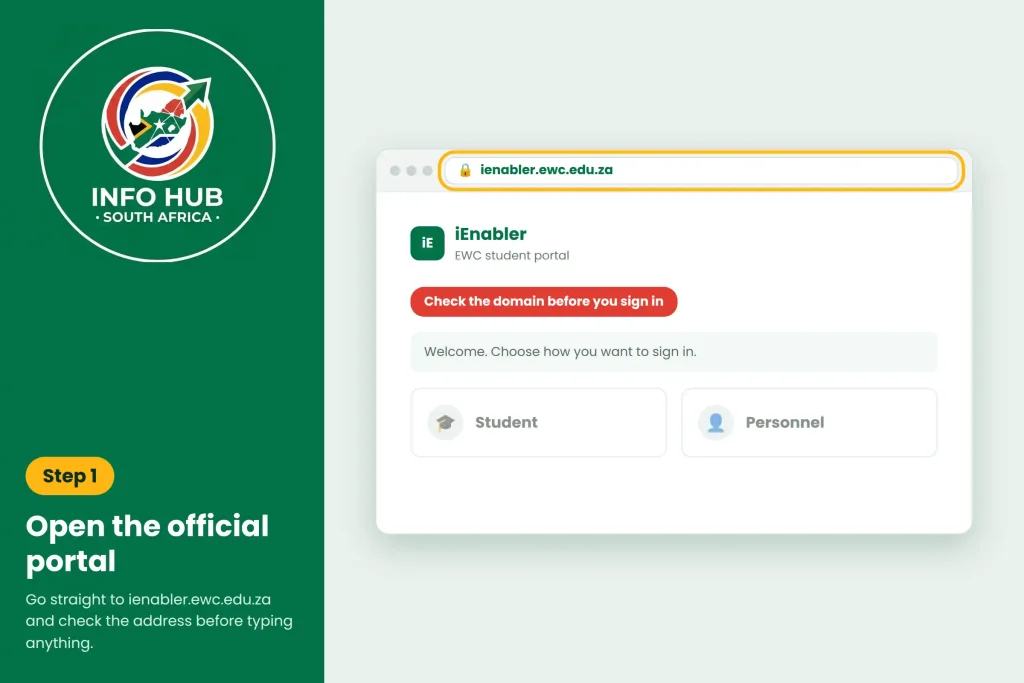
Check the domain before entering any personal information. The official login page is hosted on ienabler.ewc.edu.za, which is different from the main EWC website domain.
This distinction matters because searches such as ienabler ewc edu za login may return several pages or references. Going directly to the official portal reduces the risk of using an unofficial login page.
Step 2: Choose the Correct User Type
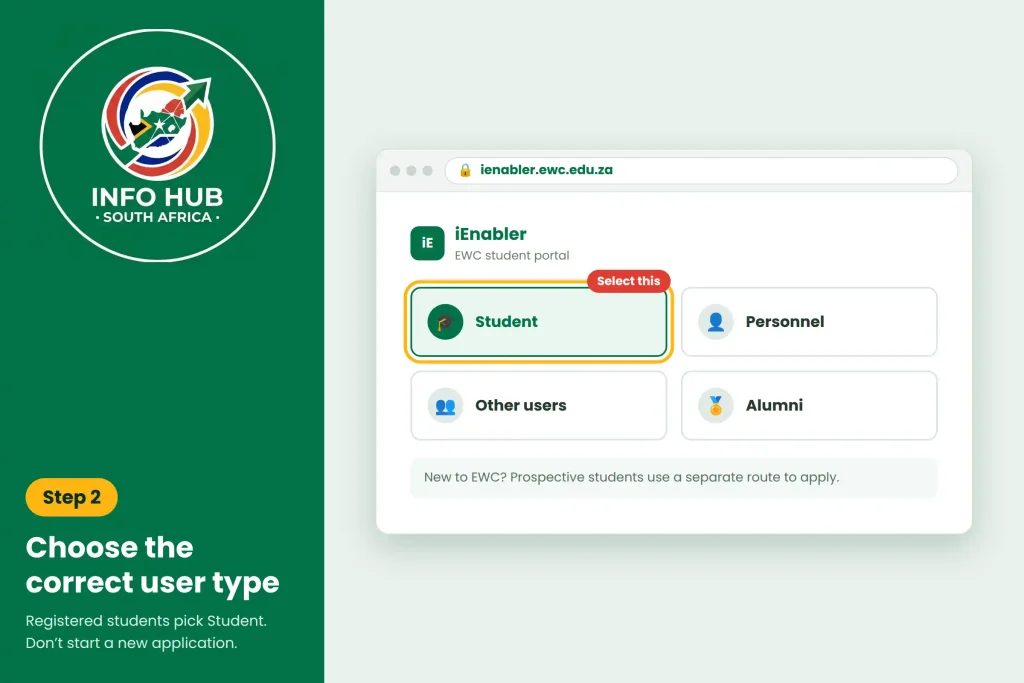
The official iEnabler page presents different access categories. Registered users can select the Student option, while the portal also provides options for personnel, other users and alumni. Prospective students are given a separate route for applying and other self-service functions.
If you are already registered at EWC, use the registered-student login rather than creating another application unnecessarily.
Step 3: Enter Your Student Number
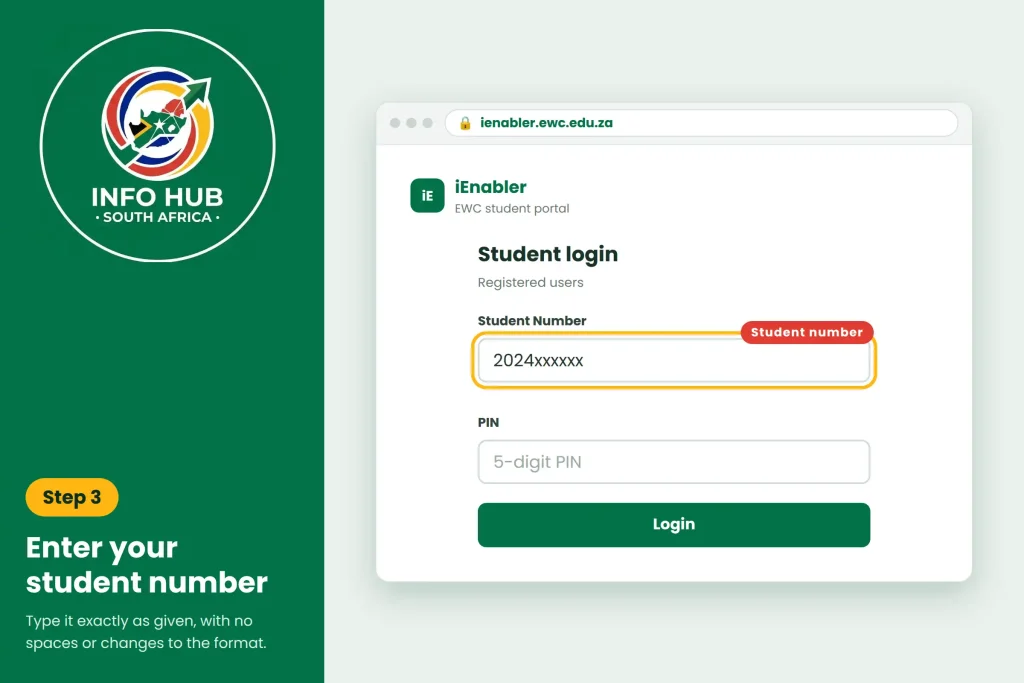
The registered-user section asks for your Student Number.
This is why the search phrase ewc login using student number is closely related to the normal portal process. Your student number identifies your account within the EWC system.
Enter it carefully. Avoid adding spaces or changing the number’s format.
Step 4: Enter Your PIN
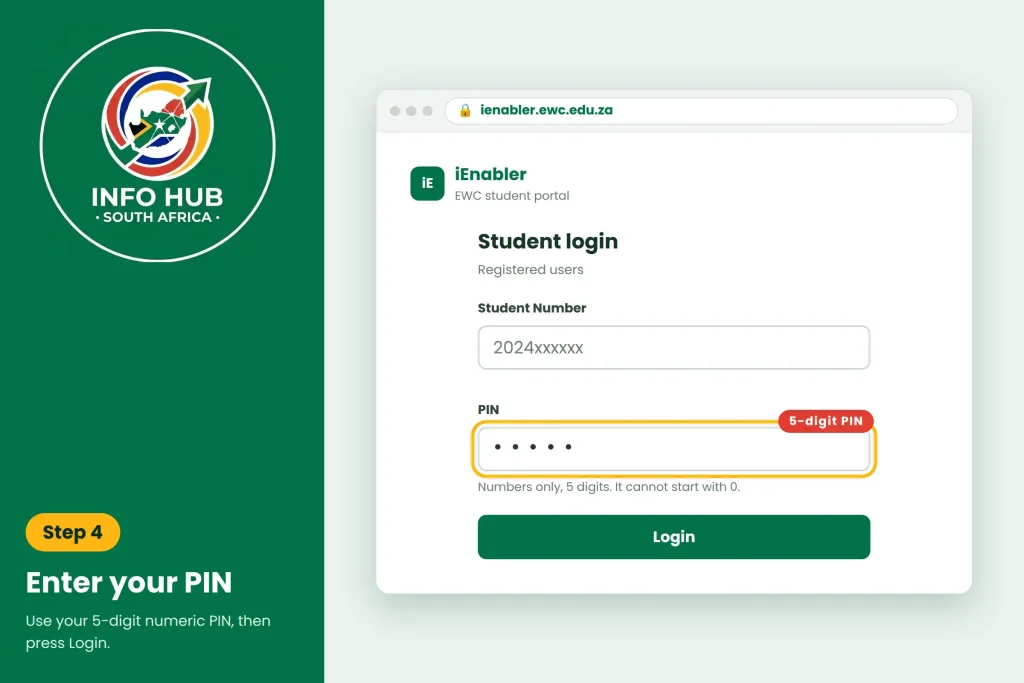
The official portal specifies a 5-digit numeric PIN. It also states that the PIN should not start with zero.
Enter the PIN exactly as provided for your account and then proceed with the login.
Security tip: Never publish your student number and PIN together on social media, public forums or messaging groups. Your login credentials should remain private.
EWC Student Portal Login 2026
If you’re searching for ewc student portal login 2026, the process still centres on the official EWC iEnabler portal. The important thing is to use the current official address rather than relying on an old bookmarked page or an unofficial website.
The official college website is active in 2026 and continues to publish current announcements, programme information and student-related information.
Why Use the Official EWC Website?
The main EWC website is useful when you need college-wide announcements, programme information, campus details or official contact information. The iEnabler page is the more direct destination when your task specifically involves the student administration system.
What Can You Do Through the EWC Portal?
The exact options visible to a user can depend on their account and the college’s current processes. However, EWC’s official portal identifies several important self-service functions.
Applications
Prospective students can use the system to apply and interact with application-related services. This is particularly relevant if you’re looking for an ewc application status check.
Registration
The official portal also provides registration functionality. EWC’s Annual Report confirms that iEnabler forms part of the college’s online registration system.
Personal Information
The iEnabler portal allows users to change personal information through its self-service functions, according to the official portal.
Academic Information
Academic and other information can also be accessed through the system. This is relevant when students are looking for ewc student portal login results or other academic information.
Payments
The official portal also lists payment functionality among its available self-service services.
EWC Student Portal vs Main EWC Website
It is easy to confuse the two addresses, especially when searching for ewc student portal login.
| Website | Best used for |
|---|---|
| EWC official website | College news, programmes, campuses and official information |
| EWC iEnabler | Student and prospective-student self-service |
| Student login | Registered-user access using student number and PIN |
The college’s official website provides general institutional information, while the iEnabler page provides the dedicated self-service interface.
How to Check Your EWC Application Status
One of the main reasons applicants search for ewc application status check is to find out whether their application has progressed after submission.
EWC’s official iEnabler system provides prospective students with online application-related services. The portal is also used as part of EWC’s online admissions and registration process.
To begin, go directly to the official portal:
From there, select the appropriate option for a prospective or registered student and follow the instructions displayed by the portal.
EWC Application Status Check: What to Look For
After accessing your account, look for the section relating to your application or student information. Depending on your account and the stage of the admissions process, the information available to you may differ.
When checking your status, make sure you are using the same details associated with your original application. Creating another account simply because you cannot immediately see an application can create unnecessary confusion.
A useful approach is:
- Open the official EWC iEnabler portal.
- Select the relevant prospective-student or registered-student option.
- Enter the requested identification or reference details.
- Access your application information.
- Review the latest status displayed.
- Follow any outstanding instructions shown by EWC.
Important: The supplied EWC information confirms that the portal supports applications and application-related services, but it does not provide a fixed list of every possible status message. Therefore, applicants should rely on the status actually displayed in their official account rather than assuming that a particular wording means acceptance or rejection.
EWC Student Portal Login Status Check
The phrase ewc student portal login status check can refer to two different things.
First, an applicant may want to check the status of an EWC application. Second, a registered student may want to access information associated with their student account.
These are related, but they are not necessarily the same process.
If you have already applied but have not yet registered as a student, use the prospective-student route available through the official iEnabler system. If you have received a student number and are a registered student, use the student login section.
This distinction is important because entering the wrong type of account can make the portal appear confusing.
A Simple Way to Identify Your Route
| Your situation | What to use |
|---|---|
| You want to submit an application | Prospective student services |
| You have already applied | Application-related services |
| You have a student number | Registered student login |
| You need academic information | Student account |
| You need registration services | Student/iEnabler services |
EWC’s official iEnabler page separates prospective-student services from registered-user login, making it important to choose the option that matches your current relationship with the college.
What If Your EWC Student Portal Login Does Not Work?
A failed ewc student portal login does not always mean that your account is invalid.
There are several basic things worth checking before contacting the college.
Check Your Student Number
Make sure you have entered the correct student number. A single incorrect digit can prevent the portal from identifying your account.
If you have more than one number from different EWC communications, use the number specifically associated with your student account.
Check Your PIN
The official portal requires a five-digit numerical PIN.
Do not add spaces or other characters. Also remember the official instruction that the PIN must not start with zero.
Confirm You Are Using the Official Portal
Search results can contain third-party pages that discuss EWC. They are not the same as the official student administration system.
Forgot Your EWC PIN? Start With the Official Portal
If you cannot remember your PIN, avoid repeatedly guessing different numbers.
Instead, use the recovery or PIN-related option provided on the official EWC portal if it is available for your account.
The supplied information indicates that users can access the portal using a five-digit PIN, but it does not establish a universal recovery procedure or guarantee that a PIN will always be sent through a particular method.
For that reason, don’t rely on instructions from unofficial blogs that claim a specific SMS, email or reset process unless that procedure is shown by EWC itself.
Before Trying to Recover Access
Have the following information available:
Keep your login information private throughout the process.
EWC Student Portal Login Using Student Number
The phrase ewc login using student number describes one of the key parts of the registered-user login process.
The official iEnabler page specifically provides a student-number field for registered users.
This means you should not normally need to search for a separate third-party “student number login” page.
Use the official EWC iEnabler page and enter your student number in the registered-user section.
Student Number vs Application Reference
Applicants should also be careful not to confuse a student number with an application or reference number.
The correct identifier depends on the account type and service you are accessing. If the portal asks for a particular number, use the identifier requested on that specific page rather than substituting another number.
This is especially important for applicants who have started the admission process but have not yet become registered students.
Common EWC Portal Problems and What to Try
| Problem | What to check |
|---|---|
| Login rejected | Recheck your student number and PIN |
| Forgot PIN | Use the official recovery option shown on the portal |
| Wrong account type | Select prospective or registered student correctly |
| Application not visible | Confirm you’re using the account connected to your application |
| Page will not load | Refresh and try again later |
| Unofficial login page | Return to the official EWC iEnabler address |
| Academic information unavailable | Confirm that you are logged into the correct student account |
Not every portal problem can be fixed from the login screen. If your credentials are correct but the account still cannot be accessed, contacting EWC directly is the safer next step.
EWC Online Application and Registration
EWC’s official documentation confirms that iEnabler plays an important role in the college’s online application and registration process. The college’s Annual Report describes online applications through the system and online registration for accepted students.
That means the ewc student portal can be relevant at different stages of your college journey.
You may encounter it when:
The process is not necessarily identical for every applicant, so always follow the instructions associated with your own EWC account.
Keep Your EWC Details Secure
Your student number and PIN provide access to account information. Treat them as private credentials.
Avoid:
If you use a shared computer, log out after completing your session.
EWC Student Portal: What to Do After You Log In
Once your ewc student portal login is successful, take a moment to identify the services available to your account. The iEnabler system is designed as a self-service platform, so the options shown to you may depend on whether you are a prospective applicant, registered student or another authorised user.
For registered students, the portal can provide access to student administration and academic information. EWC’s official information also identifies applications, registration, personal information, academic information and payments among the functions associated with its online self-service system.
If you are using the portal for a particular task, such as an ewc application status check or checking academic information, look for the relevant option rather than changing account details unnecessarily.
When You Should Contact EWC
Sometimes an issue cannot be solved through the ewc student portal login page itself.
Contact EWC through its official channels if:
The supplied EWC information lists the college’s central enquiries number as +27 (0)11 323 1600 and the general email as [email protected].
EWC Campuses and Student Support
Ekurhuleni West TVET College operates several campuses in Gauteng. The supplied information identifies:
The official EWC website provides college and campus information if you need to identify the appropriate location or find further institutional details.
EWC Student Portal Login: Final Checklist
Before finishing your session, use this checklist:
The most important point is simple: use the official portal for the task you need to complete and avoid unofficial login pages.
FAQs
Conclusion
The EWC iEnabler portal provides a central place for prospective and registered students to manage important college-related services online. Whether you need to complete an EWC student portal login, check an application, access registration information, or view available academic details, the official iEnabler system should be your first point of reference.
For the most accurate and up-to-date information, always use the official EWC website and iEnabler portal when entering your student number or other personal details. This helps you avoid outdated instructions and unofficial websites that may provide incorrect login information.
If you need additional guidance, Info Hub South Africa also provides easy-to-follow information about South African universities, TVET colleges, applications, student portals, status checks and other education-related services. Our goal is to make complicated online processes easier to understand by bringing useful information together in a clear and practical format.
For official account access, however, always rely on Ekurhuleni West TVET College’s own systems. Info Hub South Africa is an informational resource and does not replace the official EWC portal or college support channels.
Read More
GEHS Login South Africa 2026: Online Login, Password Reset & Status Check Guide
Television Licence South Africa: Online Application, Status Check & SABC TV Licence Guide 2026
UMP Moodle Login South Africa 2026: Student Portal Access Guide