UKZN Student Central Login South Africa: Student Portal Guide 2026
UKZN Student Central is the online gateway that helps University of KwaZulu-Natal students access important academic and administrative services in one place. Through student central, students can manage tasks such as registration, checking academic results, applying for accommodation, and viewing their fee statements.
The platform also provides convenient access to essential student services and information. If you are searching for student central UKZN login, UKZN status check, or information about the student iEnabler, using the correct university system is important for accessing your student records and completing relevant academic tasks.”Visit Homepage for more”.
What Is UKZN Student Central?
UKZN Student Central is an online platform that brings together many of the academic and administrative services students need during their studies at the University of KwaZulu-Natal. The student central system allows students to manage important university tasks without having to access separate services for every request.
What Can You Do on Student Central?
The platform can be used for several student-related activities, including:
For students looking for a student central UKZN login, it is important to use the correct university access point and have the required student credentials available. Depending on the task, you may also encounter services such as student iEnabler when managing specific academic or administrative functions.
The UKZN student system is designed to bring key services together, making it easier to manage registration, academic information, financial details and other university-related tasks from one place.
How to Log Into UKZN Student Central
Accessing UKZN Student Central only takes a few steps. Follow the process below to reach your account and continue with your student services.
Step 1: Open the UKZN Student Central Website
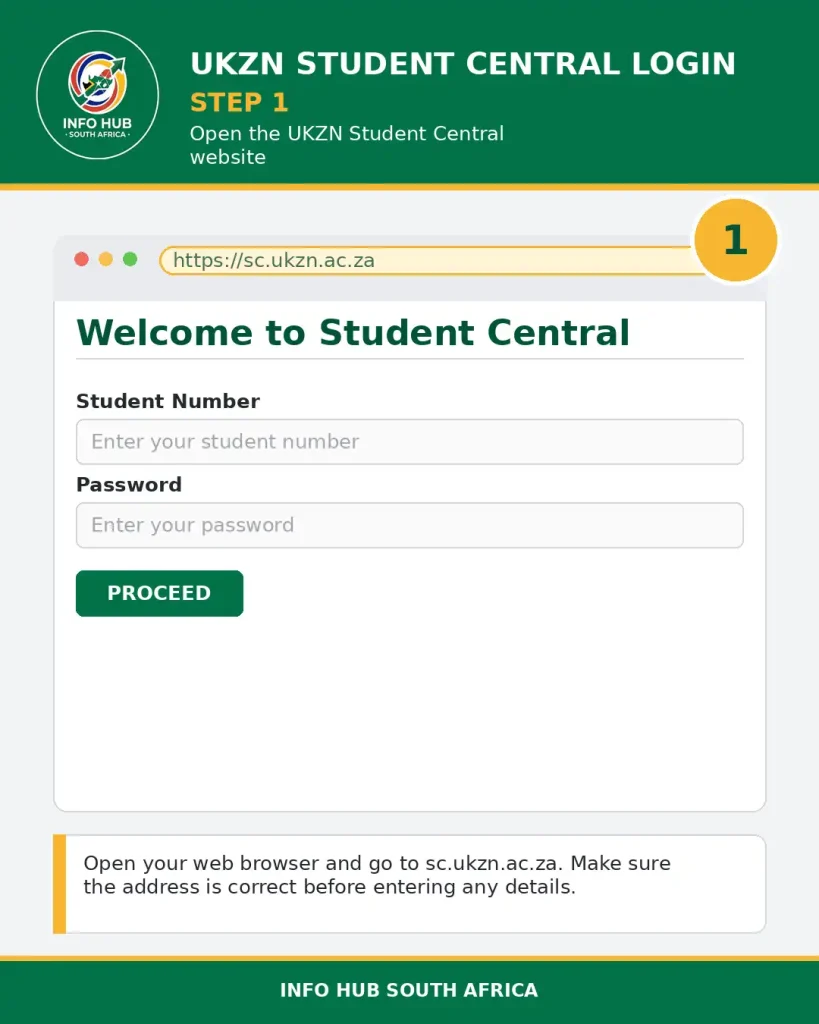
Open your preferred web browser and go directly to the official UKZN Student Central page at sc.ukzn.ac.za. Make sure you are using the correct website before entering your login details.
Step 2: Enter Your Student Number
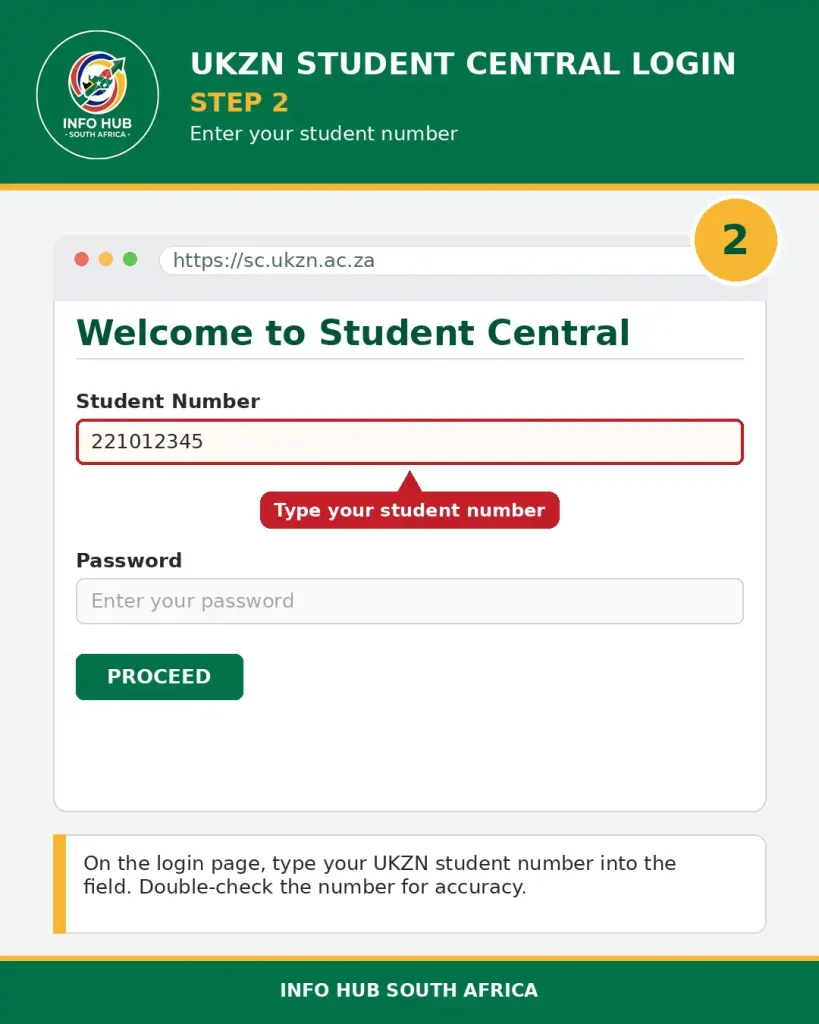
On the student central UKZN login page, enter your UKZN student number in the designated field. Check the number carefully before continuing.
Step 3: Select “Proceed”
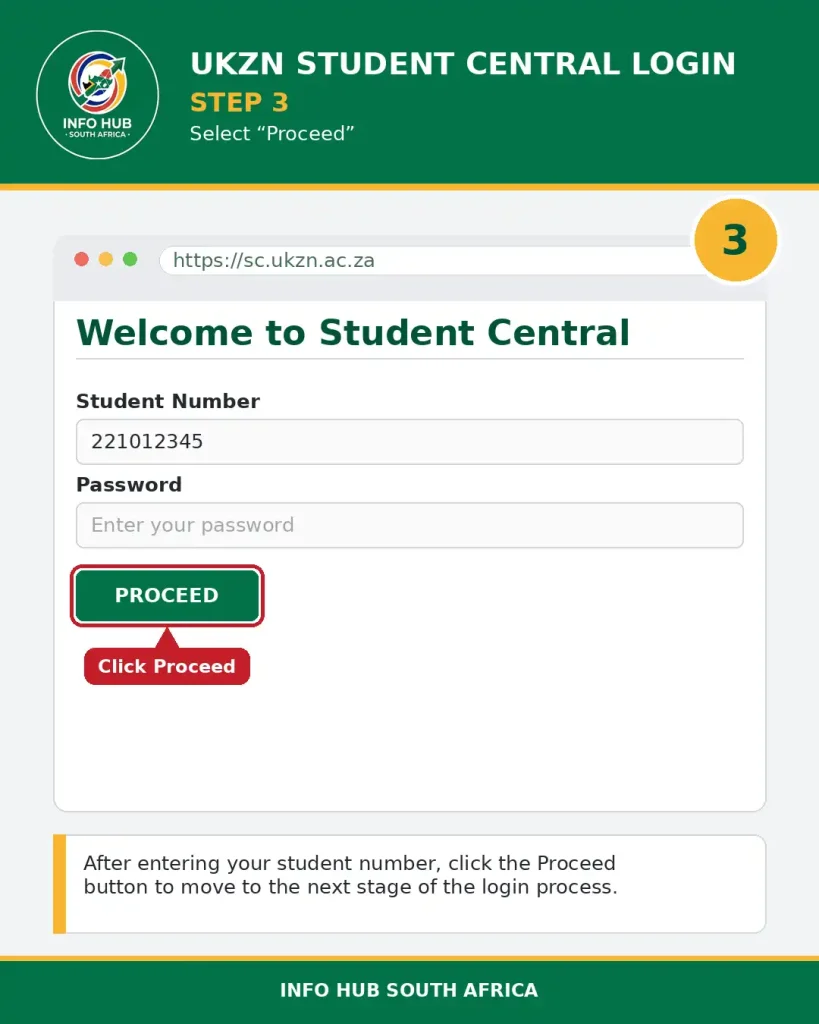
After entering your student number, click the Proceed button. This will take you to the next stage of the login process.
Step 4: Enter Your Password
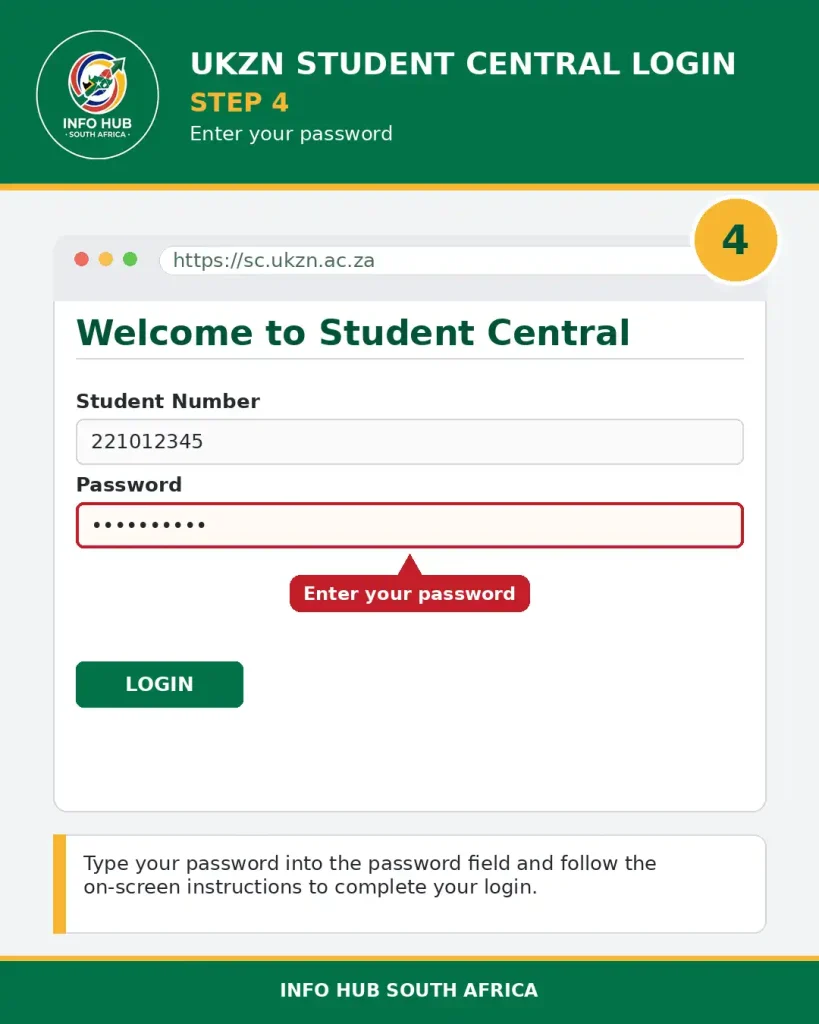
Enter your password in the required field and follow the on-screen instructions to complete the login. Once your credentials are accepted, you can access the services available through your student account.
Useful UKZN Student Links
UKZN Student Central also provides access to several useful university services and resources, including:
The student central login page is shown in the screenshot below, which can help you identify the correct page before entering your details.
Accessing the Student Portal and Administrative Tools
Managing your day-to-day academic responsibilities relies heavily on secure online hubs. Getting familiar with these platforms saves time and keeps your studies on track.
Essential Student Services Available
The university provides a broad suite of digital and physical services designed to support you from enrollment until graduation.
| Service Category | Key Features & Functions |
| Course Registration | Register for modules, view lecture timetables, and manage your academic program structure. |
| Academic Records | View grades, official transcripts, track academic progress, and check graduation requirements. |
| Financial Services | Check account balances, make secure online payments, and view detailed fee statements. |
| Personal Information | Update contact details, manage emergency contacts, and maintain personal data accuracy. |
| Applications & Forms | Submit digital applications for student residence, study permits, and ancillary services. |
| Account Security | Change passwords, adjust security settings, and oversee overall account access privileges. |
Overview of Campus Locations and Focus Areas
Different faculties and specialised programmes are distributed across distinct campuses, each offering tailored facilities to match your field of study.
How to Reset Your UKZN Password
If you need to change your UKZN Student Central password, you can use the Online Password Self Service at passwordchange.ukzn.ac.za. This service is available 24/7 from both on-campus and off-campus locations.
To use the password self-service option, you must know your current password. If you still have access to your account, enter your existing login details and follow the instructions to create a new password.
What to Do If You Forgot Your UKZN Password
If you cannot remember your password, the source information provides two options for requesting a new one:
When requesting a password by email, include a scanned copy of your card and your mobile phone number. A new password will then be sent to you by SMS.
Once you receive the new password, return to the Online Password Self Service at passwordchange.ukzn.ac.za. Log in using the one-time password and then change it to your preferred password.
Reset Your UKZN Network Password Using the MyUKZN Mobile App
The MyUKZN Mobile App provides another password-reset option for registered users. You must already have the app installed on your mobile phone or tablet before using this method.
The app also requires your mobile number to have been captured in the ITS iEnabler system because that number is used to send the SMS needed during the process.
Follow these steps:
Step 1: Open the MyUKZN App
Log in to the MyUKZN Mobile App using your registered account.
Step 2: Open the Self-Help Menu
Find the Self-Help option in the app menu. If it isn’t visible, swipe to the right on one of the menu items to access additional options.
Step 3: Select “Change My LAN Account Password”
Choose Change My LAN Account Password from the Self-Help menu to begin the password-change process.
Step 4: Create a New Password
Enter your new password in both required fields, then tap Submit to save the change.
MyUKZN App
The MyUKZN app brings together a range of University of KwaZulu-Natal student and university information in one mobile platform. Students can use the app to access course and examination schedules, check admission and funding application status, view graduation information, and use various self-service features.
The app also includes emergency functions that can help students contact campus security when there is an immediate threat, along with contact information for other university services.
Key Features of the MyUKZN App
The app provides several features designed to support students during their time at UKZN, including:
Students who experience problems accessing student central or other UKZN services can visit an ICS Walk-In Centre on campus for assistance.
FAQs
Conclusion
Accessing your academic tools through the UKZN student central login is a straightforward process, making the main hub an indispensable asset for every student at the University of KwaZulu-Natal. By mastering these digital platforms, you can easily streamline your academic administration and maximise your time on campus.
To stay ahead with the latest updates, step-by-step registration walkthroughs, and reliable portal guides, you can always turn to Info Hub South Africa to support you through every stage of your educational experience.
Read More
SIS Portal South Africa: Login, Registration & Student Guide 2026
Wits Self Service Portal South Africa: Login, Application Status & Student Guide 2026
UFH Blackboard Login South Africa: Student Portal Guide 2026
Learners Licence Booking South Africa 2026: Requirements, Steps & Fees