SASSA R350 Change Banking Details Online 2026: Complete South Africa Guide
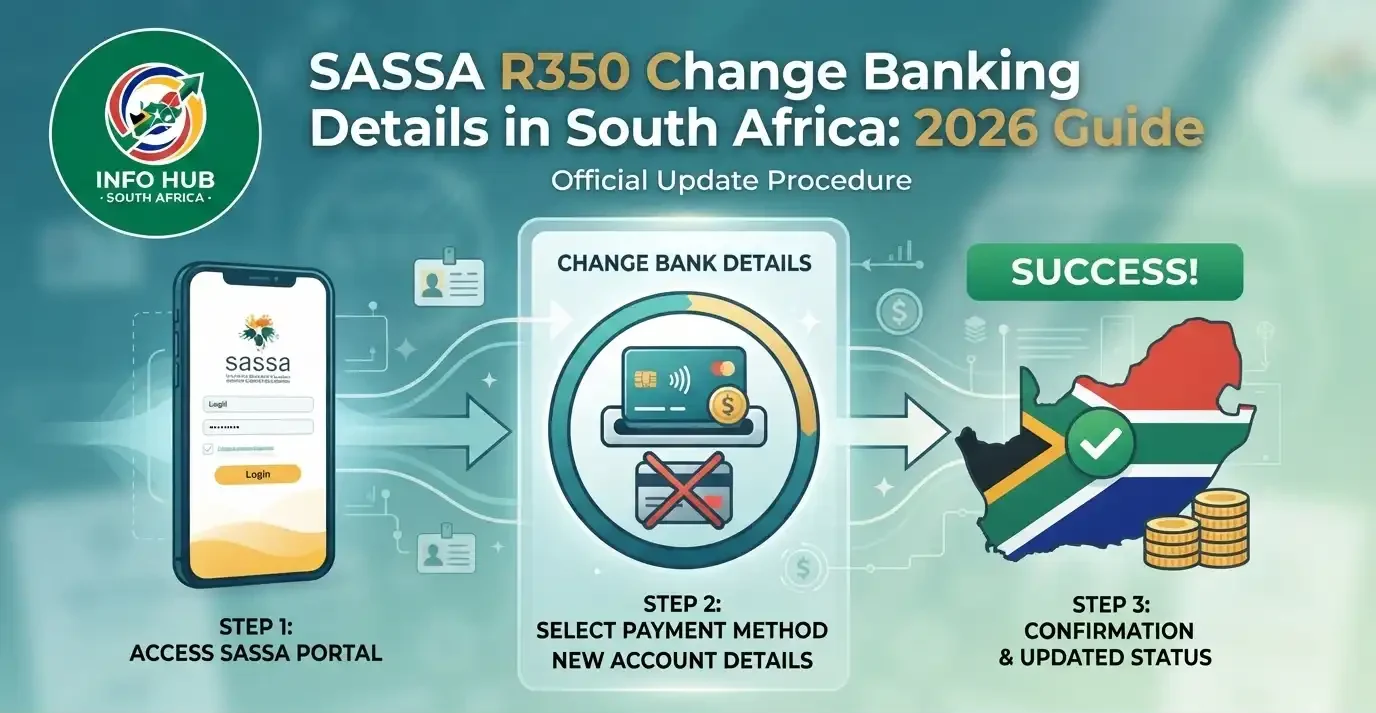
You can update your SASSA SRD banking details online through the official SRD platform, by phone, or by visiting a SASSA office. If you need help with a SASSA R350 Change Banking Details request, make sure the new bank account information is entered correctly before submitting it.
After you submit the change, SASSA normally verifies the new account within 3 to 7 working days. Once the verification is completed successfully, future SRD payments can be directed to the updated bank account.
Important: Try to submit your banking details change at least 10 working days before your expected payment date. This gives SASSA enough time to process and verify the new information. If verification is still pending when payments are processed, your payment may be delayed until the next payment cycle.
If you are waiting for an update after changing your banking information, you can also perform a SASSA status check or SRD status check to see whether your application or payment information has changed.”Visit Homepage for more”.
Related Post
SASSA Status Check 2026: SASSA Status Check for R370 & SRD Status Online
Which Banking Details Can You Change?
If you need a SASSA R350 Change Banking Details request, several types of payment information can be updated. The available options include:
| Banking detail | Can it be changed? |
|---|---|
| Bank name | Yes |
| Account number | Yes |
| Account type (savings or cheque) | Yes |
| Bank account to Postbank card | Yes |
| Postbank card to bank account | Yes |
| Bank account to cash send or money transfer | Yes |
The bank account you provide must be registered in your own name, matching the name shown on your South African ID. SASSA checks the account holder information during verification, so you cannot use a bank account belonging to a family member, partner or friend, even if they have given you permission.
Method 1: Update Your Banking Details Online
For most applicants, the online option is the most convenient way to change SRD payment information. You can use a mobile phone, tablet or computer with an internet connection.
Step 1: Visit the SRD Website

Open srd.sassa.gov.za using your preferred browser.
Step 2: Sign In

Enter your 13-digit South African ID number and the OTP sent to your registered mobile number.
Step 3: Choose the Banking Update Option
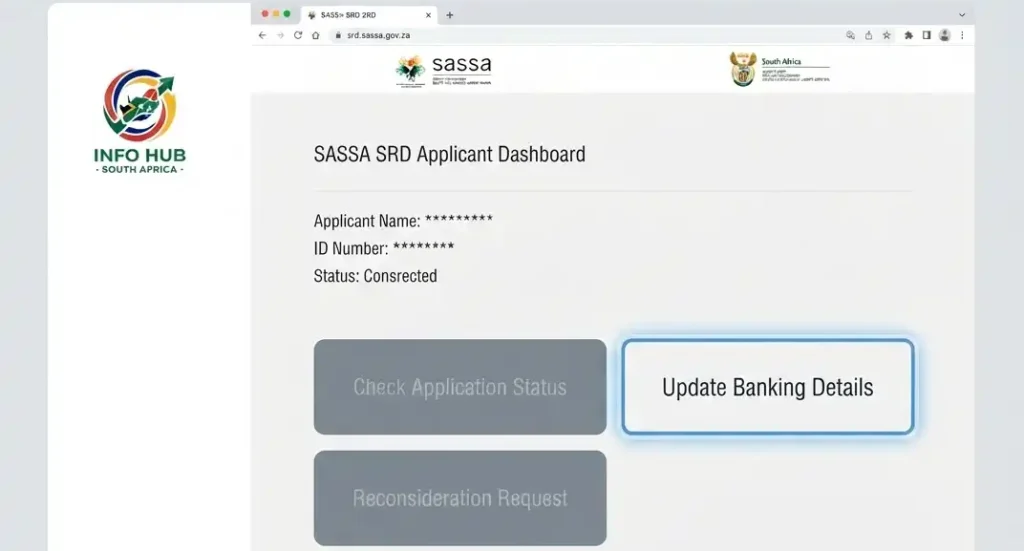
After accessing your dashboard, select “Update Banking Details” from the available options.
Step 4: Enter the New Information

Provide the requested details, including:
Step 5: Submit the Change
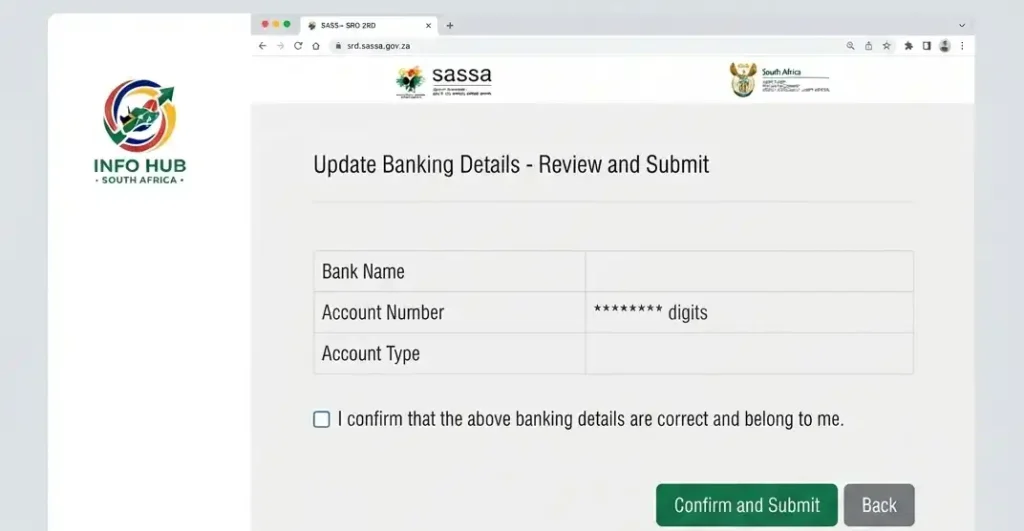
Review the information carefully and select Submit. SASSA will then send the new banking information for verification.
Step 6: Allow Time for Verification

Banking verification can take around 3 to 7 working days. While the process is underway, your account may display “Bank Details Pending”.
Step 7: Check Your Payment Information

After successful verification, your next eligible SRD payment should be directed to the newly verified account.
Important: Avoid submitting several banking changes within a short period. Repeated updates may result in additional verification or delays. It is better to submit the correct information once and wait for the verification process to finish.
Method 2: Change Your Banking Details by Phone or at a SASSA Office
If you cannot use the online service or access the Moya app, you can also seek assistance by telephone or visit a SASSA office.
Change Banking Details by Phone
You can contact the SASSA toll-free helpline on 0800 60 10 11, available Monday to Friday from 08:00 to 16:00. A SASSA representative can guide you through the process.
Before calling, keep your ID document and new bank account information nearby so you can provide the required details during the call.
Visit a SASSA Office
Another option is to visit your nearest SASSA office in person. Take the following with you:
A SASSA official can assist with updating the information. Visiting an office may be particularly useful if the online service does not accept your request or you have previously experienced an identity-verification problem.
After making the change, you can use a SASSA status check or SRD status check to monitor the progress of your application and payment information.
What Documents Can You Use as Bank Account Proof?
If you’re completing a SASSA change banking details for R350 request in person, you’ll need evidence showing that the bank account exists and is registered in your name. Having the correct proof with you can help avoid unnecessary delays when SASSA processes the banking update.
SASSA accepts several forms of bank account proof:
| Document | Accepted? | Notes |
|---|---|---|
| Bank-stamped letter | Yes — preferred | Ask the bank to stamp and date the letter |
| Bank statement from the last 3 months | Yes | Should display your full name and account number |
| Bank card in your name | Yes | Using it together with a bank statement is recommended |
| Screenshot from a banking app | No | A printed or official document is required |
| Letter from a relative | No | The bank account must belong to you |
What Must Appear on the Document?
Before visiting a SASSA office, check that your proof of account clearly displays:
The details should be clear and readable so they can be checked against your identification information.
What If Your Bank Name and ID Name Are Different?
If the name registered on your bank account is different from the name on your ID, you may need to provide additional supporting documents. For example, someone whose bank account still uses a maiden name after marriage may need a marriage certificate to explain the difference.
Once your banking information has been submitted, you can carry out a SASSA status check or SRD status check to monitor your application and payment information.
Universal Bank Branch Codes for SASSA Payments
If you are updating payment information through an older SASSA terminal, paper form, or an in-person process, you may be asked for your bank’s universal branch code. The reference below lists the codes provided for the major banks in the source material.
| Bank | Universal branch code |
|---|---|
| Capitec Bank | 470010 |
| FNB (First National Bank) | 250655 |
| Nedbank | 198765 |
| Standard Bank | 051001 |
| ABSA | 632005 |
| TymeBank | 678910 |
| African Bank | 430000 |
| Postbank | 460005 |
| Bidvest Bank | 462005 |
Online banking update: The SRD online portal at srd.sassa.gov.za generally requires you to choose your bank from a list rather than enter a branch code. Branch codes are mainly relevant to older paper-based processes and certain third-party payment systems.
If you are completing a SASSA R350 Change Banking Details request online, check the information carefully before submitting it. After the update, a SASSA status check or SRD status check can help you monitor the progress of your payment information.
Capitec as an Alternative Banking Choice
Capitec is presented in the source material as a popular option among SRD recipients. Its basic Global One account has no monthly fee, and physical branches are available in many towns and townships.
Opening a Capitec Global One Account
The supplied information states that you can:
After receiving your account number, go to srd.sassa.gov.za to update your payment details. Select “Capitec Bank”, enter the account number and choose “Savings” as the account type.
One advantage of Capitec compared with a kiosk-based banking model is the availability of physical branches, which may be useful when you need face-to-face assistance.
TymeBank for SRD Payments
TymeBank is another banking option mentioned for SRD recipients. The source material states that its accounts can be used for SASSA SRD payments and can be opened at self-service kiosks located inside participating Pick n Pay and Boxer stores.
Reasons given for considering TymeBank include:
Once the account is active, you can use the banking information when updating your payment method through the SRD portal.
Can You Receive SRD Payments Through Cash Send?
A bank account isn’t the only payment method described in the supplied information. Eligible recipients may also choose cash send or money transfer to receive their SRD payment through their mobile number.
To use this option:
When changing your payment method, select the cash-send or money-transfer option through srd.sassa.gov.za. Keep in mind that fees may apply at some collection points.
Changing Bank Details for Other SASSA Grants
The SRD online portal is intended for SRD R370 recipients. If you receive another type of SASSA grant, such as the Older Persons, Disability, Child Support, Foster Child or Care Dependency Grant, the banking-details process described in the source is different.
Older Persons, Disability and Care Dependency Grants
For these grants, the supplied information states that banking details must be changed in person at a SASSA office rather than through the SRD online portal.
Take:
The stated processing period is generally 5 to 10 working days after visiting the office. Once the change has been confirmed, the next payment is sent to the updated account.
Child Support Grant
For a Child Support Grant, the caregiver receiving the payment on behalf of the child must visit a SASSA office to request the banking update.
The caregiver should bring:
If the person responsible for the child is changing as well, a full change-of-caregiver process is required. A banking update alone does not cover a change in caregiver.
SRD vs Other Grant Banking Updates
The main difference between the SRD grant and the other grant types covered in the source material can be summarised as follows:
| Grant type | Banking change method | Stated processing time |
| SRD R370 | Online through srd.sassa.gov.za or at a SASSA office | 3 to 7 working days |
| Older Persons Grant | SASSA office only | 5 to 10 working days |
| Disability Grant | SASSA office only | 5 to 10 working days |
| Child Support Grant | SASSA office only | 5 to 10 working days |
| Care Dependency Grant | SASSA office only | 5 to 10 working days |
Tip: If you have recently changed your payment information, allow the stated processing period before assuming there is a problem. You can then perform a SASSA status check or SRD status check to review the latest information available for your application.
Can You Update Bank Details While Your Application Is Pending or Declined?
Your ability to change payment information depends on the current status of your SRD application. Changing your bank details does not automatically change an eligibility decision.
If Your Status Is Pending
Yes. You can still update your banking information through srd.sassa.gov.za while your application is pending. The banking change is queued and can be applied when the application is approved and a payment is processed.
If you’ve submitted a SASSA R350 Change Banking Details request, allow time for the new account information to go through verification before expecting a payment to reach it.
If Your Status Is Declined
You can still change your banking details, but updating the payment method does not overturn a declined application. A declined decision is linked to eligibility checks such as income, other grants or UIF rather than the bank account used for payment.
If you believe the decision is incorrect, you need to submit an appeal through the SRD platform.
If Your Status Is Approved
When your application is approved, a verified banking update normally takes effect from the next payment cycle. If you make the change close to the payment date, the current month’s payment may still be sent to the previous account.
A SASSA status check can help you monitor whether the banking update has been processed.
How Often Can You Change Your Banking Information?
SASSA does not state a fixed annual limit for changing SRD banking details in the supplied information. However, making repeated changes can create additional verification delays.
Keep these points in mind:
Best practice: Only change your banking details when necessary. Submit the correct information, wait for verification, and check that the next payment reaches the new account before making another change.
What Should You Do After Your Bank Details Are Verified?
When the status moves from “Bank Details Pending” back to “Approved”, the banking verification process has been completed.
You can then confirm that the payment is going to the intended account by following these steps:
- Check your SRD status: Visit srd.sassa.gov.za and confirm that the application shows “Approved” together with a payment date.
- Wait for the scheduled payment date: Your first payment to the new account should be made on the next approved payment date.
- Check the new account: Review your bank account on or after the scheduled payment date.
- Payment missing? Wait one full business day, as processing can continue until the end of the day. If the payment is still missing, call 0800 60 10 11.
If a payment is sent to your previous bank account even though the new details have already been verified, contact SASSA as soon as possible. The supplied information describes this as an edge case where SASSA may trace and redirect the funds, although this can take 7 to 14 working days.
What If You No Longer Have Your Registered Phone Number?
An online banking update requires an OTP sent to the mobile number registered with your SASSA application. If you no longer have access to that number, you cannot complete the banking update online.
You have two options:
1. Update Your Phone Number
You can first try to change your registered phone number through srd.sassa.gov.za. The supplied information notes that this normally requires the old number for OTP verification.
If you no longer have the old SIM, follow the relevant phone-number update process instead of trying to bypass the OTP requirement.
2. Visit a SASSA Office
You can visit a SASSA office in person. Staff can verify your identity using your ID document and assist with updating your phone number and banking information without relying on the online OTP process.
Do not use another person’s mobile number for the OTP. The OTP request is linked to the registered number, so using a different number will not complete the verification.
When Should You Submit a Banking Change?
Timing matters when making a SASSA R350 Change Banking Details request. If your new banking information is still under verification when the monthly payment process takes place, that month’s payment may be held or delayed.
| Action | Recommended timing |
|---|---|
| Ideal time to submit | 10 or more working days before payment |
| Minimum safer window | 7 working days before payment |
| Submitted after the cutoff | May only take effect for the following month’s payment |
Before submitting a change, check your scheduled payment date on the SRD platform. This gives you a better idea of whether there is enough time for the banking verification process.
After submitting the update, you can perform an SRD status check to monitor the application and payment information.
What Does SASSA Check During Banking Verification?
The 3 to 7 working day verification period is used to confirm that the new payment information is valid. During this process, SASSA checks three main things:
- The account number is valid: The bank account exists with the bank selected during the update.
- The account belongs to you: The account holder’s name must match the name on your ID exactly.
- The account can receive payments: The account needs to be active and capable of receiving deposits.
While the verification is underway, your status may display “Bank Details Pending”. According to the supplied information, payment is not made to either the old or newly submitted account during this verification window. After the banking details are approved, the next payment is directed to the new account.
If you’ve recently completed a SASSA R350 Change Banking Details request, there’s no need to submit another change simply because the status remains pending during the normal verification period.
What Happens If Verification Is Pending or Fails?
Verification Is Still Pending on Payment Day
If your banking verification has not finished by the scheduled payment date, the payment is typically held until the details are successfully verified and the next payment batch is processed.
The supplied information states that the money is not lost; it remains held until your banking information has been confirmed.
Your Banking Verification Fails
A verification failure can happen when information such as the account number or account-holder name does not match the required records, or when the account is inactive.
If verification fails, the status changes back and you need to submit corrected banking information. A failed attempt does not permanently prevent you from trying again.
Common Reasons for Failed Verification
Check the following before submitting another banking update:
Banking Details Change Not Working? Try These Fixes
If you’re having difficulty with your banking update, the problem may be linked to the information entered, verification, your registered phone number or the SRD website.
| Problem | What to do |
|---|---|
| “Bank Details Pending” for more than 7 working days | Contact SASSA on 0800 60 10 11 |
| Name mismatch error | Make sure the account is registered in your exact legal name as shown on your ID |
| Account rejected | Check that you selected the correct savings or cheque account type; credit and loan accounts are not suitable |
| A relative’s account is rejected | Use a bank account registered in your own name, such as a Capitec or TymeBank account |
| Unable to log in or receive the OTP | Follow the applicable process for changing your registered phone number |
| Payment hasn’t arrived after verification | Allow 1 full business day, then contact SASSA on 0800 60 10 11 |
| srd.sassa.gov.za isn’t working | Try again early in the morning, before 08:00, or visit a SASSA office |
After making corrections, you can use a SASSA status check or SRD status check to monitor the latest application and payment information. This is especially useful after submitting another SASSA R350 Change Banking Details request.
Scam Warning: Protect Your Banking Details
SASSA will never contact you first by phone, SMS, or WhatsApp to ask you to update your banking details. If someone claims to represent SASSA and asks for your ID number, bank account details, or OTP, treat the request as a potential scam.
How These Scams Work
Fraudsters may use different methods to trick SASSA beneficiaries, including:
Ways to Keep Your Information Safe
For additional guidance on recognising and reporting fraudulent messages, Info Hub South Africa also provides a dedicated SASSA scam warning resource with practical examples and safety information.
FAQs
Conclusion
Keeping your SASSA banking details accurate is important to make sure your SRD payment can reach the correct account. Whether you are updating your bank account, changing your payment method, or resolving a verification issue, always provide information that matches your ID and allow enough time for SASSA to complete the verification process.
After submitting a banking update, use the official SRD platform to monitor your application and payment information. A regular SASSA status check or SRD status check can help you see whether your banking details have been verified and whether a payment date has been issued.
Most importantly, protect your personal and banking information. Never share your OTP or account details with someone who contacts you unexpectedly, and only use trusted SASSA channels when making changes.
For more practical information about SRD payments, banking updates, application guidance and SASSA services, Info Hub South Africa provides helpful resources to assist beneficiaries in understanding the process and avoiding common mistakes.
Read More
SASSA Change Phone Number South Africa: Step-by-Step Guide 2026
Home Affairs Online Booking South Africa 2026: Complete Appointment & Application Guide
Matric Results 2026 Online Check South Africa: Get Your NSC Results Instantly
Z83 Form South Africa 2026: Download, Complete & Submit Online