enatis South Africa 2026: Complete Guide to the Online Traffic Information System
Need to renew a vehicle licence or manage a traffic-related service without starting your journey at a licensing office? The eNaTIS system provides an online route for selected services through South Africa’s National Traffic Information System.
The Road Traffic Management Corporation (RTMC) operates the online service as part of its wider road traffic management responsibilities. RTMC describes itself as South Africa’s lead road safety agency and is responsible for coordinated road traffic management activities.
This guide focuses on the practical side of using the eNaTIS login portal. It covers registration, signing in, vehicle licence renewal, bookings, preparation, common problems and useful checks to make before submitting an online transaction.”Visit Homepage for more”.
Quick answer: To start using NaTIS traffic system online, visit the official portal, create or access your profile, and select the service available for your needs. Always check that you are using the official
online.natis.gov.zaaddress before entering personal or payment information.
What Is the eNaTIS System?
The vehicle registration services is the electronic National Traffic Information System used for road-traffic administration in South Africa. The online portal gives members of the public access to selected services without requiring every transaction to be handled at a physical licensing office.
The online service is particularly useful for motorists who want to deal with vehicle licence renewals remotely. RTMC has reported substantial growth in online vehicle-licence transactions and says registered vehicle owners can use the portal to update contact information and receive renewal reminders.
Depending on the service available to you, the portal can be used for activities such as:
The exact services and availability can change, so users should rely on the live portal rather than an old screenshot or third-party website.
Why Use eNaTIS Online?
One of the biggest advantages of the NaTIS online system is convenience. Instead of travelling to a licensing centre for every supported transaction, a vehicle owner can handle an eligible renewal from a computer or compatible mobile device.
RTMC has stated that online vehicle-licence renewal allows motorists to renew from home or an office, while the renewed licence can be delivered by courier.
The portal can also reduce unnecessary trips when an online service is available for the transaction you need. However, online access does not mean every traffic-related process can be completed remotely. Some applications, tests and identity-related processes may still require attendance at a Driving Licence Testing Centre (DLTC) or another authorised facility.
Main advantages
Convenience: You can access supported services online instead of automatically visiting an office.
Time saving: Online processing can reduce the time spent travelling and waiting for certain services.
Digital records: Your profile can keep relevant contact and transaction information connected to your online account.
Renewal reminders: RTMC has said registered vehicle owners can receive email and SMS reminders when vehicle licence renewals become due.
Online payments: The platform supports online payment for supported transactions, helping motorists complete eligible renewals without paying at a physical counter.
Before You Attempt an eNaTIS Login
A failed vehicle registration services is not always caused by an incorrect password. Registration information, browser sessions, verification requirements and account details can also affect access.
Before opening the portal, have the information you may need ready. Your exact requirements depend on the service you are using.
| What to prepare | Why it matters |
|---|---|
| Identity information | Used when creating or verifying your profile |
| Active email address | Needed for online account communication |
| Mobile number | Useful for contact and notifications |
| Vehicle details | Required when dealing with a vehicle linked to your profile |
| Payment method | Needed for transactions that require online payment |
| Reliable internet connection | Prevents interrupted sessions |
| Supported browser | Helps avoid display or session problems |
Use your legal details carefully. If information entered during registration does not match the relevant records, verification may not succeed.
A note for foreign residents
The information supplied by the user source indicates that foreign residents may use identification options such as a refugee ID or foreign passport where the portal supports those categories. Because eligibility and verification rules can depend on the specific service and records held by NaTIS, do not assume that every service available to a South African ID holder will work in exactly the same way for a foreign document.
If your information cannot be verified online, the appropriate next step may be to contact the relevant support channel or visit an authorised facility with your documents.
How to Register for an eNaTIS Profile
You need an online profile to use services that require authentication. The registration process begins from the official portal.
Step 1: Open the official eNaTIS website
Go directly to the official portal:

Avoid clicking advertisements, unofficial social-media links or unfamiliar domains that claim to provide an NaTIS online login. Check the website address before entering your ID number, password or payment information.
Tip: Bookmark the official website after confirming the address so you can return to the same portal later.
Step 2: Select the registration option
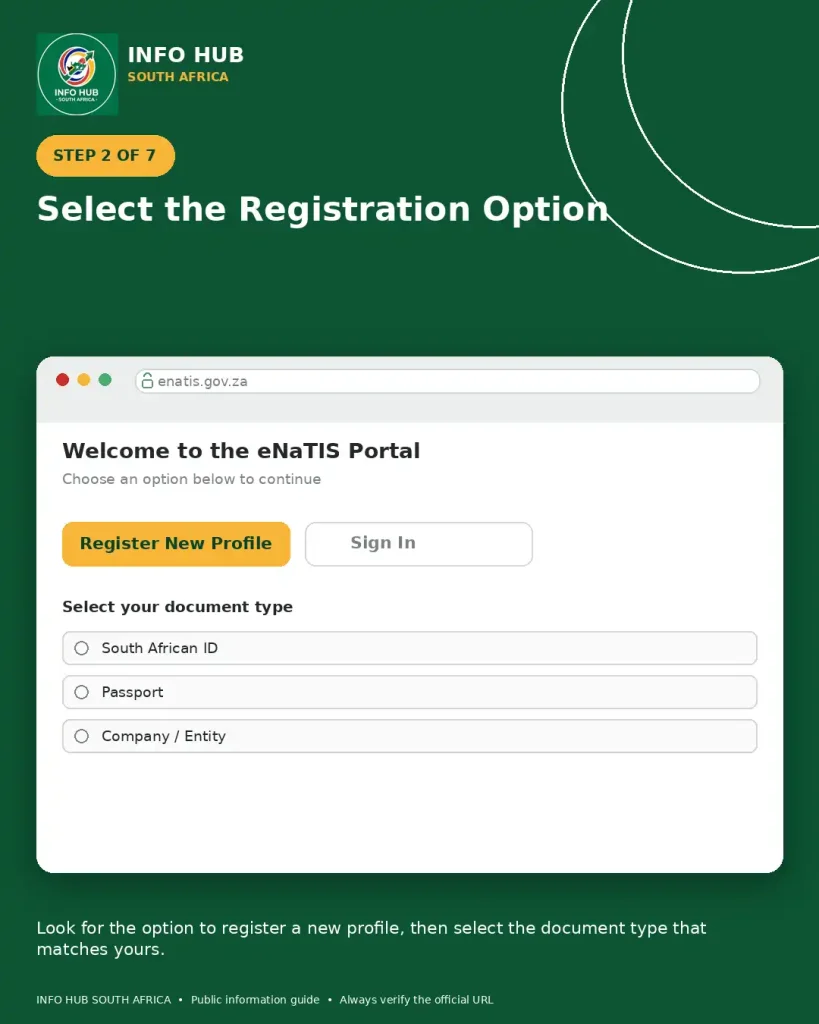
Look for the option to register a new profile. Follow the instructions displayed by the live vehicle registration services website.
The registration screen may ask you to identify the type of document you are using. Select the category that accurately represents your official documentation.
Step 3: Enter your personal information

Provide the requested personal details carefully.
Use the same spelling and identifying information that appears on your official documentation. A small difference in names, initials or identification information can create verification difficulties.
Do not use another person’s information to create an account.
Step 4: Add your contact details
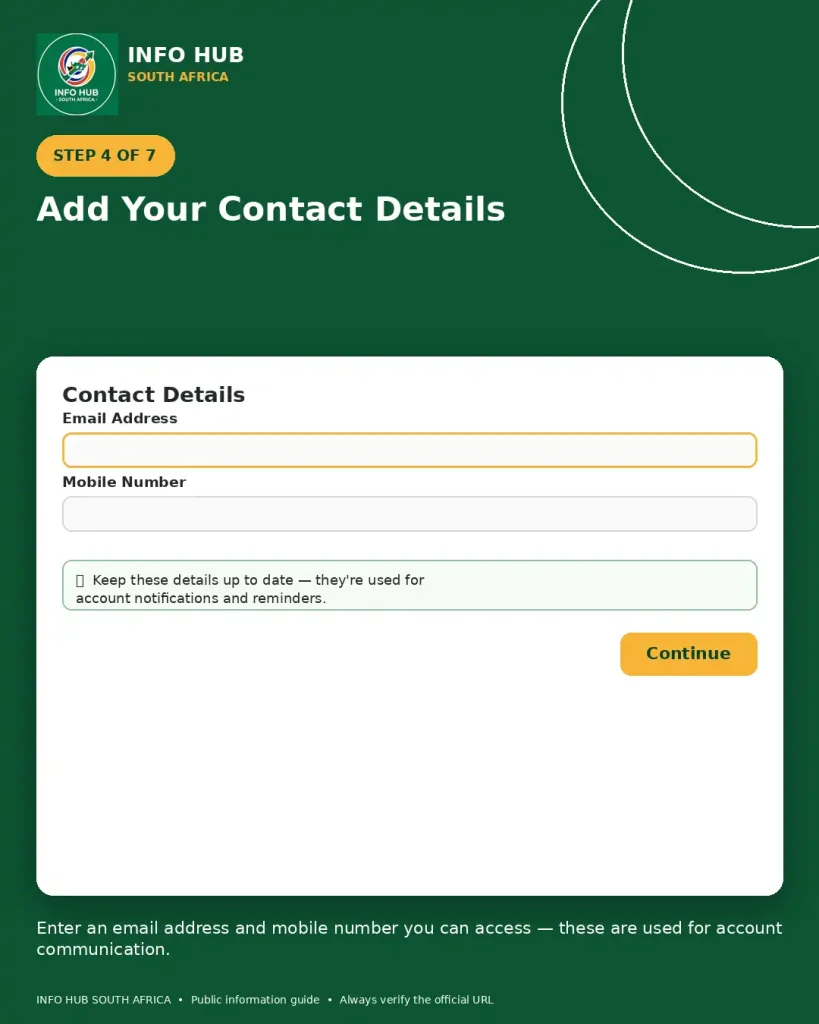
Enter an email address and mobile number that you can access.
This is important because online services may use your contact details for account communication, notifications or reminders. RTMC has specifically encouraged motorists to keep their cellphone and email details updated on the online portal.
Step 5: Create your password

Choose a password that is difficult for another person to guess. Do not reuse a password that you use for banking, email or other important accounts.
Keep your login credentials private. RTMC will not need your personal password to provide ordinary support.
Step 6: Complete verification

Follow any verification instructions displayed by the portal.
If an account-verification message is sent to your email, check your inbox as well as the spam or junk folder. Use the current verification instructions supplied by the portal rather than relying on an old tutorial.
Step 7: Return to the eNaTIS login page
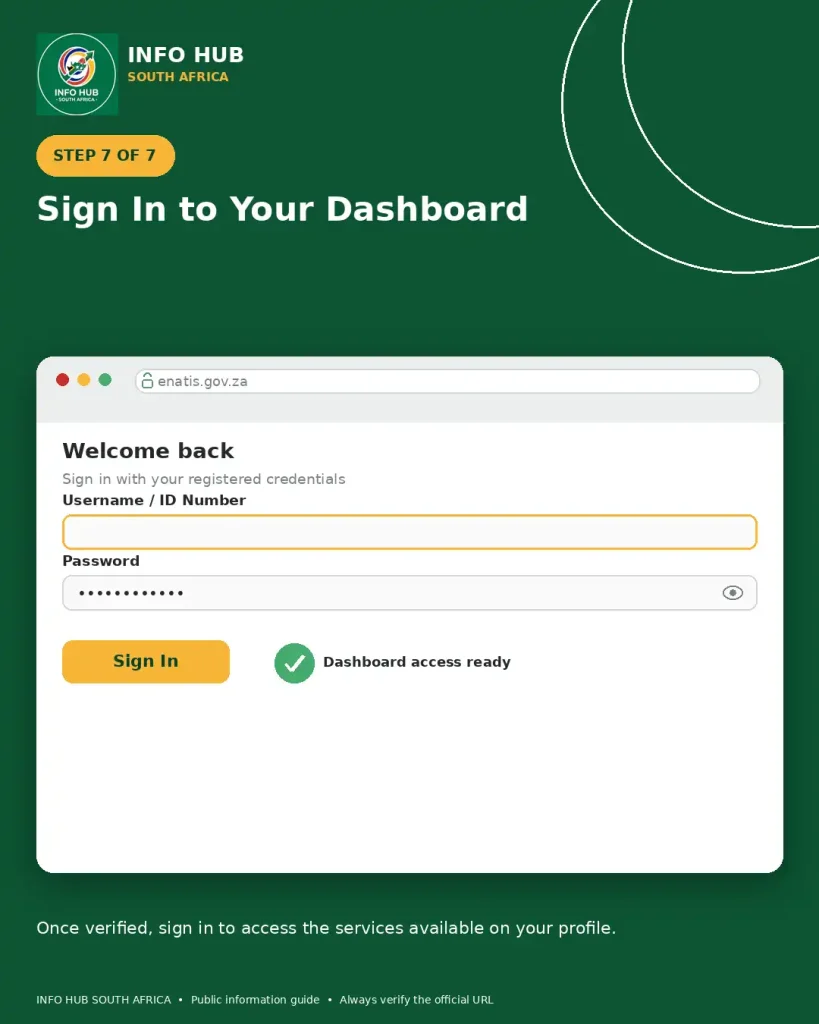
Once your profile has been registered and verified, return to the official website and sign in using the credentials associated with your account.
Your dashboard should provide access to the services available to your profile.
eNaTIS Login: How to Sign In
The NaTIS online traffic system login process is straightforward when your account has already been registered.
- Open the official vehicle registration services traffic system website.
- Select the login option.
- Enter the credentials associated with your registered profile.
- Submit the information.
- Wait for your dashboard to load.
- Select the service you want to use.
If the page does not load correctly, avoid repeatedly submitting the login form. First check your internet connection, refresh the page and consider opening the portal in a private browsing window.
What if your eNaTIS login does not work?
Start with the basics:
Do not give your password to someone claiming they can “unlock” your account for a fee.
How to Renew a Vehicle Licence Online
Vehicle licence renewal is one of the most useful services associated with vehicle registration services. RTMC reports that motorists can register on the online platform, update their contact details and renew vehicle licences through the portal.
The exact screens can change as the portal is updated, but the general process is as follows.
Step 1: Complete your eNaTIS login
Open https://online.natis.gov.za/ and sign into your registered account.
If you have several vehicles associated with your profile, make sure you select the correct vehicle before continuing.
Step 2: Find the vehicle renewal service
From your dashboard, look for the motor vehicle licence renewal option or the corresponding service shown by the portal.
The wording of buttons and menus may change, so follow the labels currently displayed on the official website.
Step 3: Check your vehicle information
Before paying, carefully review the vehicle details displayed by the system.
Check that the vehicle registration information and other displayed particulars correspond to the vehicle you intend to renew.
If something appears incorrect, do not simply continue because you are in a hurry. An incorrect record may need to be addressed through the appropriate authority or support channel.
Step 4: Review the amount payable
The system should display the amount associated with the transaction.
Read the payment summary before confirming. Keep a record of the transaction after payment.
Step 5: Pay through the available online option
Use the payment method supported by the portal at the time of your transaction.
Never send your card details to a person through WhatsApp, Facebook, email or another unofficial channel because they claim to be helping with an vehicle registration services or renewal.
RTMC has confirmed that its online platform supports online payment for vehicle licence renewals and related online services.
Step 6: Keep your confirmation
After completing the transaction, save the confirmation or receipt supplied by the system.
Keeping proof of payment is useful if you later need to ask about the status of the transaction.
Step 7: Delivery
Where home delivery is offered for the transaction, provide the required delivery details carefully.
RTMC has previously stated that online vehicle licence renewals can be delivered by courier, with a 2024 RTMC advisory stating delivery within three to five working days. Actual delivery times can vary, so check the current information shown during your transaction.
Important Checks Before Paying
An online payment should be treated as the final review point, not simply a button to click.
Before confirming, check:
A few seconds spent checking the details can save unnecessary follow-up later.
What Services Can You Access Through eNaTIS?
The services shown after your vehicle registration services login depend on the functions currently offered by the online portal and the information associated with your profile.
Common online services include:
| Service | What it is used for |
|---|---|
| Motor vehicle licence renewal | Renew an eligible vehicle licence online |
| Driving licence card renewal | Book a supported renewal appointment |
| Learner’s licence test | Look for an available test appointment |
| Driving licence test | Find and reserve an available test slot |
| Appointment booking | Select an available DLTC and time |
| Transaction queries | Review relevant online transaction information |
Not every transaction can necessarily be completed from beginning to end online. For services involving physical identity checks, photographs, tests or other in-person requirements, you may still have to attend the selected facility.
That distinction is important when using the vehicle registration services portal: an online booking does not automatically mean that the entire government process has moved online.
How to Book a Driving Licence Service on eNaTIS
If you need to book a learner’s licence test, driving licence test or driving licence card renewal, start by accessing your online profile.
Step 1: Sign in
Open the official NaTIS online traffic system online portal and complete your vehicle registration services login.
Make sure you are using the account connected to your own personal information.
Step 2: Select the relevant service
Once your dashboard opens, review the available services and select the transaction you need.
For example, the portal may provide an option relating to:
Select the option that matches your actual requirement. Choosing the wrong service can result in an unsuitable appointment.
Step 3: Choose your province
The booking process may ask you to select the province where you want to complete the service.
Choose the province that is appropriate for your appointment and continue to the available facilities.
Step 4: Select a DLTC
A Driving Licence Testing Centre (DLTC) is the facility where many driving-related services are performed.
Review the available locations carefully before choosing one. Consider the distance from your home or workplace and whether you can arrive at the selected centre on the appointment date.
Step 5: Look for an available date and time
The booking calendar will show the appointments currently available through the system.
If a date or time is unavailable, select another option rather than repeatedly refreshing the same slot.
Availability can change as appointments are taken or released, so the calendar displayed during your South African traffic services login session should be treated as the current source for your booking.
Step 6: Check the booking information
Before confirming, review the:
Make sure the details are correct before submitting the booking.
Step 7: Save the confirmation
After successfully completing the booking, retain the confirmation information.
A screenshot or downloaded confirmation can be useful when you later need to confirm your appointment details.
Practical tip: Don’t rely only on memory for the appointment date. Save the confirmation somewhere you can access it easily.
Understanding eNaTIS Appointment Slots
Finding an available appointment can sometimes be more difficult than completing the South African traffic services login itself, particularly when a popular DLTC has limited availability.
Appointment availability is controlled by the facilities and booking system. As a result, one centre may show no suitable appointment while another location has availability.
Rather than assuming that the entire South African traffic services system is unavailable, check whether the issue is limited to the particular facility, service or date you selected.
If no appointment is available
Try the following:
- Check another date.
- Search another DLTC in the same province.
- Recheck the portal later.
- Confirm that you selected the correct service.
- Make sure your profile information is complete.
- Contact official support if you believe there is a technical problem.
Avoid paying an unofficial person to obtain an appointment for you. Use the official portal and authorised facilities.
eNaTIS Requirements for Different Users
The information required can vary depending on the service. A person renewing a vehicle licence online may not need exactly the same information as someone booking a driving licence service.
Vehicle owners
If you’re using South African traffic services online for a motor vehicle licence renewal, make sure your vehicle is correctly associated with your profile and that your contact information is current.
It is also sensible to have your previous licence documentation available in case you need to check vehicle information during the process.
South African ID holders
Use your South African identification information exactly as recorded on your official documentation when registering or verifying an online profile.
Do not deliberately change the spelling of your name to make it fit another document. Matching information is important when online records are checked.
Foreign residents
The source information provided for this guide indicates that the portal can accommodate identification categories such as a refugee ID or foreign passport for foreign residents. However, the exact services available to a foreign-document holder may depend on the person’s records and the requirements of the transaction.
If your document cannot be verified through the South African traffic services system, don’t repeatedly submit different variations of the same information. Instead, use official support or visit the relevant DLTC with the required identification documents.
Keeping Your eNaTIS Profile Up to Date
Your online account is more useful when your contact details remain accurate.
RTMC has encouraged users of its online services to update their email address and cellphone number because these details are used for communication and renewal reminders. (RTMC)
After an ENATIS login, review your profile information when necessary and correct outdated details through the options provided by the portal.
This is particularly useful if you’ve changed your mobile number or email address since originally registering.
What to Do If the eNaTIS Website Is Not Working
A website problem can have several causes. Your internet connection, browser session, cached information or the online service itself could be responsible.
Before assuming that your account is blocked, work through a few basic checks.
Browser troubleshooting
If the South African traffic services system displays an error, try:
A fresh browser session can sometimes resolve a temporary login or page-loading problem.
Page Not Found error
If you see a Page Not Found message, first confirm that you’re using the official portal address:
Don’t assume that an unfamiliar website offering an alternative South African traffic services login is legitimate.
If the official website itself continues to display an error, try accessing it again later. Persistent technical problems should be reported through the official support channel.
What If Your eNaTIS Login Details Are Forgotten?
If you cannot remember the credentials used for your ENATIS login, use the account-recovery option provided by the official portal rather than creating multiple accounts.
Follow the recovery instructions displayed by the website and use the email address associated with your profile.
If you no longer have access to that email address or the recovery process does not work, contact the official online support team for assistance.
Never send your password to another person, even if they claim to work with NaTIS.
Payment Problems on eNaTIS
Online transactions can occasionally fail because of a banking issue, interrupted internet connection, payment gateway problem or browser session.
If payment appears unsuccessful:
Don’t immediately pay again.
First check whether the transaction was actually processed. Look for a confirmation, receipt, email or transaction record and check your bank account before attempting another payment.
If money was deducted but the transaction does not appear to have completed, retain your payment evidence and contact official support.
This is one reason it is worth keeping screenshots, receipts and transaction references until the service has been finalised.
How to Stay Safe When Using eNaTIS Online
Traffic and vehicle services involve personal and payment information, so account security matters.
Use the official website
Always begin from:
Check the address before entering your ID number, password, contact details or card information.
Avoid unofficial “agents”
You don’t need to give your password to somebody on social media who claims they can perform your ENATIS login or renewal.
Be especially careful with people who request:
Legitimate online support should not require you to disclose your banking PIN or account password.
Don’t use public computers for sensitive transactions
If you have to use a public computer, take extra care. Always log out when finished and avoid saving passwords in the browser.
For payment transactions, a trusted personal device and secure internet connection are preferable.
eNaTIS Online vs Visiting a DLTC
The online portal can save time for supported transactions, but it does not replace every physical traffic service.
| Online ENATIS | Physical DLTC |
|---|---|
| Access selected services remotely | Provides face-to-face services |
| Vehicle licence renewals may be completed online | Physical vehicle-related services may also be available |
| Some appointments can be booked online | Tests and certain procedures require attendance |
| Online payment is available for supported transactions | Counter payment options depend on the facility |
| Reduces unnecessary trips for eligible services | Necessary when physical verification or testing is required |
The best option depends on what you need to accomplish. If your service is available online, starting with eNaTIS login can be more convenient. If your transaction requires testing, photographs, biometrics or another physical process, you should prepare to attend the relevant centre.
A Useful ENATIS Checklist
Before you start, run through this checklist:
Important Things to Remember
The RTMC services system is designed to make selected traffic services more accessible online, but users should still check the requirements of the specific transaction they are attempting.
A successful eNaTIS login does not guarantee that every service will be available on your account. Likewise, seeing a booking service online does not mean that you can avoid attending a DLTC where the process requires an in-person test or verification.
The safest approach is to use the official portal, enter your details accurately, check every transaction before payment and retain confirmation documents after completing an online service.
eNaTIS Support: What to Do When You Need Help
If basic troubleshooting doesn’t resolve your issue, use the official support information rather than relying on an unofficial social-media account or third-party “agent”.
The support details supplied for this guide are:
RTMC online support: 0861 762 847
Email: [email protected]
Before contacting support, prepare useful information about the problem, such as:
Never include your banking PIN, password or one-time banking authentication code in a support email.
What Information Should You Keep After an Online Transaction?
Don’t discard your records immediately after completing an ENATIS online transaction.
Keep:
These records can make it much easier to explain a problem if a transaction is delayed or doesn’t appear correctly in your profile.
Common eNaTIS Mistakes to Avoid
Using an unofficial website
The most serious mistake is entering sensitive information into a look-alike website.
Start from the official RTMC services login address and check the domain carefully.
Entering inaccurate personal details
Your name and identification information should be entered accurately. Deliberately changing information can interfere with verification.
Selecting the wrong service
Before confirming a booking, make sure you’ve selected the service you actually need. A learner’s licence test, driving licence test and driving licence card renewal are different transactions.
Paying before checking the details
Review the vehicle, appointment and payment information before submitting a transaction.
Paying twice after an error
If a payment appears to fail, first check your bank account and transaction history. A temporary error message doesn’t necessarily mean that no payment was processed.
Sharing your credentials
Your eNaTIS login details should remain private. Never give your password or banking authentication information to another person who claims they can process your transaction.
ENATIS Quick Reference
| Question | Quick answer |
|---|---|
| Official portal | online.natis.gov.za |
| Main purpose | Selected South African traffic and vehicle services |
| Account needed | Required for services that require a personal profile |
| Vehicle renewal | Available online for eligible transactions |
| Driving bookings | Available for selected services |
| Physical attendance | Still required for services involving tests or other in-person procedures |
| Foreign residents | Identification options may be available depending on the service |
| Best browser approach | Use a current mainstream browser |
| Security | Use the official portal and keep credentials private |
| Support | RTMC online support |
Before You Leave the eNaTIS Portal
A successful eNaTIS login is only the beginning. If you’re completing an important transaction, take a final moment to confirm that everything has been recorded correctly.
Final eNaTIS checklist
FAQs
Conclusion
The ENATIS system gives South African motorists a convenient way to access selected traffic-related services online. For many users, the biggest benefit is being able to handle an eligible vehicle licence renewal or arrange a supported appointment without making an unnecessary first trip to a licensing centre.
For a smooth experience, start with the official portal, keep your personal information accurate and make sure you understand which parts of your chosen service must still be completed in person.
If you’re looking for the eNaTIS login, vehicle licence renewal, online bookings or related NaTIS services, use the official website rather than an unofficial intermediary. Keep your confirmation records and never share passwords or banking security information.
Info Hub South Africa provides this guide to help readers understand and navigate online government and public-service information. Always verify service availability, requirements, fees and appointment information on the official portal before completing an important transaction.
Read More
Majuba Student Portal South Africa 2026: Student Login, Registration & Complete Portal Guide
Matric Results 2026 Online Check South Africa: Get Your NSC Results Instantly
CUT Status Check South Africa 2026: Complete Application and Admission Guide
Sol Plaatje University Online Application 2026 South Africa: Complete Step-by-Step Application Guide
TUT Late Applications 2026 in South Africa: Complete Guide to Apply Before the Closing Date
UP Portal South Africa: University of Pretoria Login & Student Guide