eTenders South Africa 2026: Complete Guide to Government Tenders
Finding government procurement opportunities can be difficult when information is spread across different public-sector organisations. In South Africa, the etenders portal provides a central place where suppliers can search government tender notices, review procurement information and monitor opportunities that may suit their businesses.
Whether you are a new supplier looking for your first public-sector opportunity or an established business tracking contracts in a particular province or industry, the etenders Gov platform can help you organise your tender searches more effectively.
This guide covers the main features of the eTender portal, including searching for tenders, using filters, checking tender documents, monitoring corrigenda, understanding eSubmissions, researching procurement plans and reviewing award information.”Visit Homepage for more”.
What Is the eTender Portal in South Africa?
The eTender portal is South Africa’s central online publication platform for public-sector tender opportunities. It brings tender information from public-sector organisations across the different spheres of government together in one online location.
The platform is intended to make procurement information easier to access and support transparency in public procurement. The official information associated with the portal describes it as being managed through the Office of the Chief Procurement Officer (OCPO), with the aim of supporting procurement that is fair, equitable, transparent, competitive and cost-effective.
For suppliers, eTender Gov can be used to:
The portal is also described by the official service as freely available to suppliers and other users.
Why Use eTender Gov for Government Procurement Searches?
Government procurement covers a wide range of goods and services. A business searching for opportunities across multiple departments, municipalities, agencies or provinces could spend considerable time visiting individual institutional websites.
The etenders portal provides a central starting point for this type of search.
For instance, a construction business may search for construction-related opportunities, while an IT company could look for technology, software, networking or professional-service requirements. Using relevant categories and search filters can make the results more manageable.
The portal also goes beyond currently advertised opportunities. Its interface includes sections such as Procurement Plans and Procurement Data, which can be useful when researching government purchasing activity.
Useful tip: Don’t focus only on tenders that are already open. Checking procurement plans can help you identify potential future requirements and prepare before a formal opportunity is advertised.
eTender Portal Login: What Suppliers Should Know
The current login information on the official platform states that users can sign in using their CSD credentials. Login is relevant for features such as bookmarking tenders and subscribing to tender notifications.
How to access the etenders Portal
To access the supplier features:
Step 1: Visit the Official eTender Gov Website

Open the official eTender Gov website to access the portal and its available supplier features.
Step 2: Select the Login Option
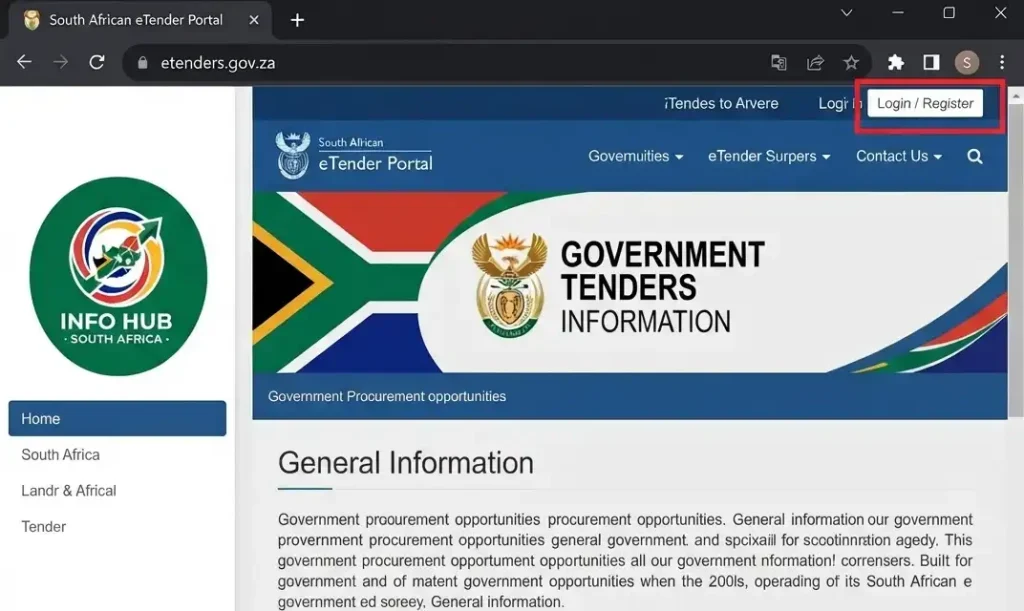
On the portal, look for and select the Login option to access the supplier login area.
Step 3: Enter Your CSD Credentials
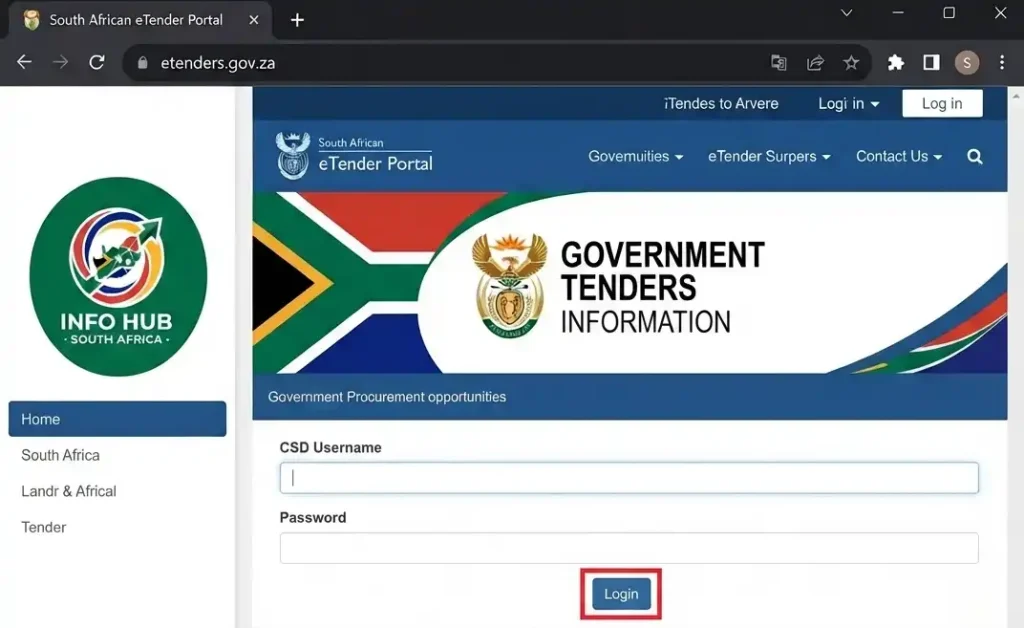
Use the available login method and enter your CSD credentials as required.
Step 4: Complete the Required Verification
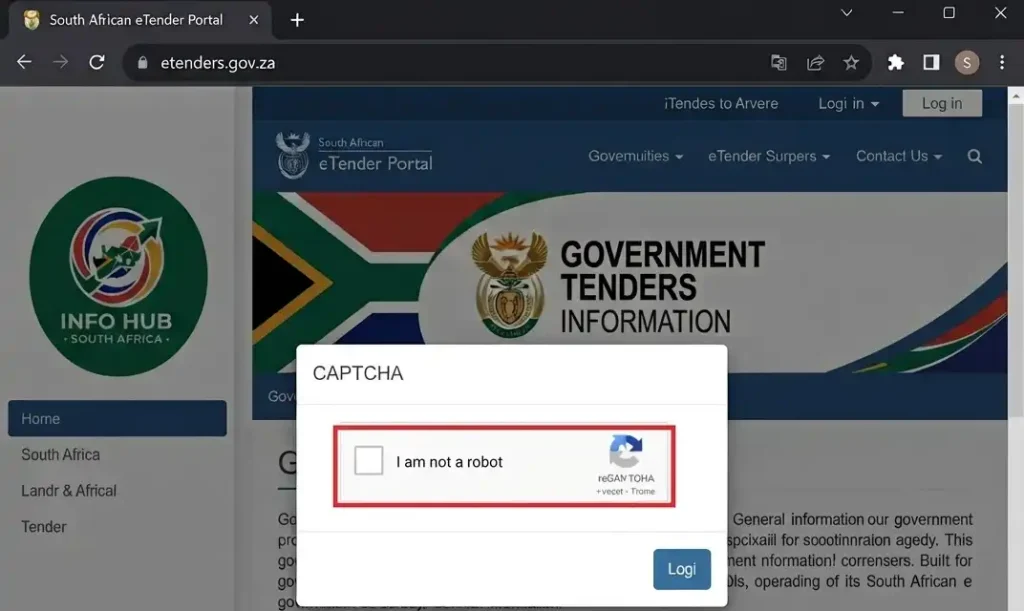
Complete any verification shown on the login page, including the CAPTCHA if requested.
Step 5: Access the Supplier Features
After signing in successfully, you can use the available supplier functions provided through the eTender portal.
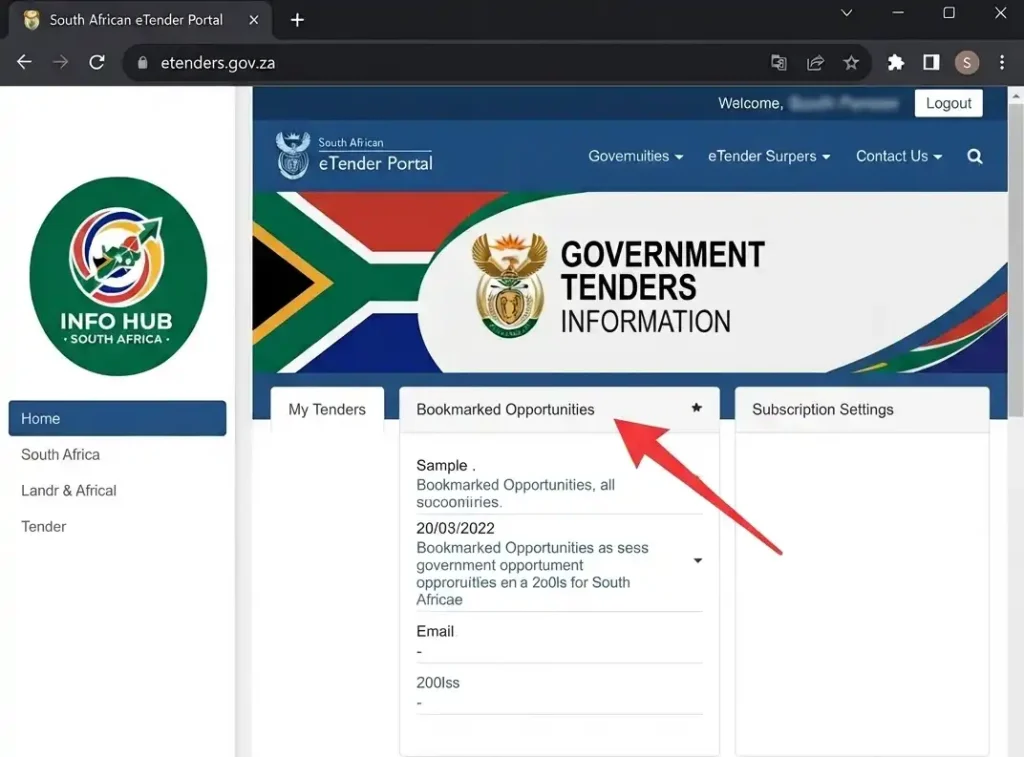
The platform also provides functionality for bookmarking opportunities and subscribing to notifications. These features can help suppliers keep track of tenders they are interested in and monitor relevant updates.
Can you search without logging in?
Yes. The public-facing parts of the etenders portal allow users to browse and search tender information.
However, signing in provides additional functionality, particularly where you want to save tenders or subscribe to notifications.
Finding Government Tenders on the eTender Portal
The quickest starting point is the search facility on the official etenders portal.
The homepage provides search options based on information such as:
There is also a Browse Opportunities function for users who need more detailed search options.
Start With a Targeted Search
If you already know the type of opportunity you want, enter a relevant keyword, phrase or tender number.
A broad search such as government tender may produce a large number of results. A more specific phrase, such as IT support services or building maintenance, can make the results more relevant to your business.
The goal is not simply to find the largest number of tenders. It is to identify opportunities that genuinely match your capabilities.
How to Use Advanced Search Filters
When a basic search produces too many results, the advanced search functionality can help narrow them down.
The current opportunities interface provides filters for categories, provinces, organs of state, tender numbers, MAAA numbers, supplier names and tender types. It also allows users to identify opportunities that are accepting or not accepting eSubmissions.
Useful eTender search filters
| Filter | Purpose |
|---|---|
| Category | Helps locate opportunities within a particular business sector |
| Province | Narrows results according to province |
| Organ of State | Helps find opportunities from a selected public institution |
| Tender Number | Locates a particular advertised tender |
| MAAA Number | Helps identify a specific procurement record |
| Tender Type | Narrows results according to the listed procurement process |
| eSubmissions | Shows opportunities accepting or not accepting electronic submissions |
The portal currently lists tender types such as Request for Bid (Open-Tender), Request for Bid (Limited-Tender), Request for Quotation, Request for Information, Request for Proposal and Expression of Interest, along with other listed procurement types.
These distinctions matter because procurement opportunities can have different requirements and submission arrangements. A tender listed on eTender Gov should therefore be assessed according to its own instructions rather than treated like every other opportunity.
Search Smarter by Using Related Keywords
Searching only for the exact commercial name of your product or service may limit the results you see.
Government procurement descriptions can use formal, technical or broader terminology. A company supplying network equipment, for example, may find relevant opportunities under wider technology or ICT-related descriptions instead of the precise name it uses commercially.
Consider searching combinations of:
The official portal includes categories covering areas such as technology, communication, office solutions, print, professional services and travel, while its broader tender database contains other opportunities.
Using several relevant search terms can give you a better picture of the opportunities available to your business.
What to Check When You Open an eTender Listing
A search result is only the beginning. Before deciding whether to pursue an opportunity, examine the tender record carefully.
Several pieces of information should be checked before you move on to the tender documents.
Tender number
The tender number provides an important reference for the procurement opportunity. Keep it available when communicating with the relevant institution or locating the tender elsewhere.
Organ of state
Check which government department, municipality, agency or other public institution is responsible for the procurement.
Tender description
Read the description carefully to understand what the institution is looking to procure.
Closing date and time
The deadline should be recorded immediately. Do not assume that you can submit at any point on the closing day.
Tender type
Check whether the opportunity is an RFB, RFQ, RFI, RFP, Expression of Interest or another listed procurement type.
Submission method
Pay particular attention to whether the opportunity accepts eSubmissions. The official search interface provides an eSubmission filter, making this easier to identify.
How to Access Tender Documents Through eTender Gov
The short tender advertisement may not contain everything you need to prepare a response.
The etenders portal provides access to tender records and associated documentation. Once you identify an opportunity, open its details and review the available files before making a bid decision.
A useful process is:
Find the tender → open the record → expand the details → review the documents → download the relevant files → study the requirements.
Tender documentation may include information covering:
The short description in the search results should not replace the full tender documentation. Use the detailed documents to understand what the procuring institution actually requires.
Check eTender Corrigenda Before You Submit
Tender information can change after an opportunity has been advertised.
The eTender portal provides for the publication of corrigenda by procuring entities. Suppliers should therefore check the tender record again before finalising their submissions.
Look for:
This is particularly important when you have been preparing a bid for several days or weeks. A supplier working from an older version of a document could overlook a later amendment.
A good monitoring habit
Record the tender number and revisit the listing while preparing your response. Before submission, perform one final check for changes and updated documents.
Does Finding a Tender Mean You Submit It Online?
No.
The etenders portal serves as a central publication and information platform, but the actual submission process depends on the individual procurement opportunity.
The current opportunities interface distinguishes between tenders that are accepting eSubmissions and those that are not accepting eSubmissions.
So, finding an opportunity on eTender Gov does not automatically mean that the bid must be submitted through the same website.
Before preparing your final response, confirm:
The specific tender documentation should guide you on the required submission procedure.
Why You Should Record the Tender Deadline Early
Tender deadlines can involve more than simply uploading or delivering a document.
A response may require several supporting items, signed forms, pricing information, certifications, electronic files, physical documents or internal approval.
Leaving preparation until the final hours creates unnecessary pressure.
Once you identify a suitable opportunity, record the closing date and time and work backwards from that deadline. This gives you time to review the requirements, gather documents and check the final response.
Using Procurement Plans to Look Beyond Current Tenders
The etenders portal is not limited to active tender advertisements. Its navigation also includes Procurement Plans and Procurement Data, which can provide useful information for suppliers researching future government procurement activity.
Procurement plans can be particularly useful when you want to identify potential requirements before they become formal tender opportunities.
A practical monitoring approach is:
- Identify public institutions that regularly purchase your type of service.
- Review relevant procurement plans.
- Note activities that appear suitable for your business.
- Continue monitoring the etenders portal for the eventual advertisement.
- When the tender is published, compare the final requirements with your capabilities.
This creates a more organised procurement-search process instead of relying only on random searches for currently open tenders.
Research Previous Awards on the eTender Portal
Historical procurement information can also be useful when researching a market.
The etenders portal provides access to procurement information that can help businesses examine previous tender activity and award-related information.
Depending on the procurement record, you may be able to research:
Previous results should be treated as research rather than a prediction of future outcomes. A supplier that was successful in an earlier tender is not automatically guaranteed success in another procurement process.
How Award Information Can Help Your Research
Suppose your company wants to provide a particular service to a government institution.
Instead of immediately preparing a bid, you can examine previous opportunities involving similar requirements. This may help you identify patterns in the institution’s procurement activity.
Research can help you consider questions such as:
This makes your tender-search strategy more focused and helps you decide where to spend your preparation time.
Carry Out a Bid-or-No-Bid Check
Finding a tender that looks interesting doesn’t necessarily mean you should submit a response.
Before investing significant time in a bid, assess whether your business can actually meet the stated requirements.
Pre-bid assessment
| Question | Why check it? |
| Do we provide the required service? | Confirms the basic fit |
| Can we meet the technical requirements? | Tests your capability |
| Can we meet the deadline? | Checks operational capacity |
| Do we have the required experience? | Identifies whether relevant evidence is available |
| Can we supply the mandatory documents? | Helps identify compliance issues |
| Can we meet the delivery requirements? | Tests practical feasibility |
| Can the business support the contract? | Helps avoid commitments beyond capacity |
| Have we checked amendments? | Reduces the risk of using outdated information |
A tender may appear attractive but still be unsuitable if the business cannot satisfy a mandatory condition.
Read the Full Tender Pack, Not Just the Advertisement
The advertisement gives you an initial overview. The tender documents contain the detailed requirements that should guide your response.
Give particular attention to the following areas.
Scope of Work
The scope explains what the successful supplier is expected to deliver.
Don’t assume that a service you already provide will have identical requirements across different tenders. Assess the scope for each individual opportunity.
Technical Specifications
Technical requirements can determine whether your products, systems, personnel or services meet the procurement’s needs.
Compare each mandatory specification against what your business can actually provide.
Pricing Requirements
Check how prices must be presented.
If the procuring institution provides a pricing schedule or template, follow the specified format and make sure the relevant items have been considered.
Returnable Documents
Create a list of every form and document that must be returned.
For larger tender packs, a written checklist is safer than trying to remember every requirement.
Evaluation Requirements
Review how responses will be evaluated and what evidence is expected.
A polished company profile will not compensate for an overlooked mandatory requirement, so compliance should remain a central part of the preparation process.
Build a Tender Compliance Checklist
Once you have read the documentation, create a working checklist for that particular opportunity.
Your list can include:
The checklist should be adjusted according to the requirements of the specific tender.
Common eTender Portal Mistakes Suppliers Should Avoid
Even a suitable tender can become difficult to pursue if the search and preparation process is poorly managed.
Searching only once
Government opportunities change over time. If public-sector procurement is an important source of business, a single search is unlikely to be enough.
Create a regular routine around your main keywords, categories and institutions.
Focusing only on active tenders
Open opportunities matter, but Procurement Plans and historical procurement information can also support your research.
Use the wider information available through the eTender portal instead of treating it solely as a list of current advertisements.
Overlooking the exact closing time
A tender closing at a specified time should not be treated as though you have the entire day available.
Record the exact deadline and plan your work around it.
Assuming every tender is submitted online
A tender appearing on eTender Gov does not automatically mean the response is submitted through that portal.
Check the tender’s instructions and its eSubmission status where applicable.
Working from old documents
Review the tender record again before submission to see whether a corrigendum, revised document or other update has been published.
Treating previous winners as guaranteed competitors or outcomes
Award information can support market research, but it cannot guarantee who will win a future procurement opportunity.
Assess each tender on its own requirements.
A Better Way to Monitor eTender Opportunities
You don’t need to spend all day browsing the etenders portal. A consistent monitoring system can make the process more manageable.
Search your main keywords regularly
Check the terms most closely connected to your services and products.
Monitor relevant institutions
If particular departments, municipalities or agencies are important to your business, use the available organ-of-state filters.
Narrow searches by province
Where your operations are limited to particular areas, province-based filtering can make the results more relevant.
Bookmark opportunities
Logged-in users can use available account features to bookmark tenders they want to monitor.
Subscribe to notifications
The portal’s login information indicates that subscription functionality is available for tracking relevant tender information and changes.
Check the tender again before submission
Return to the relevant tender record and confirm that no new documents, corrigenda or other changes have been published.
Making this final check part of your routine can help you avoid relying on outdated information.
eTender Portal vs CSD: What Is the Difference?
The eTender portal and the Central Supplier Database (CSD) have different roles within the government procurement environment.
The eTender portal is primarily used to publish and provide access to government procurement opportunities and related procurement information.
The Central Supplier Database forms part of the wider supplier-registration and government procurement environment.
The current eTender login page states that users can access the login system using their CSD credentials.
This means the two systems should not be treated as identical simply because CSD credentials are used for certain eTender functions.
When you need to deal with supplier registration or supplier information, use the relevant official government service rather than assuming that every supplier-related action takes place through eTender Gov.
Practical Advice for First-Time eTender Users
If you’re new to the eTender portal, avoid trying to monitor every available government opportunity. Start with the areas that have a genuine connection to your business.
Concentrate on relevant searches
Choose categories, provinces, institutions and keywords that match your capabilities.
Learn the common procurement terms
Understanding terms such as these makes tender listings easier to interpret:
Keep business documentation organised
When an appropriate tender appears, preparation is easier if commonly required company documents are already organised internally.
Allow enough preparation time
Some tender responses require information from management, finance, technical personnel and legal or compliance staff.
Starting early gives you more time to identify missing information or potential problems.
Treat every requirement seriously
A requirement that appears minor may still be important to the procurement process. Read the tender documentation carefully and follow its stated process if clarification is needed.
FAQs
Conclusion
The etenders portal South Africa is a useful central resource for businesses searching for public-sector procurement opportunities. Its search tools allow suppliers to find tenders using keywords, tender numbers, categories, provinces, organs of state and other available filters.
Finding a suitable tender is only the starting point. Before preparing a bid, review the full tender documents, confirm the required submission method, check for corrigenda and updates, note the closing deadline and make sure your business can meet the stated requirements.
The portal can also support longer-term procurement research through areas such as Procurement Plans and Procurement Data. By combining regular searches with careful document checks and organised preparation, suppliers can use eTender Gov more effectively.
For more helpful information about South African government services, tenders and online platforms, Info Hub South Africa provides practical guides designed to make important information easier to understand and use.
Read More
PSIRA Online Booking 2026: Complete Guide to Booking Your Appointment in South Africa
WSU Student Portal Login 2026 South Africa: Complete Walter Sisulu University Guide
Z83 Form South Africa 2026: Download, Complete & Submit Online
CUT Status Check South Africa 2026: Complete Application and Admission Guide
Sol Plaatje University Online Application 2026 South Africa: Complete Step-by-Step Application Guide
NSFAS Online Application 2026 South Africa: Complete Application Guide & Requirements